|
|
|
Home | Forums |
Downloads | Gallery |
News & Articles | Resources |
Jobs | FAQ |
| Join |
Welcome !
|
5 Users Online (3 Members):
Show Users Online
- Most ever was 626 - Mon, Jan 12, 2015 at 2:00:17 PM |
Forums
|
Forums >> Revit Building >> Technical Support >> Schedules
|
|
|
active
Joined: Tue, Oct 10, 2017
0 Posts
No Rating |
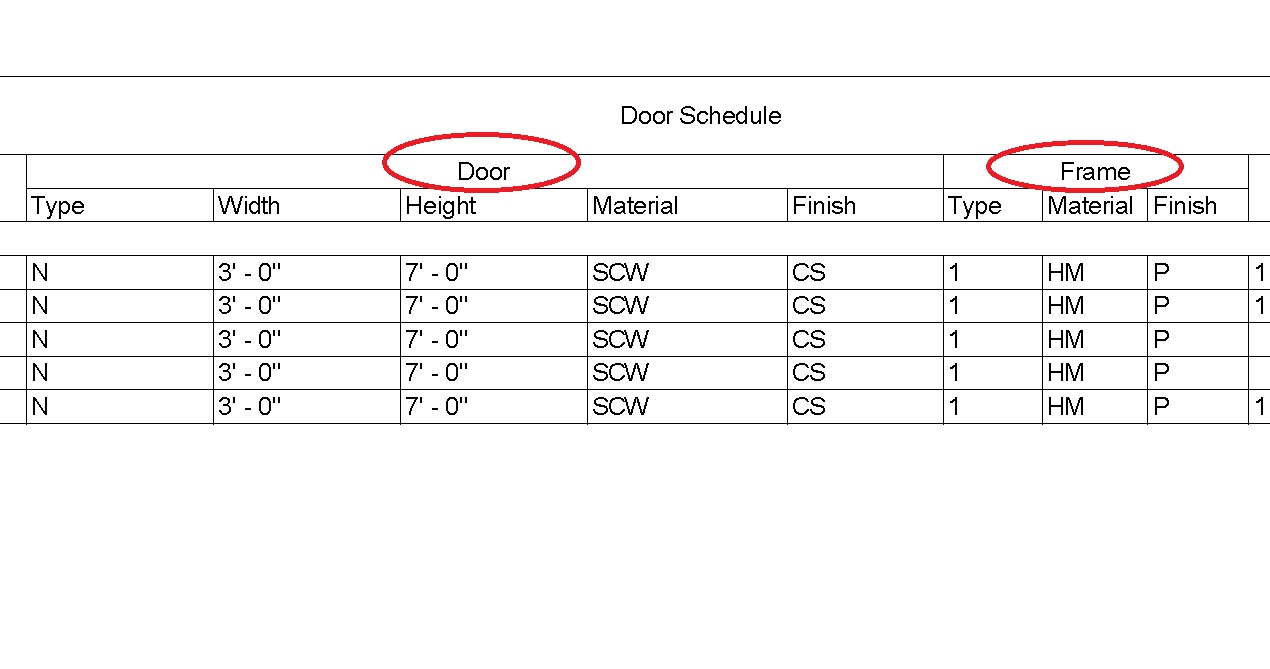
How do you get schedules to look thike these. Are these "fields" or text? Would like to know how to create a schudule like this.
|
This user is offline |
|
 | |
|
|
site moderator|||
Joined: Tue, May 16, 2006
13079 Posts
 |
Use your HELP:
http://help.autodesk.com/view/RVT/2016/ENU/?caas=caas%2Fscreencast%2FMain%2FDetails%2F45836800-0e89-4877-82d9-57c3cf9f4de6.html
|
This user is offline |
|
|
|
active
Joined: Tue, Apr 12, 2005
1310 Posts
 |
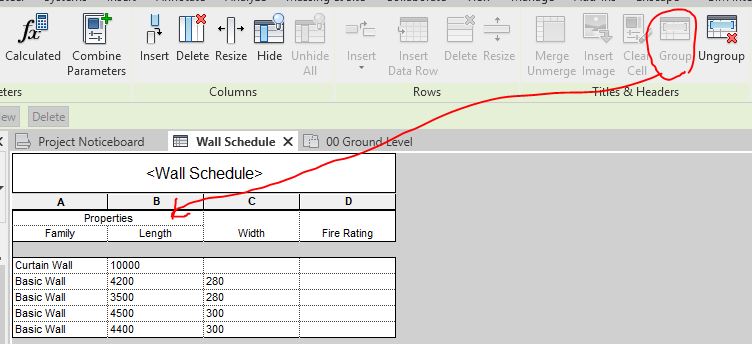
There is a group option in the schedule window - you can use that. See attached image.
|
This user is offline |
View Website
|
|
|
Similar Threads |
|
multiple schedules |
Revit Building >> Technical Support
|
Tue, May 1, 2012 at 1:04:42 PM
|
2
|
|
Schedules for Information In Schedules HAHA |
Revit Structure >> Technical Support
|
Mon, Feb 13, 2012 at 12:08:12 PM
|
1
|
|
Schedules on multiple sheets |
Revit Building >> Technical Support
|
Thu, Apr 27, 2006 at 11:01:59 PM
|
1
|
|
Large number of schedules |
General Discussion >> Revit Project Management
|
Mon, Jun 20, 2011 at 12:56:18 PM
|
5
|
|
Area Schedules showing Metric and Imperial |
Revit Building >> Technical Support
|
Thu, May 28, 2009 at 11:49:29 AM
|
4
|
|
|
Site Stats
Members: | 2161655 | Objects: | 23325 | Forum Posts: | 152479 | Job Listings: | 3 |
|
 Search