|
|
|
Home | Forums |
Downloads | Gallery |
News & Articles | Resources |
Jobs | FAQ |
| Join |
Welcome !
|
6 Users Online (4 Members):
Show Users Online
- Most ever was 626 - Mon, Jan 12, 2015 at 2:00:17 PM |
Forums
|
Forums >> Revit Building >> Technical Support >> Controlling Images in Schedules - R2019
|
|
|
active

Joined: Tue, Nov 17, 2009
148 Posts
No Rating |
Greetings
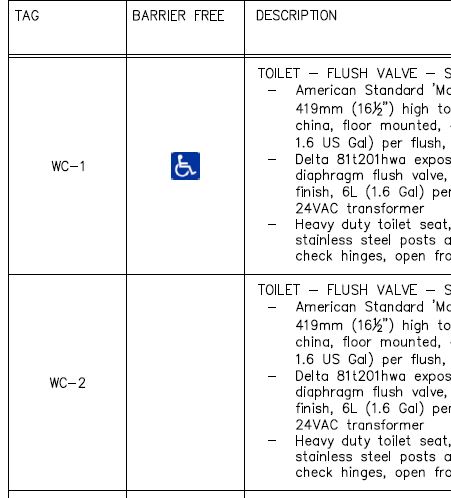
I am using Revit 2019 and trying to fancy up a plumbing schedule with a Barrier-Free image, when the fixture is intended to be barrier-free. Ideally I'd like it to look something like this (Capture 1.JPG, below).
I can get my schedule to deliver a CHARMAP 'dot' using this line in a calculated parameter ... if(Accessible, "●", ""). Is it possible to manage the visibility of an image parameter similarly?
Additionally, I'd like to be able to manage the image size as it appears in the schedule (x/y not dpi).
Grateful for any suggestions ...
-----------------------------------
Ian Shafer
Principal Consultant
True North S&F Consultants |
This user is offline |
View Website
|
 | |
|
|
active
Joined: Tue, Apr 12, 2005
1310 Posts
 |
You could insert an image into the family, which you can schedule. If the image only shows for 'Barrier Free' then don't insert images for the other families. The column width controls the size of the image.
|
This user is offline |
View Website
|
|
|
Similar Threads |
|
R2019: Can I adjust hatch along the element? |
Revit Building >> Technical Support
|
Tue, Feb 4, 2020 at 1:53:28 PM
|
2
|
|
Controlling the Row Height In Schedules |
Revit Structure >> Tips & Tricks
|
Wed, Jan 27, 2010 at 9:52:27 AM
|
0
|
|
Controlling Wall Paths |
Revit Building >> Technical Support
|
Tue, May 26, 2009 at 11:06:37 AM
|
4
|
|
Error in the number of images in the Gallery... |
General Discussion >> Wishlist
|
Wed, Jul 16, 2008 at 4:43:03 PM
|
4
|
|
multiple schedules |
Revit Building >> Technical Support
|
Tue, May 1, 2012 at 1:04:42 PM
|
2
|
|
|
Site Stats
Members: | 2161655 | Objects: | 23325 | Forum Posts: | 152479 | Job Listings: | 3 |
|
 Search