Forums
|
Forums >> Revit Systems >> Technical Support >> Revit MEP add space problem
|
|
|
active
Joined: Tue, Sep 24, 2013
6 Posts
No Rating |
Hi all , I have a problem with revit mep 2012 , when i link Architecture revit file with rooms into revit mep , and started to add spaces , revit doesn't able to do it .NOTE , i checked the room bounding check box at the type properties panel , and when i linked the same Architecture file into new revit mep file , i was able to add spaces !!!
these problem hapened in 2 floors only, not in all floors Can anyone help me please ?
|
This user is offline |
|
 | |
|
|
active

Joined: Thu, Mar 17, 2005
1231 Posts
 |
Are the 'spaces' visibility tirned off in the view you are trying to add into ?
Using phases or design options ?
-----------------------------------
.
FULL 'DOWNLOAD ACCESS' to all 850+ CADclips videos for only $150
|
This user is offline |
View Website
|
|
|
active
Joined: Mon, Feb 22, 2010
6 Posts
No Rating |
Helps to check the drop down on VG for spaces..you need to have interior and or reference checked
most of my default views have spaces checked but then the drop down only has color fill checked
|
This user is offline |
|
|
|
active
Joined: Tue, Sep 24, 2013
6 Posts
No Rating |
Thanks dgcad & wgfleth for your response and help, actually i checked the VG for the view for spaces but no matter, also i tried to create view template from the view which i have problem with , then applied these template to another view which has NO problem with spaces but doesn't made any difference.
the major problem is all ather views doesn't has this spaces problem, i tried to copy monitor the concrete level for the same floor ( 100 mm below the original floor '' Finish Floor Level '' ) but the problem didn't happened again the spaces is normal.
Thanks
|
This user is offline |
|
|
|
active
Joined: Tue, Sep 24, 2013
6 Posts
No Rating |
Thanks dgcad & wgfleth for your response and help, actually i checked the VG for the view for spaces but no matter, also i tried to create view template from the view which i have problem with , then applied these template to another view which has NO problem with spaces but doesn't made any difference.
the major problem is all ather views doesn't has this spaces problem, i tried to copy monitor the concrete level for the same floor ( 100 mm below the original floor '' Finish Floor Level '' ) but the problem didn't happened again the spaces is normal.
Thanks
|
This user is offline |
|
|
|
active
Joined: Tue, Sep 24, 2013
6 Posts
No Rating |
Thanks dgcad & wgfleth for your response and help, actually i checked the VG for the view for spaces but no matter, also i tried to create view template from the view which i have problem with , then applied these template to another view which has NO problem with spaces but doesn't made any difference.
the major problem is all ather views doesn't has this spaces problem, i tried to copy monitor the concrete level for the same floor ( 100 mm below the original floor '' Finish Floor Level '' ) but the problem didn't happened again the spaces is normal.
Thanks
|
This user is offline |
|
|
|
active
Joined: Tue, Sep 24, 2013
6 Posts
No Rating |
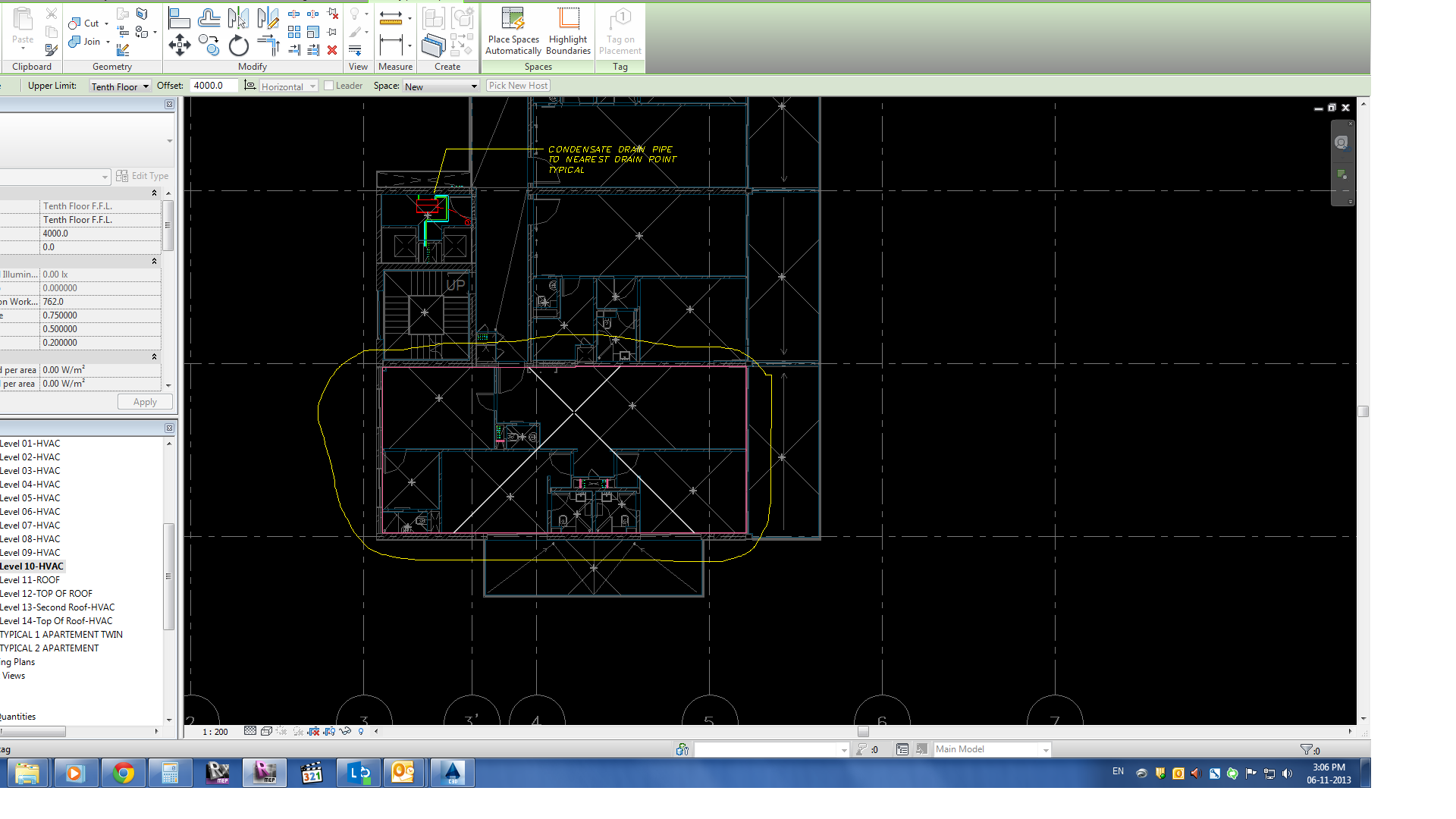
Here is a snap shot for the problem , Revit can't dedict the room correctly.
|
This user is offline |
|
|
|
Similar Threads |
|
MEP + Unoccupied Space?? |
Revit Systems >> Technical Support
|
Fri, Feb 19, 2010 at 2:53:14 AM
|
3
|
|
Revit MEP 2013 - One space says its there but none to be found |
Revit Systems >> Technical Support
|
Mon, Feb 18, 2013 at 12:22:48 PM
|
1
|
|
Inner space is not surrounded by outer space with higher height. |
Revit Systems >> Technical Support
|
Thu, Sep 6, 2012 at 8:34:57 AM
|
2
|
|
Revit MEP '09 Space tags not reading Revit Arch Model walls. |
Revit Systems >> Technical Support
|
Sun, Sep 7, 2008 at 4:12:17 PM
|
2
|
|
Revit MEP or AutoCad MEP |
General Discussion >> Revit Project Management
|
Fri, Oct 14, 2011 at 8:21:49 AM
|
6
|
|
|
Site Stats
Members: | 2161655 | Objects: | 23325 | Forum Posts: | 152479 | Job Listings: | 3 |
|

 Search