|
|
|
Home | Forums |
Downloads | Gallery |
News & Articles | Resources |
Jobs | FAQ |
| Join |
Welcome !
|
12 Users Online (10 Members):
Show Users Online
- Most ever was 626 - Mon, Jan 12, 2015 at 2:00:17 PM |
Forums
|
Forums >> General Discussion >> Revit Project Management >> use of beams
|
|
|
active
Joined: Sat, Sep 20, 2008
42 Posts
No Rating |
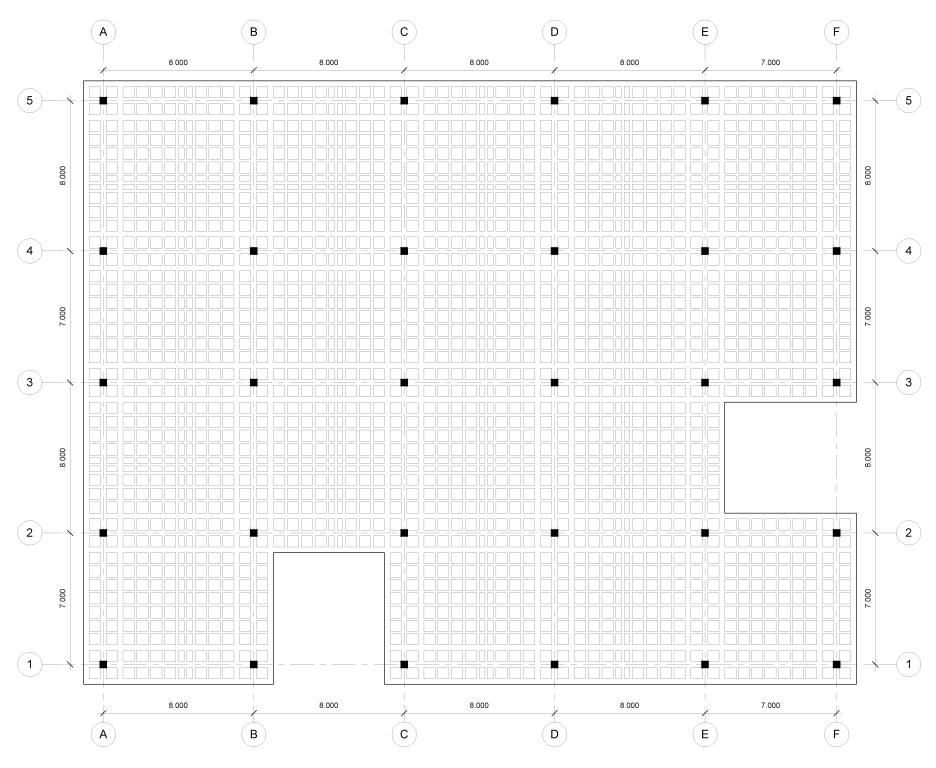
Hi, i am doing a 4 stories building. i have done the first floor structure and not even half way revit just goes slooooooowww
i have win7, i5, 4gb ram, 1gb for video dedicated
i have attached an image where you can see the beams that are being placed for one floor
i want to know what am i doing wrong or what are you people doing to avoid this kind of issues
thanks in advance!
|
This user is offline |
|
 | |
|
|
active
Joined: Sat, Sep 20, 2008
42 Posts
No Rating |
|
This user is offline |
|
|
|
active
Joined: Sat, Sep 20, 2008
42 Posts
No Rating |
sorry the image was to big, it is in metric
|
This user is offline |
|
|
|
active

Joined: Sat, Feb 4, 2006
425 Posts
 |
Looking at your specs, I would say that your amount of RAM will probably be the biggest factor regarding poor performance. Also, if it is a 32bit system, that will impact it as well.
If this is a 32bit system, you may consider enabling the 3Gig switch and see about upping your page file.
If possible, I would upgrade the amount of RAM to a minimum of 12GB.I run windows 7 64 ultimate, 16GB RAM, Quad Core i7 and a SSD and even with all that, I can still push the limits of my system.
If updating is not an option, you will need to explore some modeling best practices as well as turn on worksharing to control what information is loaded or unloaded.
You can search these forums or google much of this information...look for the last version of the Model Performance Technical Note...was some good advice in there.
Good luck
-----------------------------------
"You cannot escape the responsibility of tomorrow by evading it today. " ~ Abraham Lincoln |
This user is offline |
|
|
|
active
Joined: Sat, Sep 20, 2008
42 Posts
No Rating |
its a 64 bit
but yeah, upgrading now its not an option, but looks like i will have to take a search on your advices, and see how will be the best way to push my laptop to its limits
thanks!
|
This user is offline |
|
|
|
Similar Threads |
|
joining two beams |
Revit Building >> Technical Support
|
Fri, Jul 6, 2007 at 12:03:10 PM
|
9
|
|
making beams dotted and upstands |
Revit Structure >> Technical Support
|
Tue, Jun 3, 2008 at 3:50:24 AM
|
7
|
|
Beams that are copied are invisible, while beams placed can be seen?? |
Revit Building >> Technical Support
|
Sat, Jan 20, 2007 at 9:53:43 AM
|
5
|
|
RVT2015 - Insert steel beams over doorway |
Revit Building >> Technical Support
|
Tue, Apr 25, 2017 at 9:06:47 PM
|
4
|
|
Battered ends of L-Beams |
Revit Structure >> Technical Support
|
Thu, May 9, 2013 at 12:32:50 PM
|
3
|
|
|
Site Stats
Members: | 2161655 | Objects: | 23325 | Forum Posts: | 152479 | Job Listings: | 3 |
|
 Search