|
|
|
Home | Forums |
Downloads | Gallery |
News & Articles | Resources |
Jobs | FAQ |
| Join |
Welcome !
|
20 Users Online (18 Members):
Show Users Online
- Most ever was 626 - Mon, Jan 12, 2015 at 2:00:17 PM |
Forums
|
Forums >> Revit Building >> Technical Support >> sharp render image
|
|
|

Joined: Sun, Jan 4, 2009
356 Posts
 |
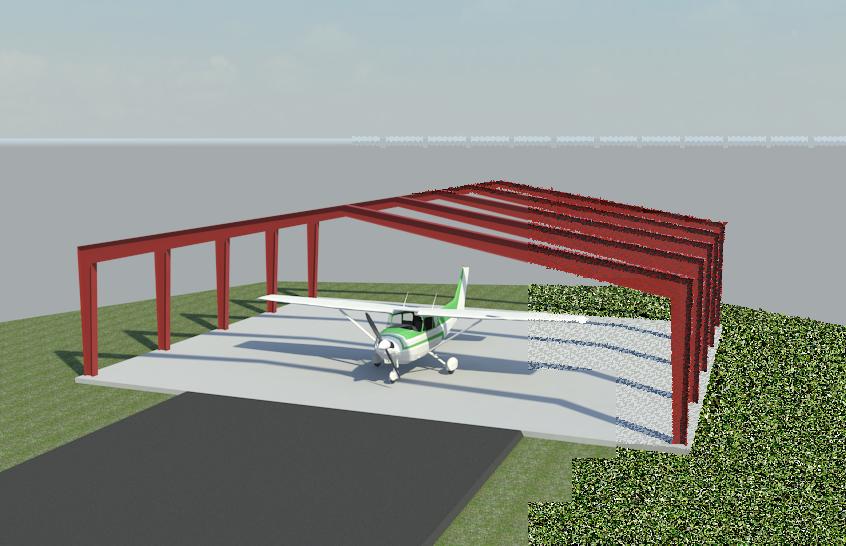
i don't get this- WHY do i see much SHARPER rendered images in the gallery when i set mine to 10 for antialising? you can't set it any higher than that.. i turned all the reflections off except for a 2 on the refraction so i can see some glass.. and all the illuminations are on 8 and 5.. makes no sense to me.. i hope nobody is going to tell me to render for seven hours to a 600 DPI printer setting and then somehow shrink it down to a JPEG to post.. what's going on here please..
|
This user is offline |
|
 | |
|
|
active
Joined: Tue, Apr 12, 2005
1310 Posts
 |
Unfortunately the cool images that you see probably took over ten hours to render. Setting Revit to render to printer rather than screen on 150dpi will make a difference. 300dpi will take more than twice as long to render and 600dpi more than twice again. I set mine up to render overnight, but a high quality rendering with lights will take days rather than hours on a standard machine. Some of the images in the gallery took over a week to render. We will have to wait for more computing power to get good renders fast.
|
This user is offline |
View Website
|
|
|
Joined: Sun, Jan 4, 2009
356 Posts
|
thanks tim- yes i know if you render a high DPI and shrink it down- the image will be very sharp.. but how do they get a JPEG to fit the screen for posting to the gallary with a huge image? are they printing to another program that shrinks the image and then saves it as a new JPEG or what?
|
This user is offline |
|
|
|
active
Joined: Tue, Apr 12, 2005
1310 Posts
|
Thats exactly what I do, normally after rendering overnight. I export it as a TIFF and then change the size and change it to a JPG. You can just use Windows Paint to do this.
|
This user is offline |
View Website
|
|
|
Joined: Sun, Jan 4, 2009
356 Posts
|
tim- i always use paint for my pictures- but i've never known any way to save as a different size.. i would like to know how you do this.. i have many tiff images exported from revit and i opened one in paint like i always do and changed the size to a very small image and then saved it as a jpeg and then went to that saved jpeg- but it opens as the original size.. i can't believe this.. even if you change the size of an image in paint and then close paint- it does not ask you if you want to save any changes.. please tell me what you are talking about?
|
This user is offline |
|
|
|
active
Joined: Tue, Apr 12, 2005
1310 Posts
|
I don't have any problem doing this. When you save it, do you give it another name? - perhaps that is the problem. I have just opened up a 3.65M TIFF, reduce the size (both sides by 50%, under Image, Resize) and saved it as a JPG (36Kb) and as a TIFF (893Kb).
|
This user is offline |
View Website
|
|
|
Joined: Sun, Jan 4, 2009
356 Posts
|
wow finally- thanks tim.. image> resize.. NOT view> zoom> custom..
|
This user is offline |
|
|
|
Similar Threads |
|
Beams connections - "soft", not sharp |
Revit Building >> Technical Support
|
Fri, Dec 7, 2012 at 9:06:42 AM
|
2
|
|
Wooden floor render problem - how to change direction of flooring??????? |
Revit Building >> Technical Support
|
Fri, Mar 18, 2011 at 2:42:49 PM
|
3
|
|
Render - Lumincent Image - Interior Scene |
Revit Building >> Technical Support
|
Mon, May 9, 2011 at 3:59:33 PM
|
1
|
|
Aliased Rendering |
Revit Building >> Technical Support
|
Fri, Apr 1, 2005 at 11:15:37 AM
|
0
|
|
can't render background image at 300DPI |
Revit Building >> Technical Support
|
Mon, Oct 11, 2010 at 11:26:56 AM
|
7
|
|
|
Site Stats
Members: | 2161655 | Objects: | 23325 | Forum Posts: | 152479 | Job Listings: | 3 |
|
 Search