|
Mon, May 10, 2010 at 4:28:22 AM
#1
|
|
site moderator

Joined Tue, May 22, 2007
 This user is offline |
Your Welcome
|
 |
|
Sun, May 16, 2010 at 4:54:02 PM
#2
|
|
active

Joined Fri, Oct 17, 2008
This user is offline |
Thy what s the title of the forum tread? I would like to learn too! Nice car by the way gebber!
|
|
|
Mon, Jun 14, 2010 at 9:38:29 AM
#3
|
|
active
Joined Mon, Jan 24, 2005
No rating This user is offline |
excelent
|
|
|
Tue, Jun 22, 2010 at 1:32:01 AM
#4
|
|
active
Joined Mon, Jun 21, 2010
No rating This user is offline |
A nice car. Thank a lot
|
|
|
Mon, Aug 23, 2010 at 4:15:29 AM
#5
|
|
active

Joined Thu, Jan 24, 2008
 This user is offline |
http://www.revitcity.com/forums.php?action=viewthread&thread_id=8076 I gues it was this tread
|
|
|
Tue, Feb 1, 2011 at 12:28:19 PM
#6
|
|
active
Joined Fri, Sep 24, 2010
 This user is offline |
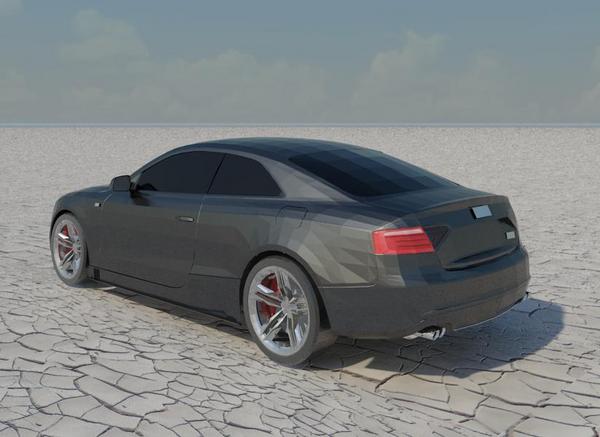
CAR LOOKS GOOD BUT MY QUESTION IS HOW DID YOU DO THE GROUND?
|
|
|
Fri, Feb 18, 2011 at 5:25:47 AM
#7
|
|
active
Joined Thu, Jan 24, 2008
This user is offline |
The to do the Ground: 1 (web)search the image you like. 2 copy the image and make it black and white 3 make a new material 4 go to generic browse to the desired image (color). 4 go to bump and aply the black and white image 5 aply the image to a floor, a site does not suppurt the bump
|
|
|
Wed, Oct 19, 2011 at 12:59:30 AM
#8
|
|
active
Joined Wed, Oct 19, 2011
No rating This user is offline |
Nice thanks 
|
|
|
Mon, Nov 7, 2011 at 9:20:40 PM
#9
|
|
active
Joined Mon, Aug 10, 2009
This user is offline |
used this in my last rendering, looks sweet.
|
|
|
Thu, Feb 9, 2012 at 1:55:49 AM
#10
|
|
active

Joined Thu, Jan 19, 2012
This user is offline |
This is really nice, thank you!
|
|
|
Tue, Feb 20, 2018 at 11:37:43 AM
#11
|
|
active
Joined Wed, Jan 27, 2016
No rating This user is offline |
Muy Bien ese carro queda muy bonito
|
|

 Search