
|
|
|
Home | Forums |
Downloads | Gallery |
News & Articles | Resources |
Jobs | FAQ |
| Join |
Welcome !
|
7 Users Online (5 Members):
Show Users Online
- Most ever was 626 - Mon, Jan 12, 2015 at 2:00:17 PM |
|
|
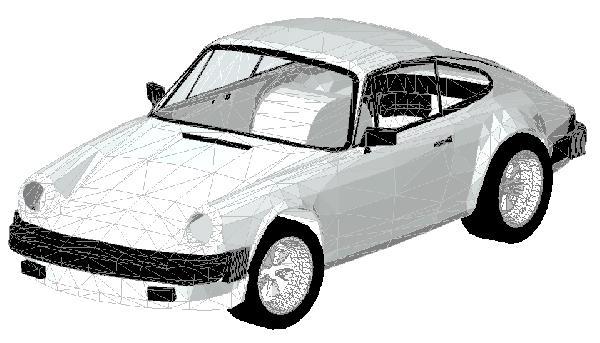
Porsche 911
9870 Downloads

|
 | 
| |
Porsche 911 |
|
CSI Division: 34 Transportation
RevitCity Division: Entourage > Vehicles
|
Uploaded By: sjs
Uploaded On: Thu, Mar 18, 2004
|
|
Comments
|
Tue, Jun 17, 2008 at 12:30:31 PM
#1
|
|
active
Joined Tue, Mar 25, 2008
This user is offline |
Is it possible to change the color? When I render it the entire vehicle is grey.
|
|
|
Tue, Jun 17, 2008 at 12:46:27 PM
#2
|
|
active
Joined Tue, Mar 25, 2008
This user is offline |
Figured it out...
|
|
|
Sun, Jun 5, 2011 at 8:12:37 PM
#3
|
|
active
Joined Mon, Oct 11, 2010
No rating This user is offline |
I Jizz all over this car :O <==3
|
|
|
Tue, Nov 8, 2011 at 12:56:26 PM
#4
|
|
active
Joined Wed, Apr 7, 2010
No rating This user is offline |
How to change the colour of it ?
|
|
|
Thu, Nov 1, 2012 at 7:14:24 PM
#5
|
|
active
Joined Mon, Oct 15, 2012
This user is offline |
mpb206, can you post how you changed the color?
|
|
|
Sat, Feb 14, 2015 at 7:28:46 AM
#6
|
|
active
Joined Wed, Feb 11, 2015
 This user is offline |
To change the colors load it into your project, go to "manage", "object styles" and click on "imported objects". The materials are classified under "CARS-P911" for body, glass, rims, tires, trim. Select each and change their appearance. Good luck!
|
|
|
Site Stats
Members: | 2161655 | Objects: | 23325 | Forum Posts: | 152479 | Job Listings: | 3 |
|
 Search