
|
|
|
Home | Forums |
Downloads | Gallery |
News & Articles | Resources |
Jobs | FAQ |
| Join |
Welcome !
|
8 Users Online (6 Members):
Show Users Online
- Most ever was 626 - Mon, Jan 12, 2015 at 2:00:17 PM |
|
|
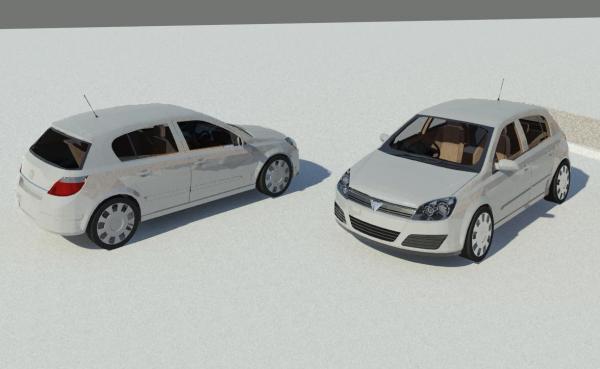
Vauxhal Astra - Car Automobile Vehicle
6703 Downloads

|
 | 
| |
Vauxhal Astra - Sounds German IDK, but it was a special request so here it is. Im also guessing right side steering if not you can always flip it with no problems. Materials are listed under ASTRA for easy location.
Note: included the AutoCAD 2007 version for those wanting to import into earlier versions of Revit. |
|
CSI Division: 34 Transportation
RevitCity Division: Entourage > Vehicles
Product Version: Revit Architecture 2012 |
Uploaded By: bradley911
Uploaded On: Fri, Jul 6, 2012
|
|
Comments
|
Fri, Jul 6, 2012 at 6:35:47 PM
#1
|
|
active
Joined Tue, Jun 14, 2011
 This user is offline |
Really nice work and thanks for posting both file versions.
Is their any tutorials you would recommend for learning to do this in Revit?
|
|
|
Fri, Jul 6, 2012 at 7:00:31 PM
#2
|
|
active

Joined Thu, Nov 12, 2009
 This user is offline |
LOL, I wish, Basically trial and error and a hole lot of free tiime. Best place to start is googles warehouse. find a desired SKETCH UP file and down load it. then import it via insert, import CAD, file type (sketchup) and open in to Revit.......export to AutoCAD, open the file and CAREFULLY explode the image and seperate it little by little, setting and asigning layers as you go keeping in mind it will be imported into revit again. Get familar with AutoCADs 3D modeling abilitys and learn to combine models or creating what you need yourself. Then purge and import the file back to Revit. Once in Revit, use the Manage drop down, then object styles, imported objects, expand the import in familys, find your Newly created AutoCAD files (listed under Catagories), then asign the desired material to it. CAREFULL NOT to change the line color settings this seems to really increase the file size in revit. Import into a project and render, adjusting materials till you get your desired effects. GOOD LUCK
|
|
|
Thu, Jul 12, 2012 at 1:23:47 AM
#3
|
|
active
Joined Tue, May 25, 2010
This user is offline |
Great job! Thanks for posting this vehicle.
|
|
|
Mon, Jul 23, 2012 at 8:09:28 AM
#4
|
|
active
Joined Thu, Nov 12, 2009
This user is offline |
your welcome
|
|
|
Fri, Jun 5, 2015 at 6:21:33 AM
#5
|
|
active

Joined Thu, Nov 9, 2006
 This user is offline |
Hi, great model.
Could you make this one as well?
https://3dwarehouse.sketchup.com/model.html?id=24d88095f33c3e66c066a93075975313
I can contribute by making 2d symbols as did for these
http://www.revitcity.com/downloads.php?action=view&object_id=5211
http://www.revitcity.com/downloads.php?action=view&object_id=5207
|
|
|
Site Stats
Members: | 2161655 | Objects: | 23325 | Forum Posts: | 152479 | Job Listings: | 3 |
|
 Search