
|
|
|
Home | Forums |
Downloads | Gallery |
News & Articles | Resources |
Jobs | FAQ |
| Join |
Welcome !
|
4 Users Online (2 Members):
Show Users Online
- Most ever was 626 - Mon, Jan 12, 2015 at 2:00:17 PM |
Search Gallery
Gallery Favorites
|
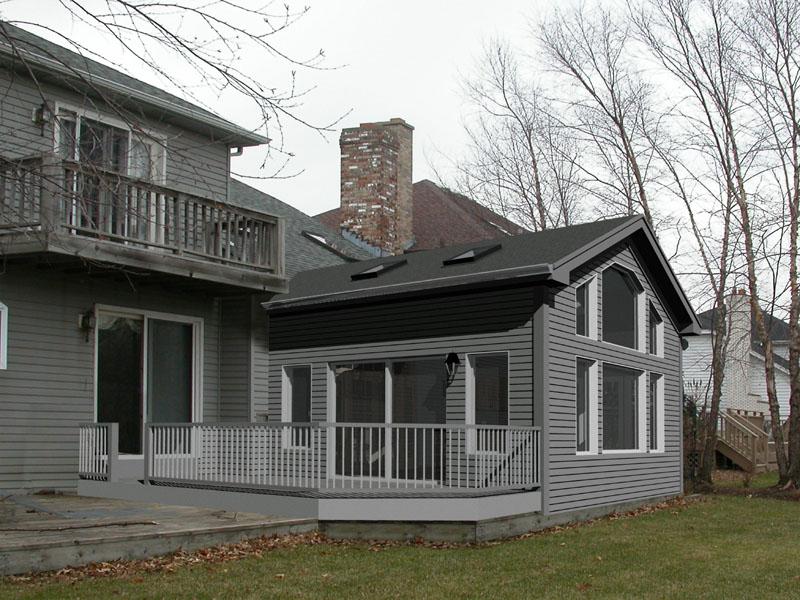
Porch Addition - proposed
 |
|
View image full size|||

|
 |
|
Uploaded By: FMCustomDesign Thu, Nov 4, 2004
|
|
Description: We tried to match the grey look of the 'grim' picture. The hard shadows on the REVIT model are a bit of a give-away. But a little clean up on the deck and some leaves around the porch perimeter, and the client can see what it will all look like.
|
Previous Next |
Comments
|
Fri, Nov 5, 2004 at 3:56:28 PM
#1
|
|
active
Joined Mon, Jun 28, 2004
 This user is offline |
Try adjusting the sun render settings to match the shadows. Turn down sun, turn up cloudiness, soft shadows on. You could even use a photo for the siding material to match it better to the existing siding.
|
|
|
Sun, Nov 7, 2004 at 12:02:27 PM
#2
|
|
active
Joined Wed, Jul 14, 2004
This user is offline |
Whilst everything can be better, I think this is as good as is needed, certainly requires two looks to see which is real and which is revit. I'm curious to know the tips and tricks behind a good montage, how to marry up the views, what software people are using (I presume its photoshop?) Anyone got any tutorials or tips?
|
|
|
Tue, Nov 9, 2004 at 11:08:23 PM
#3
|
|
active

Joined Fri, Jan 30, 2004
This user is offline |
I think the composition is just fine! I would recommend using a bump to give the siding some more texture. Or simply use the ink dropper tool from photoshop to create your own material with an underlay of the bump map. If the transparency of the underlay texture is reduced, it works. Also, to create a montage, use the magnetic lasso tool in photoshop or an alpha mask channel and cut the rendered portion and overlay the same onto another image. This should work. Make sure you experiment with the threshold level of the lasso tool. As Truevis suggested, soft shadows and turning down the sun works. Moreover, if you use real maps and create materials, it's better. Hope this helps!
Gautam
|
|
|
Mon, Nov 29, 2004 at 6:51:56 AM
#4
|
|
active
Joined Tue, Sep 9, 2003
No rating This user is offline |
This is very fine!
What aplicattions have you used to do this?
|
|
|
Wed, Mar 9, 2005 at 2:35:59 PM
#5
|
|
active
Joined Tue, Sep 9, 2003
No rating This user is offline |
The model was built in Revit with the actual setting (existing house) JPG as a background. The endresult was fine-tuned using Adobe Photoshop.
|
|
|
Site Stats
Members: | 2161655 | Objects: | 23325 | Forum Posts: | 152479 | Job Listings: | 3 |
|
 Search
;)