
|
|
|
Home | Forums |
Downloads | Gallery |
News & Articles | Resources |
Jobs | FAQ |
| Join |
Welcome !
|
5 Users Online (3 Members):
Show Users Online
- Most ever was 626 - Mon, Jan 12, 2015 at 2:00:17 PM |
Search Gallery
Gallery Favorites
|
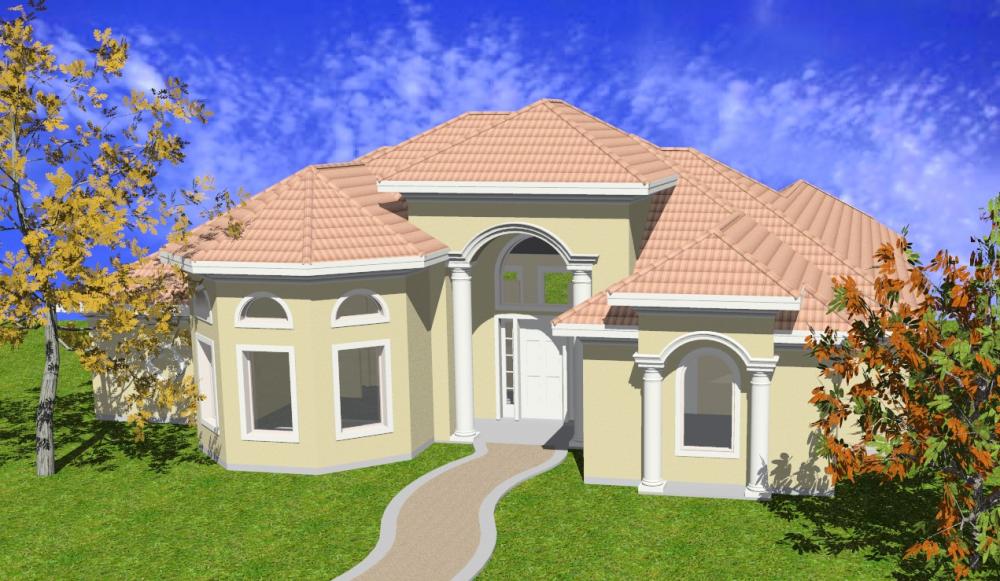
2nd Rendering
 |
|
View image full size|||

|
 |
|
Uploaded By: amjhd Sun, May 21, 2006
|
|
Description: Any tips on how to make my spanish tile look more real? Also, I am setting my glass transparency to 0 in my windows, Do you know why they don't render transparent? Thanks
|
Previous Next |
Comments
|
Mon, May 22, 2006 at 9:26:10 AM
#1
|
|
active

Joined Thu, Dec 16, 2004
 This user is offline |
They look transparent in this render...? Make the tiles look more real huh? Could make a single tile family and place each tile manually, that would probably make it look most realistic. But the you run into time and computer power issues.
Good luck!
|
|
|
Wed, May 24, 2006 at 9:36:55 AM
#2
|
|
active

Joined Wed, Mar 22, 2006
 This user is offline |
I'm sorry, I meant to say that I don't want transparent windows
I was editing my glass transparency in the wrong place.
The clouds is a backgroud image but don't remember
where I got it.
Thanks for tips on my spanish tile....don't know for sure how I
would edit my bitman and adjust what you are suggesting.
Is this done in photoshop?
|
|
|
Wed, May 24, 2006 at 8:53:42 PM
#3
|
|
active
Joined Sun, Nov 6, 2005
 This user is offline |
God stuff there, nice modelling!
In regards to your glass transparency, are you altering the Revit Material setting or the Accurender Material setting? Because when you first click on the material in the 'Material Editor', it only gives you options relating to how it looks pre-rendered. To change how it looks when you render it, you need to edit the Accurender Material setting, is this what you've been doing?
About the tiles, you could always edit the bitmap, replicate it 5 times and then change the contrast / brightness / colour balance of random tiles...
Cool sky! Is it a background image file?
Yeah, the bitmap editing could be done in photshop, or any other image editing program. You'll find that the tile material is a single image replicated over and over, find the image that it uses (Accurender Material properties) and play around with it as I said before. Mastering this is very helpfull in customising photorealistic renderings!
Or else you could do a google image search for 'tile materials' or something and use an image off the net instead...
|
|
|
Wed, May 31, 2006 at 3:57:11 AM
#4
|
|
active
Joined Tue, Apr 4, 2006
No rating This user is offline |
Your modeling looks nice. Can u advise how do you do the roof tiling image as appear in your photo.
Thanks
|
|
|
Site Stats
Members: | 2161655 | Objects: | 23325 | Forum Posts: | 152479 | Job Listings: | 3 |
|
 Search
;)