|
|
|
Home | Forums |
Downloads | Gallery |
News & Articles | Resources |
Jobs | FAQ |
| Join |
Welcome !
|
5 Users Online (3 Members):
Show Users Online
- Most ever was 626 - Mon, Jan 12, 2015 at 2:00:17 PM |
Forums
|
Forums >> Revit Building >> Technical Support >> VG and phasing not working
|
|
|
active
Joined: Thu, Oct 20, 2005
168 Posts
 |
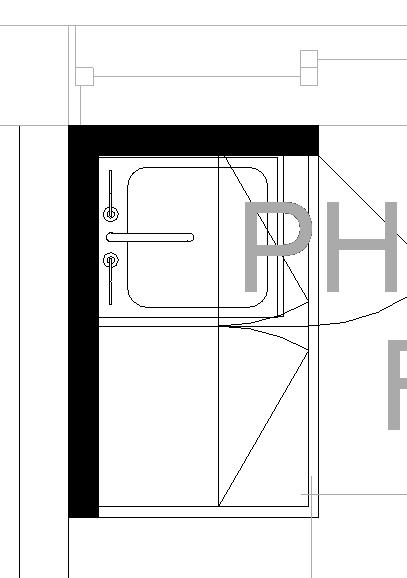
So I have a existing phase and a new phase. does anyone know how to let VG overrides work on items using a phase filter override? in my example below i need my upper wall cabs to be dashed which is what the Object style is set to for default and the VG overide is set the same. As you can see I think the phase filter override is keepingf it solid black linetype. I would appreciate any help that is available. thanks! jason
|
This user is offline |
|
 | |
|
|
active
Joined: Thu, Oct 20, 2005
168 Posts
|
bump. still trying to figure this one out. i know i can select objects indiviually and "override graphics in view" but unfortunatley it will overide the whole family and not the individual object styles. any help is appreciated.
|
This user is offline |
|
|
|
Similar Threads |
|
Wall type missing Phasing parameter |
Revit Building >> Technical Support
|
Fri, Aug 22, 2008 at 2:26:07 PM
|
2
|
|
Phasing - Building Already Done but Dind't Set up Phasing |
Community >> Newbies
|
Tue, Dec 15, 2009 at 7:40:42 AM
|
1
|
|
Phasing and changing material finishes |
Revit Building >> Technical Support
|
Wed, Apr 30, 2008 at 11:03:55 AM
|
5
|
|
Phasing Graphics and Detail Level |
Revit Building >> Technical Support
|
Wed, Jan 13, 2016 at 11:24:29 AM
|
4
|
|
Phasing Not Working For Me! Help Needed Please. |
Revit Building >> Technical Support
|
Fri, Jun 25, 2010 at 9:04:35 AM
|
3
|
|
|
Site Stats
Members: | 2161655 | Objects: | 23325 | Forum Posts: | 152479 | Job Listings: | 3 |
|
 Search