
|
|
|
Home | Forums |
Downloads | Gallery |
News & Articles | Resources |
Jobs | FAQ |
| Join |
Welcome !
|
4 Users Online (2 Members):
Show Users Online
- Most ever was 626 - Mon, Jan 12, 2015 at 2:00:17 PM |
Forums
|
Forums >> Revit Building >> Technical Support >> Floors poking through walls?
|
|
|
active
Joined: Tue, Oct 2, 2007
36 Posts
No Rating |
Afternoon all, I'm having a little problem. For some reason, whenever I model a floor, it shows up poking through the exterior walls of my building. I usually make multi-level buildings with this process: 1: Model the walls of the first level. 2: Model the floor of the first level (using the "pick walls" tool). 3: Model the second level floors (with the first level set as the underlay, so the first and second floor exterior walls are lined up properly). 4: Model the floor of the second level (using the pick walls tool). Lather, rinse, repeat. See the attached image- the floors have been colored red for clarity. Does anyone have any suggestions? I'd like to make my exterior walls continuous. Any input would be really appriciated. Thanks!
|
This user is offline |
|
 | |
|
|
active
Joined: Mon, Sep 19, 2005
217 Posts
 |
Have your walls been set up with a core. when you make a floor it will come up with the option Extend into wall(core). this means if you have a wall set with an internal core it will only go as far as the core. Have a look at the attached view.
-----------------------------------
Macca Sunshine Coast QLD Australia |
This user is offline |
View Website
|
|
|
active
Joined: Tue, Oct 2, 2007
36 Posts
No Rating |
Some of my floor edges have the option "extend into walls" while others don't. However, it dosn't seem to matter- edges that "extend into walls" still show up poking through the exterior of the building, the same as edges that don't extend into walls. has anyone else ever encountered this before? (Using Revit 2008 btw)
|
This user is offline |
|
|
|
active
Joined: Tue, Oct 2, 2007
36 Posts
No Rating |
Some of my floor edges have the option "extend into walls" while others don't. However, it dosn't seem to matter- edges that "extend into walls" still show up poking through the exterior of the building, the same as edges that don't extend into walls. has anyone else ever encountered this before? (Using Revit 2008 btw)
|
This user is offline |
|
|
|
site moderator|||

Joined: Mon, Jan 12, 2004
2889 Posts
 |
It would help to show a section of through the floor and walls so we can see how they are aligning. The reason I ask is because it is quite easy to avoid this situation by modelling appropriately. However, there is also a graphical glitch whereby when two objects are very close together are you zoom out a reasonable distance or at a large scale the element behind shows through even though technically its concealed. HTH.
-----------------------------------
Regards,
Chris.
Co-Founder | BIM Consultant | Software Designer  B. Arch) B. Arch)
Xrev Revit API Addins | Revit Rants |
This user is offline |
View Website
|
|
|
Similar Threads |
|
Dead horse still kicking - walls and floors strategy |
Revit Structure >> Technical Support
|
Tue, Oct 2, 2007 at 1:36:25 PM
|
0
|
|
join all walls with floors toguether ?? easy way? |
Revit Building >> Technical Support
|
Tue, Oct 17, 2017 at 2:50:57 PM
|
6
|
|
solid walls transparent to curtain walls and railings in back.. |
Revit Building >> Technical Support
|
Mon, Oct 29, 2012 at 7:34:26 AM
|
6
|
|
How do you convert massings into floors, walls and roofs?? |
Revit Building >> Technical Support
|
Thu, Jul 16, 2009 at 4:48:55 PM
|
6
|
|
Walls from multiple floors above showing in site plan |
Revit Building >> Technical Support
|
Wed, Oct 3, 2012 at 9:23:52 PM
|
4
|
|
|
Site Stats
Members: | 2161655 | Objects: | 23325 | Forum Posts: | 152479 | Job Listings: | 3 |
|
 Search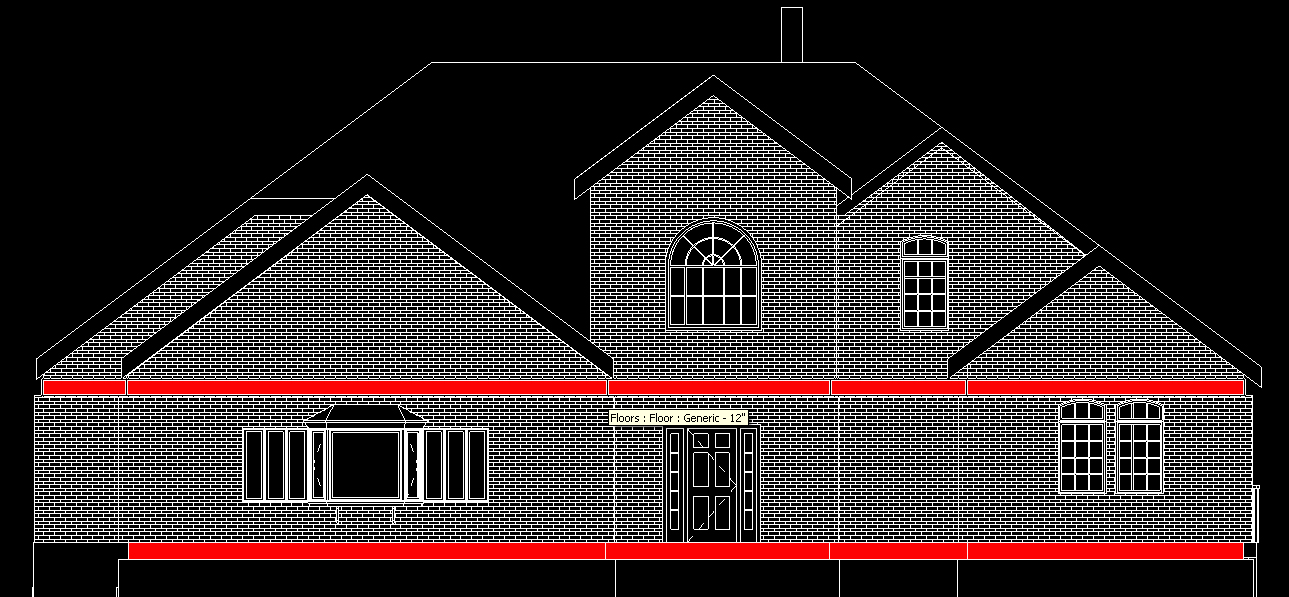
 31031_Wall_core.pdf