|
|
|
Home | Forums |
Downloads | Gallery |
News & Articles | Resources |
Jobs | FAQ |
| Join |
Welcome !
|
7 Users Online (5 Members):
Show Users Online
- Most ever was 626 - Mon, Jan 12, 2015 at 2:00:17 PM |
Forums
|
Forums >> Revit Building >> Technical Support >> Revit 9.1 dimsenions
|
|
|
active
Joined: Wed, Apr 4, 2007
69 Posts
No Rating |
hey floks, I have some walls that I am trying to dimesion and i get an error message saying that the dimension cannot be done because the walls are not parallel. i checked and we are talking about 1/256 on an inch! is there a setting that determines how much leeway you get in this? thanks pgrimmi
|
This user is offline |
|
 | |
|
|
active
Joined: Wed, Apr 26, 2006
76 Posts
 |
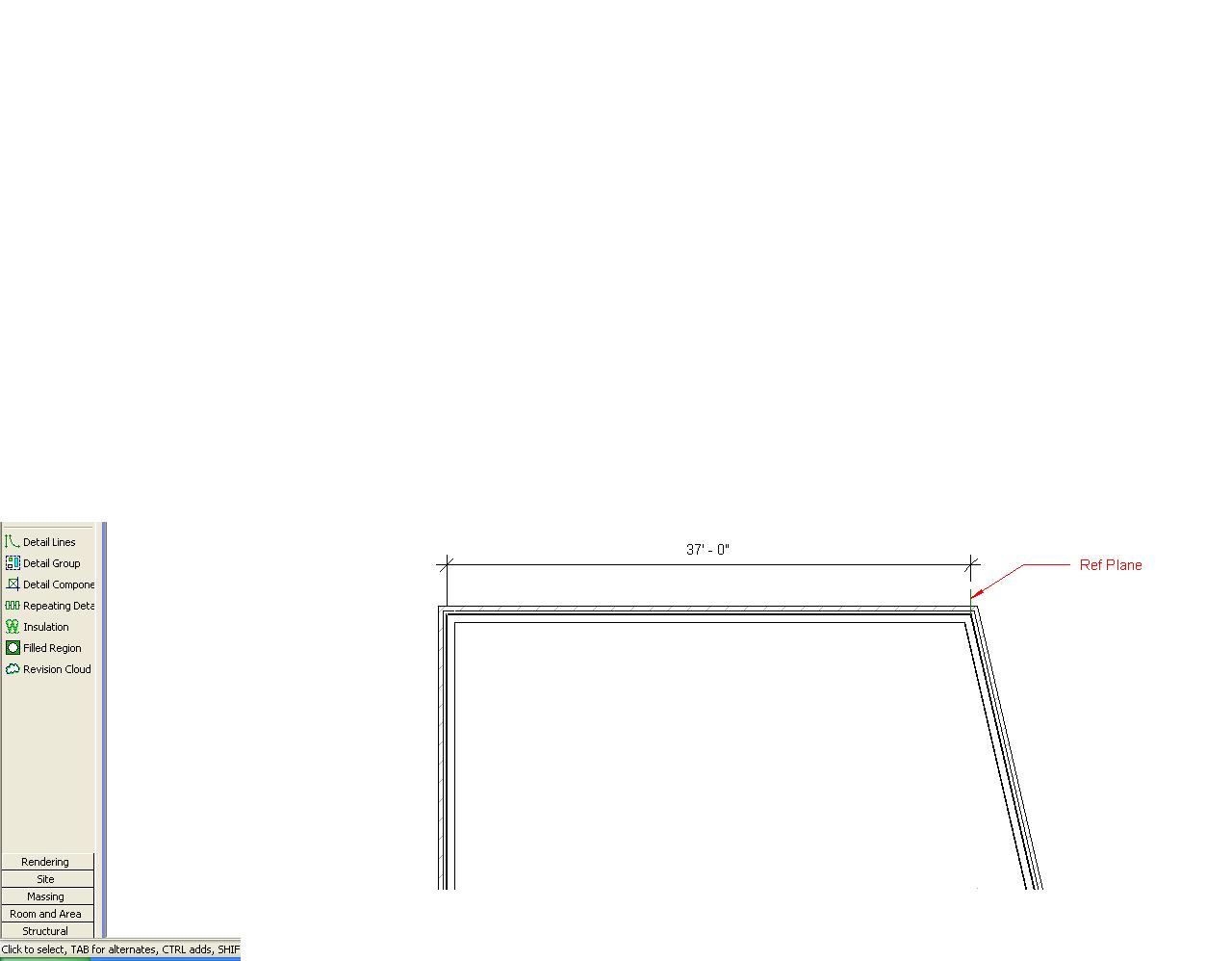
No, there is no option to change this setting. My solution has been to draw a short reference plane at the end of Wall A that is parallel to Wall B, and then dimension from the reference plane to Wall B. See the attached jpg.
|
This user is offline |
|
|
|
active
Joined: Wed, Apr 4, 2007
69 Posts
No Rating |
thanks laurabh. that did the trick! one would think that revit would give a little play between walls that are not parallel by 1/256" over 200'! perhaps such a setting will be available in later versions regards pgrimmi
|
This user is offline |
|
|
|
Similar Threads |
|
Revit for Construction Documents [ 1 2 ] |
Revit Building >> Technical Support
|
Tue, Jan 24, 2012 at 10:57:38 AM
|
20
|
|
4D simulation in Revit? [ 1 2 ] |
Workflow & Implementation >> API & Third Party Apps
|
Mon, Jan 17, 2011 at 11:27:39 AM
|
18
|
|
I need to open a Revit 2011 file into the Revit 2009 ? Are there any way ? [ 1 2 ] |
Revit Building >> Tips & Tricks
|
Thu, Jan 6, 2011 at 3:25:02 PM
|
18
|
|
We are looking for Revit Users [ 1 2 ] |
Community >> Newbies
|
Thu, Mar 31, 2011 at 5:15:24 PM
|
17
|
|
AutoCad vs Revit [ 1 2 ] |
Community >> Newbies
|
Thu, Aug 4, 2011 at 1:58:52 PM
|
16
|
|
|
Site Stats
Members: | 2161655 | Objects: | 23325 | Forum Posts: | 152479 | Job Listings: | 3 |
|
 Search