|
|
|
Home | Forums |
Downloads | Gallery |
News & Articles | Resources |
Jobs | FAQ |
| Join |
Welcome !
|
3 Users Online (1 Members):
Show Users Online
- Most ever was 626 - Mon, Jan 12, 2015 at 2:00:17 PM |
Forums
|
Forums >> Revit Building >> Technical Support >> Arc Walls with curved top?
|
|
|
active
Joined: Fri, Nov 12, 2004
1 Posts
No Rating |
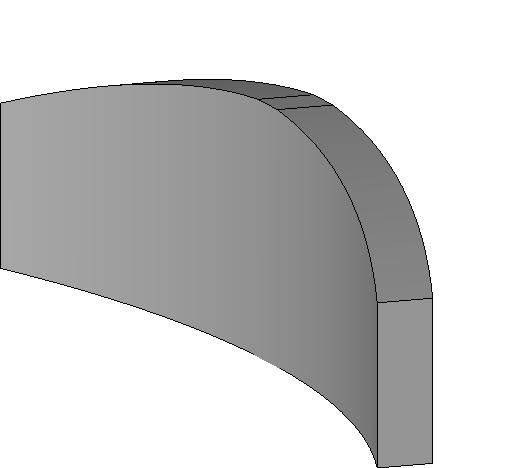
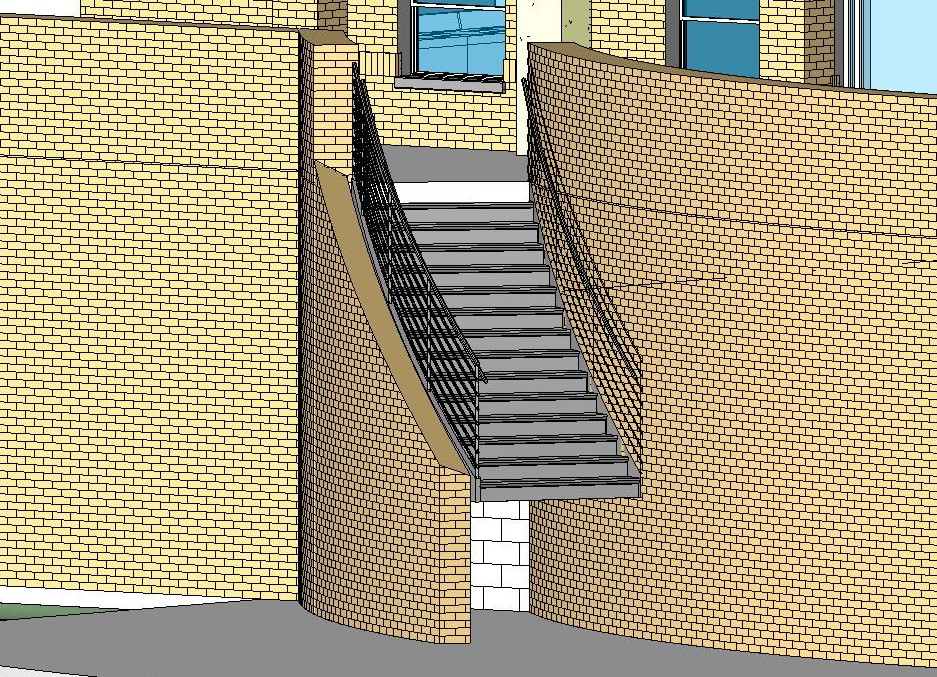
I would like to know how you arc the top of an arc wall. I know how to use the profile button to place an arc on the top of a straight wall but that option is not availabe on an arc wall. I would like to use this on curved parapet walls for a condo. Can anyone help?
Mark
|
This user is offline |
|
 | |
|
|
active

Joined: Sun, Sep 19, 2004
202 Posts
 |
It is interesting that once you created a curved or arc wall in plan, it does not allowed you to edit the profile of the wall anymore as I tried in Revit 6.1. Not too sure about Revit 7. It only allows you to create rectangular openings
The easier way to get around this is by creating another curve roof above your curved/ arc wall and attach the curved wall to the roof, than turn off the roof visibility or hide the roof using the select and hide icon. But I think this should not be the permenant solutions for this as turning off the roof visibility will subsequently turn your other roofs as well.
Create in-place family should be a better solution by the steps a slightly more. Basically, you have to create a extrude curve/ arc wall and create a curve/ arc void to have the effects done. I hope I got your question right, Attached the family created.
-----------------------------------
Life is never easy but nor it should be complex. Just stay simple  |
This user is offline |
|
|
|
site moderator|||

Joined: Mon, Jan 12, 2004
2889 Posts
 |
I sort of agree with Ale02,
But i wouln't create the curved wall as an inplace family.
Basically all you need to do is.
Create an in-place family (wall Category) use a void to cut the section of the wall you wish to remove to get the curve. Then before finishing the family use the Cut Geometry tool on the void and select the wall you wish it to cut.
Now finish the family and it shold cut as required.
|
This user is offline |
View Website
|
|
|
active
Joined: Thu, Dec 2, 2004
11 Posts
No Rating |
I was having this same problem, and I discovered that a reference plane should be used. I created a reference plane above the arc wall at the desired angle, and attached the top of the wall to the reference plane. It is the same concept as the above mentioned "attaching to a roof", but the reference plane is that tool created for this use.
Thank you for mentioning the attach to roof idea, it led me to the reference plan solution.
|
This user is offline |
|
|
|
active

Joined: Fri, Mar 28, 2008
15 Posts
No Rating |
I'm going to have to go with the massing option. I used the reference plane idea, but the top of the wall then cut sharply into a different angle, as well as sloping the entire wall. Unless anybody has other solutions?
-----------------------------------
Helping you Be Able to be the person you want to be! Sign up for my free newsletter, Being Able, at http://www.AbelGoddard.com |
This user is offline |
View Website
|
|
|
Similar Threads |
|
Complex Curved Walls - please help |
Revit Building >> Technical Support
|
Wed, Mar 25, 2009 at 5:26:10 PM
|
6
|
|
couter top for a curved wall |
Revit Building >> Technical Support
|
Mon, Nov 22, 2010 at 5:02:47 PM
|
9
|
|
Spot Elevations on curved walls with varying height |
Revit Structure >> Technical Support
|
Tue, May 3, 2011 at 5:26:46 AM
|
2
|
|
multiple curved/ arc and straight joined path line issues |
Revit Building >> Technical Support
|
Wed, Feb 14, 2007 at 6:32:43 PM
|
1
|
|
Curved/Arc Grid Line - NOT DASHED |
Revit Building >> Technical Support
|
Thu, Oct 13, 2011 at 11:22:19 PM
|
8
|
|
|
Site Stats
Members: | 2161655 | Objects: | 23325 | Forum Posts: | 152479 | Job Listings: | 3 |
|
 Search