|
|
|
Home | Forums |
Downloads | Gallery |
News & Articles | Resources |
Jobs | FAQ |
| Join |
Welcome !
|
2 Users Online (0 Members):
Show Users Online
- Most ever was 626 - Mon, Jan 12, 2015 at 2:00:17 PM |
Forums
|
Forums >> Revit Building >> Technical Support >> Custom Surface pattern.
|
|
|
active
Joined: Tue, Jun 21, 2016
0 Posts
No Rating |
Revit 2021 version with Enscape.
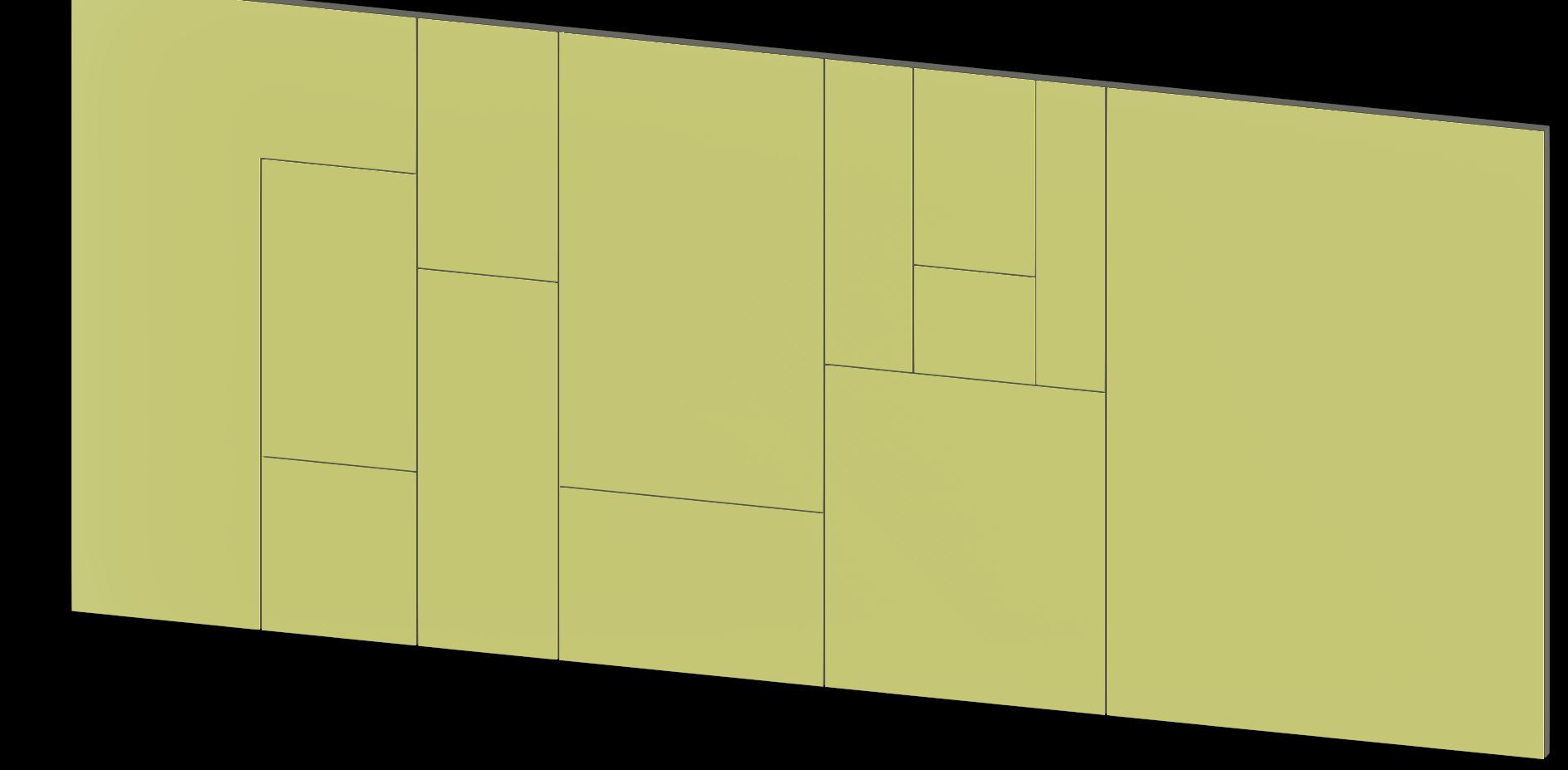
I am working on a scheme with rainscreen cladding as the external finish, which I required to be laid to a custom pattern, yet look like individual cladding panels for 3D images to show the client.
I have tried the following.
1. Use curtain walling. But since the grids are not set to fixed dimensions due the custom pattern, I need to set each individual mullion, which becomes difficult to edit if the client wants to change something. Plus curtain walling is temperament at the best of times.
2. Use surface pattern - but since the panels are of different sizes, the delta-x and delta-y are different for every panel, the pattern becomes a mess. Plus the surface pattern joint doesnt appear correctly in 3D image as recessed, making the elevation appear pretty flat.
3. Use Parts- Divided the wall into parts. but Enscape stil makes it look flat.
Please could you advise the best wall to go forward to achieve the desired pattern and 3D visual. I have also attached a CAD file if someone can help with creating the Pat file.
Thanks
Kay
|
This user is offline |
|
 | |
|
|
active
Joined: Wed, Oct 3, 2018
0 Posts
 |
I would try using wall sweeps/ reveals on the surface of the wall.
|
This user is offline |
|
|
|
active
Joined: Tue, Jun 21, 2016
0 Posts
No Rating |
Thanks for that.
But I need my wall surface to look the image attached. Not sure how wall sweep could achieve what I need. Please could you elaborate your though on using wall sweep?
|
This user is offline |
|
|
|
active
Joined: Wed, Oct 3, 2018
0 Posts
|
Start by making a wall that is just the thickness of your rain screen panel. Add the structure wall behind the rain screen. Make a profile the size of the gap between the panels. Make a reveal with that profile and place on the rain screen wall. You can copy and stretch the reveal where ever you want.
|
This user is offline |
|
|
|
active
Joined: Tue, Jun 21, 2016
0 Posts
No Rating |
Thanks Hanbyjm.
That worked brilliantly. Much appreciated.
|
This user is offline |
|
|
|
Similar Threads |
|
mssing surface pattern |
Revit Building >> Technical Support
|
Tue, Jul 3, 2012 at 10:49:25 AM
|
5
|
|
Custom divide surface pattern? |
Revit Building >> Technical Support
|
Wed, Jan 22, 2014 at 4:14:59 PM
|
4
|
|
Surface pattern |
Revit Building >> Technical Support
|
Mon, Sep 10, 2007 at 11:18:01 AM
|
1
|
|
Surface pattern move/align/adjust problems [ 1 2 ] |
Revit Building >> Technical Support
|
Thu, Sep 17, 2020 at 10:29:33 AM
|
19
|
|
SURFACE PATTERN LINE WEIGHT |
Community >> The Studio
|
Fri, Mar 28, 2014 at 2:30:00 PM
|
7
|
|
|
Site Stats
Members: | 2161655 | Objects: | 23325 | Forum Posts: | 152479 | Job Listings: | 3 |
|
 Search
 161582_Pattern_required.pdf
 161582_RH_Cladding_pattern.dwg