|
|
|
Home | Forums |
Downloads | Gallery |
News & Articles | Resources |
Jobs | FAQ |
| Join |
Welcome !
|
10 Users Online (8 Members):
Show Users Online
- Most ever was 626 - Mon, Jan 12, 2015 at 2:00:17 PM |
Forums
|
Forums >> Revit Building >> Technical Support >> duplicate or one-off families
|
|
|
active

Joined: Tue, Nov 17, 2009
148 Posts
No Rating |
Greetings
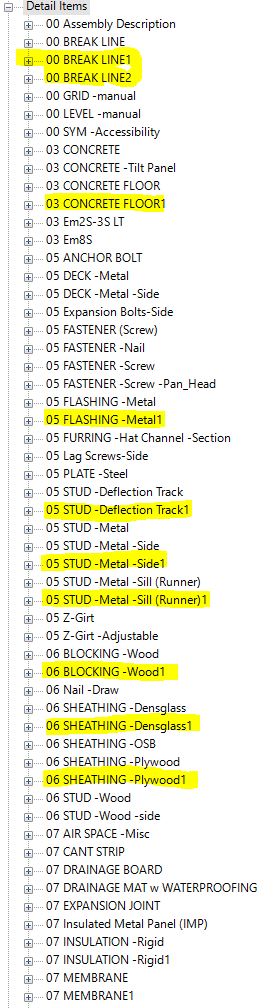
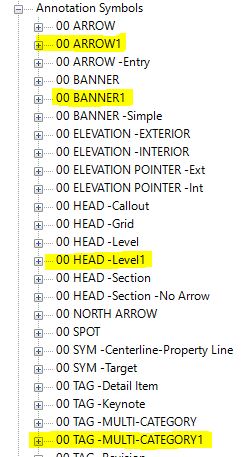
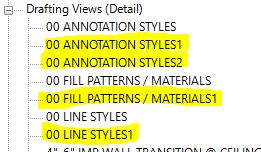
We have ongoing issues with duplicate or one-off families being generated when we copy drafting views from our library. This creates confusion for which family to use or edit, and it clutters the project browser.
To eliminate these duplicates 1 at a time is very time consuming and most users do not even attempt it.
I am hoping for a solution that stops the creation of these duplicates. Please review the attached images and advise on a solution.
thank youIan
-----------------------------------
Ian Shafer
Principal Consultant
True North S&F Consultants |
This user is offline |
View Website
|
 | |
|
|
active
Joined: Wed, Aug 19, 2015
0 Posts
 |
I recently read something about this exact thing but cannot remember if this issue is fixed in Revit 2021 or if it is planned for 2022. Currently the best option is to select the family type in the browser and then select all family types in project and switch them to the family you want them to be. Repeat this for all the copied over types and then delete the family.
|
This user is offline |
|
|
|
active
Joined: Tue, Nov 17, 2009
148 Posts
No Rating |
Thank you for your reply. I hope they do address this in the future. However, my autodesk support request only pointed me to the "Ideas" page:Don't Duplicate Detail Items When Inserting Drafting Views or Merge Detail Items - Autodesk Community
PLEASE VOTE!
So I guess R2021 doesn't have the solution. Maybe 2022 ?
Appreciate your sugestion to address these duplicates, but as I wrote: To eliminate these duplicates 1 at a time (using the select all option) is very time consuming and most users do not even attempt it.
Ian
-----------------------------------
Ian Shafer
Principal Consultant
True North S&F Consultants |
This user is offline |
View Website
|
|
|
active
Joined: Wed, Oct 3, 2018
0 Posts
 |
Can you purge them all at once?
|
This user is offline |
|
|
|
active
Joined: Tue, Nov 17, 2009
148 Posts
No Rating |
Thanks, but they cannot be immediately purged - not until they have been replaced with the original family and no instances remain in the model.
You'll find that detail items and annotation families in Legend views will not be selected with a "find all instances" command. Also line-based families and other instance parameters have issues with maintaining dimension parameters.
I suspect that Dynamo (or other scripts) might do the job, but I'm not a scripter ...
Ian
-----------------------------------
Ian Shafer
Principal Consultant
True North S&F Consultants |
This user is offline |
View Website
|
|
|
Similar Threads |
|
Unable to duplicate a view |
Revit Building >> Technical Support
|
Tue, Sep 13, 2011 at 6:44:21 PM
|
3
|
|
duplicate detail families |
Revit Building >> Technical Support
|
Mon, Oct 22, 2012 at 8:14:03 AM
|
13
|
|
Unable to Duplicate Schedule |
Revit Building >> Technical Support
|
Wed, Sep 12, 2012 at 3:43:41 PM
|
10
|
|
Duplicate view |
Revit Building >> Technical Support
|
Wed, Jul 15, 2015 at 1:50:18 PM
|
3
|
|
Creating duplicate views of elements |
Revit Systems >> Technical Support
|
Tue, Apr 24, 2012 at 5:57:37 AM
|
1
|
|
|
Site Stats
Members: | 2161655 | Objects: | 23325 | Forum Posts: | 152479 | Job Listings: | 3 |
|
 Search