|
|
|
Home | Forums |
Downloads | Gallery |
News & Articles | Resources |
Jobs | FAQ |
| Join |
Welcome !
|
7 Users Online (5 Members):
Show Users Online
- Most ever was 626 - Mon, Jan 12, 2015 at 2:00:17 PM |
Forums
|
Forums >> Revit Building >> Technical Support >> Colour Showing Under Windows and Doors
|
|
|
active
Joined: Wed, Jul 12, 2017
0 Posts
No Rating |
Hi Users
It may be a simple solution but i just can't find it.
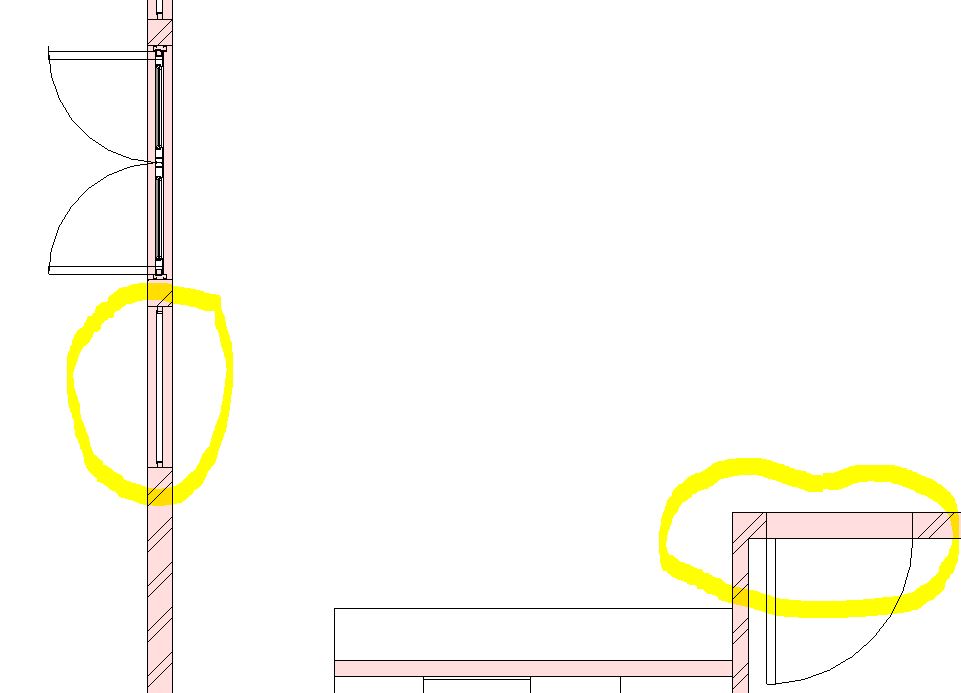
When i insert a window, and in some cases a door into a wall with a cut pattern and colour, the space under the window or door does not hide the colour part of the "hatching".
The window inserts fine and the elevations are all good but the plan is "hiding" the window due to not showing a full clear "white colour around the window space? like inthe pic below.
Anyone have an idea apart from filled regions etc etc? to make the window or door space "white" to reveal the families more clearly in smale scale plans?
Many thanks. 
|
This user is offline |
|
 | |
|
|
active
Joined: Sat, Aug 17, 2019
0 Posts
 |
In the family, you can superimpose a 2D white rectangle in the top view (plan). The borders of the rectangle are bound to the wall and the borders of the door (window).
It can also be a white 3D body.
You can try to download
windows here: https://measuredsurvey365.co.uk/revit-window-families-download/
doors here: https://measuredsurvey365.co.uk/revit-door-families-download/
I don’t remember, but maybe it is already implemented there.
|
This user is offline |
|
|
|
site moderator|||
Joined: Tue, May 16, 2006
13079 Posts
 |
Wait a minute.
Why does the wall go through the doors? Is there no floor?
How did you get the color in the wall? If that is a material property then show us that.
Show us your wall properties.
|
This user is offline |
|
|
|
Similar Threads |
|
Windows and doors not showing up in walls |
Revit Building >> Technical Support
|
Mon, Nov 8, 2010 at 3:24:05 PM
|
5
|
|
Problems Changing Colours Of Doors! |
Revit Building >> Technical Support
|
Wed, Jul 1, 2009 at 3:24:18 PM
|
4
|
|
Excluding doors and windows in count |
Revit Building >> Technical Support
|
Wed, Feb 15, 2006 at 2:59:05 AM
|
6
|
|
Windows and Door Come Out Wrong Colour After Rendering |
Revit Building >> Technical Support
|
Sun, Jul 12, 2009 at 2:30:25 PM
|
3
|
|
Exterior windows and doors |
Revit Building >> Technical Support
|
Thu, Feb 7, 2013 at 7:18:53 AM
|
1
|
|
|
Site Stats
Members: | 2161655 | Objects: | 23325 | Forum Posts: | 152479 | Job Listings: | 3 |
|
 Search