|
|
|
Home | Forums |
Downloads | Gallery |
News & Articles | Resources |
Jobs | FAQ |
| Join |
Welcome !
|
6 Users Online (4 Members):
Show Users Online
- Most ever was 626 - Mon, Jan 12, 2015 at 2:00:17 PM |
Forums
|
Forums >> General Discussion >> Revit ROI >> How to achieve smooth edges?
|
|
|
active
Joined: Wed, Jun 17, 2015
0 Posts
No Rating |
Hi All,
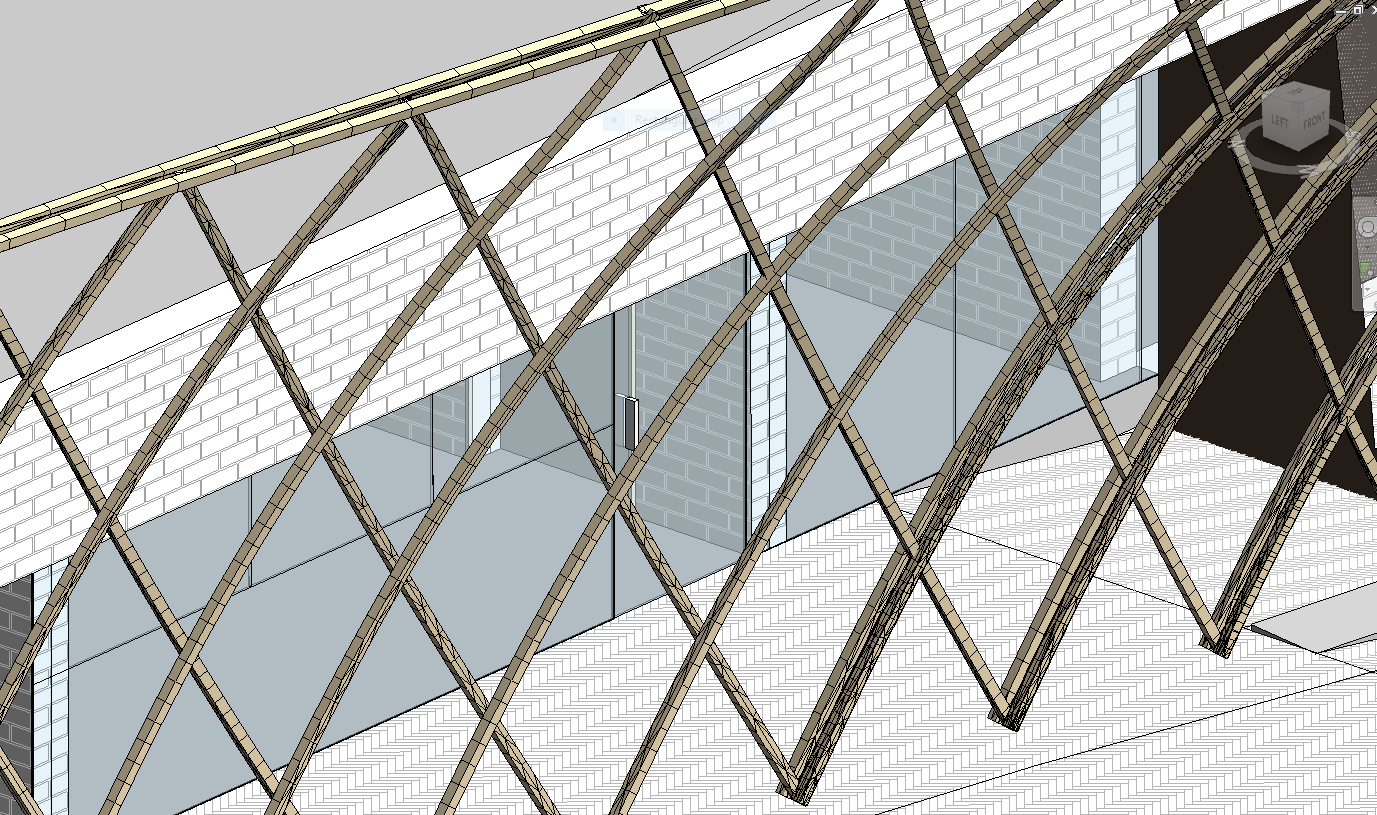
Please see attached, screenshot relating to the following issue.
I have imported a 3D structure originally generated in AutoCAD, into my Revit model. However, both when in AutoCAD and in Revit, the curved structure i segmented. I am assuming this is not a Revit issue as it is segmented in AutoCAD before importing into Revit - Does anyone have any idea/advice as to how I can get this structure to achieve smooth curves rather than segmented angular lines as seen in the screenshot.
Thank you in advance.
Wayne
|
This user is offline |
|
 | |
|
|
site moderator|||

Joined: Tue, May 22, 2007
5921 Posts
 |
Create that directly in Revit and not Autocad and you'll not have that problem.
-----------------------------------
I Hope and I Wish to LEARN more, and more, and more.... REVIT |
This user is offline |
|
|
|
Similar Threads |
|
Smooth edges? |
Community >> The Studio
|
Sun, Jan 23, 2005 at 7:09:01 PM
|
1
|
|
Curved Stair - Smooth Underside |
General Discussion >> Wishlist
|
Thu, May 3, 2007 at 9:54:55 AM
|
1
|
|
shading with edges problem |
Revit Building >> Technical Support
|
Wed, Nov 17, 2010 at 6:49:49 AM
|
3
|
|
creating a chamfer on edges of an extrusion |
Revit Structure >> Technical Support
|
Tue, Apr 21, 2009 at 5:47:05 PM
|
2
|
|
edges color and linetype |
Revit Building >> Technical Support
|
Thu, Apr 21, 2005 at 10:07:34 AM
|
2
|
|
|
Site Stats
Members: | 2161655 | Objects: | 23325 | Forum Posts: | 152479 | Job Listings: | 3 |
|
 Search