|
|
|
Home | Forums |
Downloads | Gallery |
News & Articles | Resources |
Jobs | FAQ |
| Join |
Welcome !
|
947 Users Online (78 Members):
Show Users Online
- Most ever was 3914 - Wed, Aug 26, 2026 at 4:53:14 AM |
Forums
|
Forums >> Revit Building >> Technical Support >> Stair numbering
|
|
|
active
Joined: Mon, Sep 15, 2014
0 Posts
No Rating |
Hi Reviteers,
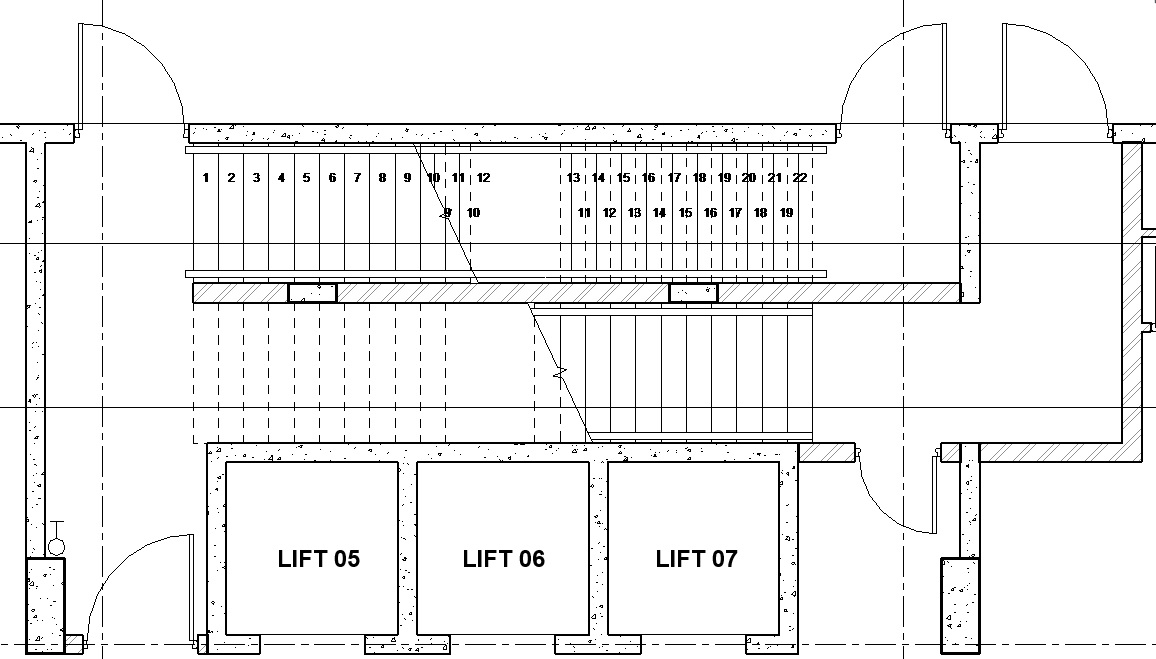
Revit ver. 2018 - I have two staircases, one above the other. I'd like each stair to have it's numbering for the visible treads only.
Pls see image attached. The numbering from the left continues all the way through the break-line, to where the steps above are in dashed lines; thus creating two lines of numbering. To avoid this confusion, I'd like to have each run's numbering for the visible treads only. The bottom-row is correct; i.e only the visible treads are numbered. The top line of numbering continues all the way through, which could confuse the plan-reader.
Has anyone found a way of neatening this up?
Thanks!
|
This user is offline |
|
 | |
|
|
active
Joined: Tue, Dec 19, 2006
57 Posts
 |
As you may already know, your choices with regard to how the tread/riser numbers show are; all, even, odd or 1st and last. That might be a good idea for a future release of revit to only show the tread/riser numbers below the cut plane.
At any rate, it's a bit time consuming, but you can place a small masking region over each of the numbers you want hidden. In all honesty I think even without the numbers it is a bit confusing to look at the stairs the way you are doing them. I would probably hide one set or the other and show them in separate plans.
Good luck my friend.
|
This user is offline |
|
|
|
Similar Threads |
|
Revit Architecture 2013 - Known Issues |
Revit Building >> Technical Support
|
Fri, Apr 6, 2012 at 7:02:23 AM
|
0
|
|
Can not swap out one stair family for another |
Community >> Newbies
|
Thu, Sep 19, 2013 at 12:24:19 PM
|
6
|
|
Precast stair with notch connection |
General Discussion >> Revit Project Management
|
Fri, Aug 26, 2016 at 1:05:15 AM
|
3
|
|
2013 stair path symbol for component stairs displays differently |
Revit Systems >> Technical Support
|
Thu, Feb 6, 2014 at 3:03:50 PM
|
2
|
|
Stair Sections, show Treads Beyond in Hidden Lines, no Linework, no Detail Lines |
Revit Building >> Tips & Tricks
|
Tue, Jul 1, 2014 at 8:08:48 PM
|
5
|
|
|
Site Stats
Members: | 2189245 | Objects: | 23399 | Forum Posts: | 152445 | Job Listings: | 0 |
|
 Search