|
|
|
Home | Forums |
Downloads | Gallery |
News & Articles | Resources |
Jobs | FAQ |
| Join |
Welcome !
|
6 Users Online (4 Members):
Show Users Online
- Most ever was 626 - Mon, Jan 12, 2015 at 2:00:17 PM |
Forums
|
Forums >> Revit Building >> Technical Support >> Changing Elevation of Linked Revit Models
|
|
|
active
Joined: Wed, Aug 20, 2008
318 Posts
 |
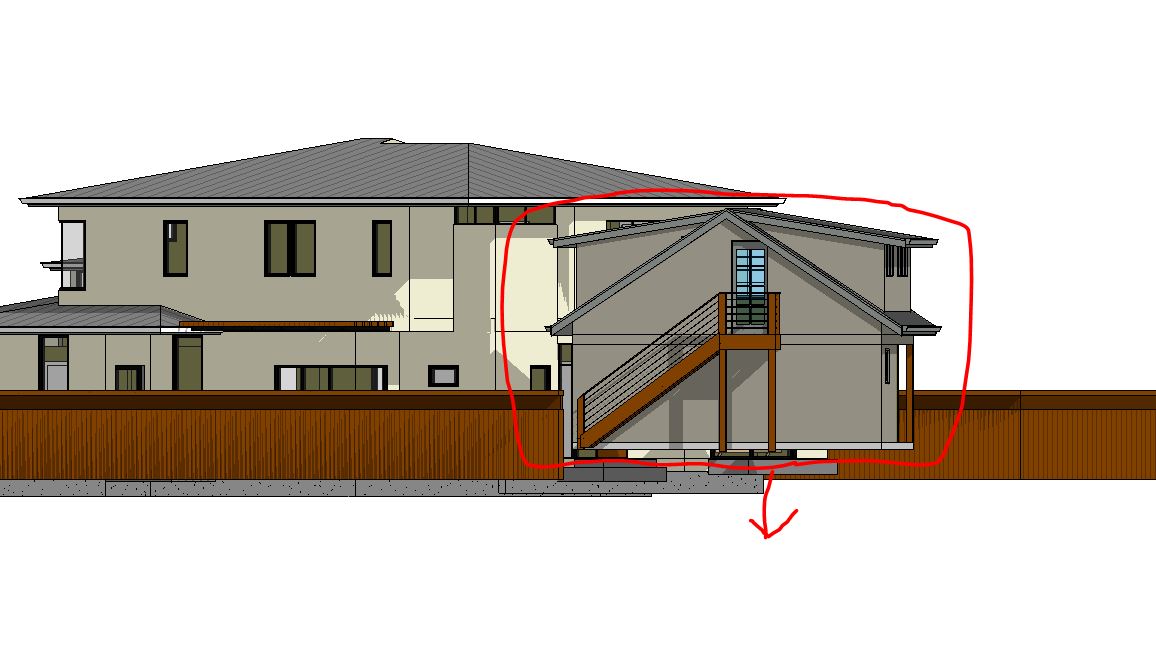
So I linked in a detached garage model to my main house model. But I can't figure out how to adjust the elevation of the model, as you can see in the pic, its floating above the first floor area a lot.
Any advice?
|
This user is offline |
View Website
|
 | |
|
|
site moderator|||
Joined: Tue, May 16, 2006
13079 Posts
 |
Links work similar to groups. You can just selec t it and move it.
|
This user is offline |
|
|
|
active
Joined: Wed, Aug 19, 2015
0 Posts
 |
Go to a section or elevation, select the link and then move it up to where you want it. You can then save position/publish the new coordinates back to the link so it knows where its new position is.
|
This user is offline |
|
|
|
active
Joined: Wed, Aug 20, 2008
318 Posts
|
HI. nether option worked. the linked model will not move in section or elevation. it only moves left or right.
Edited on: Sun, Dec 4, 2016 at 11:32:34 AM
|
This user is offline |
View Website
|
|
|
site moderator|||
Joined: Tue, May 16, 2006
13079 Posts
|
Then someone placed a dimension lock to a level.
Does this linked model have levels? If so then maybe the first floor level is locked to the host floor level. If that was done with a dimension that is now missing, you should be able to move it detached. I sometimes remove dimension locks by adding the dimension, locking it then unlock it.
|
This user is offline |
|
|
|
Similar Threads |
|
Section / Elevation annotation in Linked Revit Models |
General Discussion >> Revit Project Management
|
Fri, Jul 20, 2007 at 4:28:20 PM
|
3
|
|
View Filters and Linked Models |
Revit Building >> Technical Support
|
Tue, Mar 28, 2017 at 7:53:31 PM
|
2
|
|
Elevation visibility in linked models |
Revit Building >> Technical Support
|
Fri, Feb 25, 2011 at 9:54:38 AM
|
2
|
|
Linked Models - Element / Component Identification |
Revit Building >> Technical Support
|
Tue, Dec 7, 2010 at 4:10:55 PM
|
1
|
|
Temporarily display only analytical model for linked revit models |
Revit Structure >> Technical Support
|
Mon, Oct 17, 2011 at 3:21:59 AM
|
0
|
|
|
Site Stats
Members: | 2161655 | Objects: | 23325 | Forum Posts: | 152479 | Job Listings: | 3 |
|
 Search