RevitCity.com Logo

Home  |  Forums  |  Downloads  |  Gallery  |  News & Articles  |  Resources  |  Jobs  |  FAQ  |  SearchSearch  |  Join  |  LoginLogin

Welcome !

454 Users Online (27 Members): Show Users Online - Most ever was 3914 - Wed, Aug 26, 2026 at 4:53:14 AM


Forums

Forums >> General Discussion >> Revit Project Management >> Revit Schedules- AND/OR

Search this ThreadSearch this Thread | Page 1 of 1 |

Tue, Nov 15, 2016 at 3:51:21 PM | Revit Schedules- AND/OR

#1

thinkpositive


active

Joined: Sun, Feb 5, 2012
3 Posts
5 Stars: 8 Votes


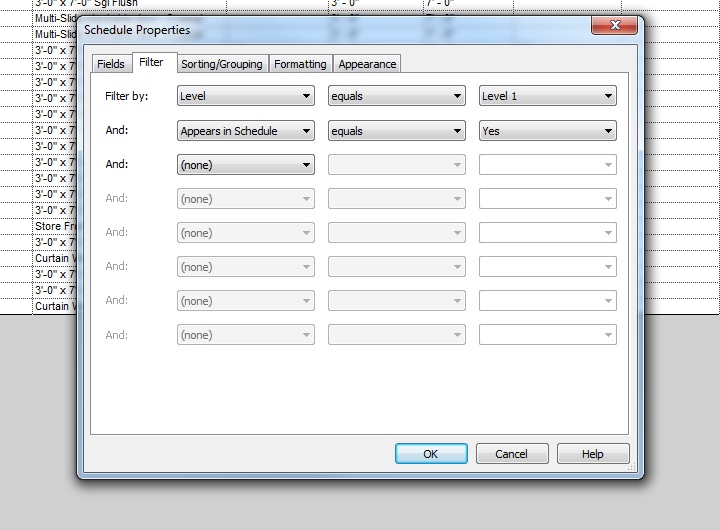
I was working on schedules and just realized there is no way to add an "OR" filter. The only way to add filters is via "AND" which means all conditions have to be met at the same time. Although not always needed, the option to have an OR filter would be nice. 


Attached Images

151697_Untitled.jpg

This user is offline


Search this ThreadSearch this Thread | Page 1 of 1 |


Similar Threads

Thread/Thread Starter

Forum

Last Post

Replies

Large number of schedules

General Discussion >> Revit Project Management

Mon, Jun 20, 2011 at 9:00:29 AM

3

can you hide zeroes in schedules?

Revit Building >> Technical Support

Tue, Feb 14, 2012 at 4:54:31 PM

2

Schedules

Community >> Newbies

Thu, Apr 28, 2011 at 12:22:14 PM

0

Applying Electrical panel schedule templates in 2011

Revit Systems >> Technical Support

Thu, Sep 9, 2010 at 11:17:50 AM

0

Revit Schedules + Misspellings

Revit Building >> Technical Support

Fri, Nov 2, 2007 at 4:12:05 PM

3

Site Stats

Members:

2175252

Objects:

23399

Forum Posts:

152401

Job Listings:

0

Sponsored Ads

Home | Forums | Downloads | Gallery | News & Articles | Resources | Jobs | Search | Advertise | About RevitCity.com | Link To Us | Site Map | Member List | Firm List | Contact Us

Copyright 2003-2010 Pierced Media LC, a design company. All Rights Reserved.

Page generation time: 0.4953

Login

User Name:

Password:

Remember Me  

Forgot Password?

Search Forums

Advanced Search

Search Forums

Advanced Search


Clear Highlights


Clear Highlights