|
|
|
Home | Forums |
Downloads | Gallery |
News & Articles | Resources |
Jobs | FAQ |
| Join |
Welcome !
|
5 Users Online (3 Members):
Show Users Online
- Most ever was 626 - Mon, Jan 12, 2015 at 2:00:17 PM |
Forums
|
Forums >> Revit Building >> Technical Support >> Edges of divided surface (massing in place)
|
|
|
active
Joined: Sat, Oct 22, 2011
0 Posts
 |
Dear Sirs,
Following my previous thread, http://www.revitcity.com/forums.php?action=viewthread&thread_id=38601 I have re-do my entire roof massing to achieve my desired roof form.
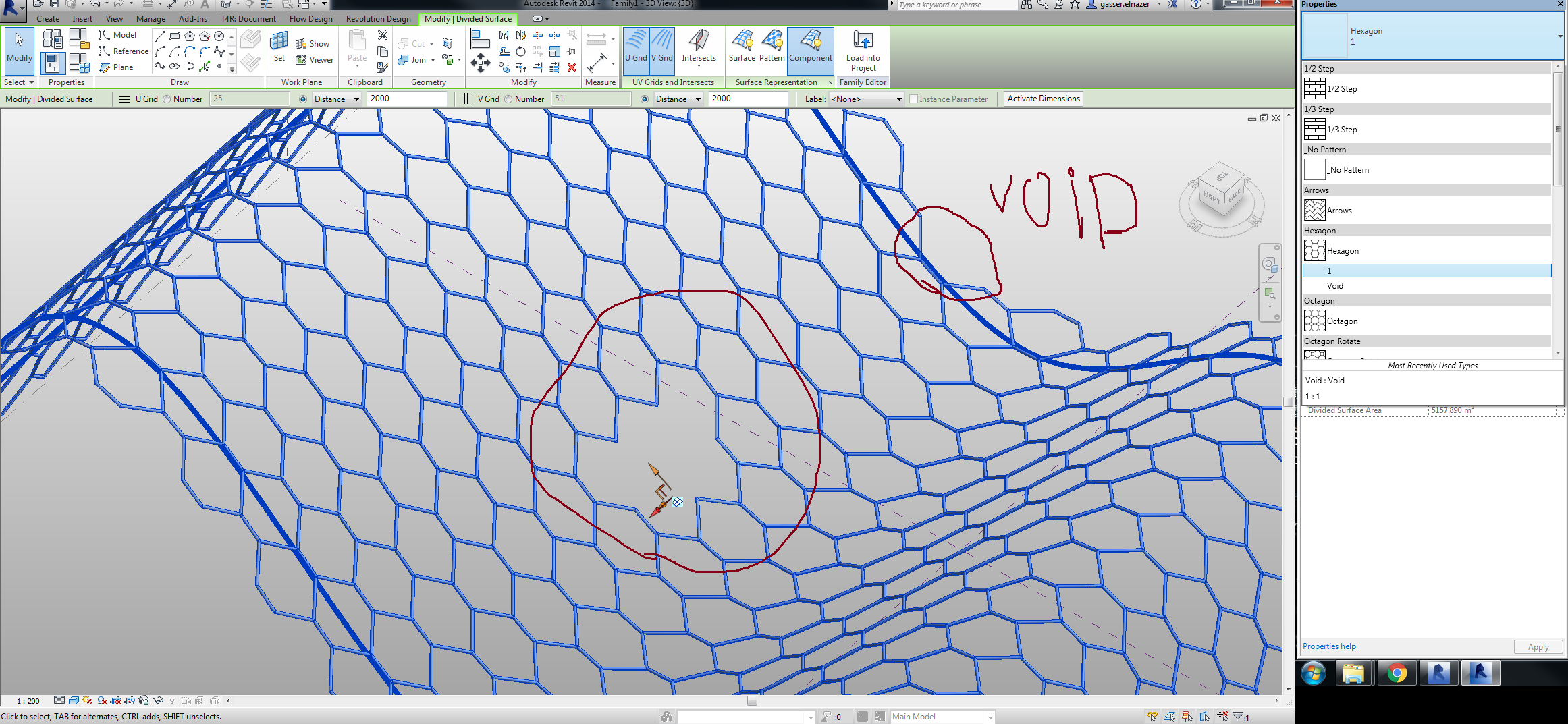
I now face a problem trying to assign a pattern to the edges of my divided surface. Note that there is a void form in the middle of the massing where my red arrows are pointing. I am trying to place bamboo beams through the divided surface grids I have achieved.
I have tried playing with the empty, partial and overhanging within the border tile but it does not work for me. The overhanging extrudes too far and impedes into the void meant for skylight. For those curious, those are meant to be bamboo beams. Any help is appreciated. Thanks.
|
This user is offline |
|
 | |
|
|
active
Joined: Wed, Aug 19, 2015
0 Posts
 |
Are you just trying to pust an edge piece around your divided form? Why not just use a fascia? Is your divided surfave a roof or just a mass?
|
This user is offline |
|
|
|
active
Joined: Thu, Feb 18, 2016
0 Posts
 |
i have an idea i dont know if its gonna work but why not making a few copies of the curtain wall pattern based family you are using one of then totally empty ... and another one with some sides empty ...... so you would be able to replace the extra panels coming with the overhanging option with those panels like on the skylight or on the edges
|
This user is offline |
|
|
|
active
Joined: Sat, Oct 22, 2011
0 Posts
|
It is a mss, and the bamboo beams are hosted as curtain panels which I've loaded.
|
This user is offline |
|
|
|
active
Joined: Sat, Oct 22, 2011
0 Posts
|
"
i have an idea i dont know if its gonna work but why not making a few copies of the curtain wall pattern based family you are using one of then totally empty ... and another one with some sides empty ...... so you would be able to replace the extra panels coming with the overhanging option with those panels like on the skylight or on the edges
"
|
This user is offline |
|
|
|
active
Joined: Wed, Aug 19, 2015
0 Posts
|
I think the idea is that you have empty curtain panels making up all the open spaces between the bamboo beams. You should make curtain panels that have bamboo edges that can be turned on or off with visibility parameters and tehn use those along the edges and and turn on the edge pieces you need.
|
This user is offline |
|
|
|
active
Joined: Thu, Feb 18, 2016
0 Posts
|
YES ,marmiketin1 is right that the idea that you create you skylight using empty panels and also your borders , but i think your borders will need some extra work , and there is a stupid sample for the idea
Edited on: Thu, Oct 27, 2016 at 8:44:41 AM
|
This user is offline |
|
|
|
active
Joined: Sat, Oct 22, 2011
0 Posts
|
"
i have an idea i dont know if its gonna work but why not making a few copies of the curtain wall pattern based family you are using one of then totally empty ... and another one with some sides empty ...... so you would be able to replace the extra panels coming with the overhanging option with those panels like on the skylight or on the edges
"
|
This user is offline |
|
|
|
Similar Threads |
|
How to delete some in-place mass divided surface triangular curtain panel? |
General Discussion >> Revit Project Management
|
Sun, Jun 9, 2013 at 1:50:48 PM
|
2
|
|
Void Mass Not Cutting Divided Surface Mass |
Revit Building >> Technical Support
|
Wed, Jan 31, 2018 at 10:19:21 AM
|
1
|
|
Question about modify divided surface |
Revit Building >> Technical Support
|
Tue, Mar 30, 2010 at 7:03:39 AM
|
6
|
|
Adding Material to Divided Surface |
Revit Building >> Technical Support
|
Thu, Apr 17, 2014 at 10:40:12 AM
|
1
|
|
Parametric Curtain wall panel in divided surface |
Revit Building >> Technical Support
|
Sun, Jan 31, 2010 at 8:08:54 AM
|
4
|
|
|
Site Stats
Members: | 2161655 | Objects: | 23325 | Forum Posts: | 152479 | Job Listings: | 3 |
|
 Search