|
|
|
Home | Forums |
Downloads | Gallery |
News & Articles | Resources |
Jobs | FAQ |
| Join |
Welcome !
|
5 Users Online (3 Members):
Show Users Online
- Most ever was 626 - Mon, Jan 12, 2015 at 2:00:17 PM |
Forums
|
Forums >> Revit Building >> Tips & Tricks >> Handy Linetype
|
|
|
active
Joined: Sat, Oct 25, 2003
411 Posts
 |
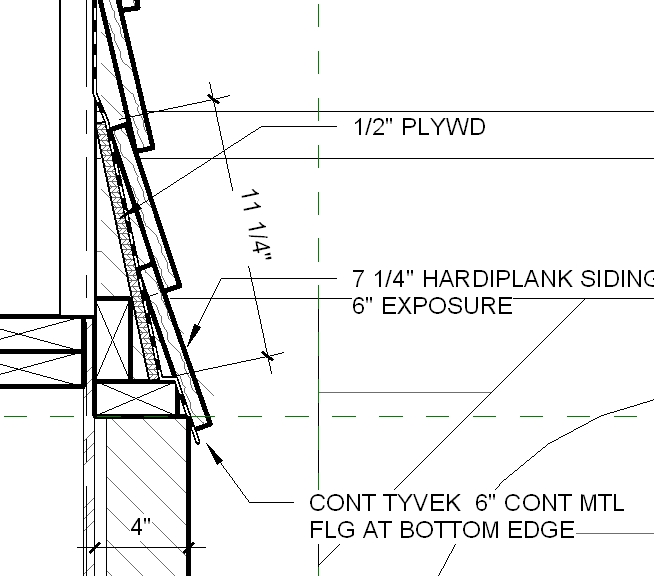
See the JPG. Here is a way to create a readable overaly linetype for detailing... make a linetype "DDD" that is black and lineweight=5 and and Line type "DD" of weight=3 that is dashed and color=white. Draw the DDD line, copy it, change it to linetype DD and paste it back on itself. Might be useful for you.
|
This user is offline |
View Website
|
 | |
|
|
active
Joined: Sat, Oct 25, 2003
411 Posts
|
ps... it's the line that is labeled "tyvek"
|
This user is offline |
View Website
|
|
|
active
Joined: Wed, Aug 4, 2004
26 Posts
 |
Good tip Steve. I like the difference in line wieghts, giving a border to the white fill. I will definitely find a use for this.
Post edited on 2006-05-07 04:17:59
-----------------------------------
Thomas W. Hillis, LEED AP |
This user is offline |
|
|
|
active
Joined: Sat, Oct 25, 2003
411 Posts
|
I would like to see Revit have some sort of 'mline" like autocad. This comes close.
|
This user is offline |
View Website
|
|
|
Similar Threads |
|
How to add new linetype to family |
Revit Building >> Technical Support
|
Fri, Jan 3, 2014 at 10:01:49 AM
|
3
|
|
Help: Linetype with text? |
Revit Building >> Technical Support
|
Thu, Jun 19, 2008 at 1:54:25 AM
|
1
|
|
Revit equivalent of AutoCAD's Linetype Generation? |
Revit Building >> Technical Support
|
Tue, Feb 24, 2009 at 7:39:33 AM
|
3
|
|
dimension line linetype |
Revit Building >> Technical Support
|
Mon, Nov 16, 2020 at 4:25:42 PM
|
2
|
|
Select all of one linetype in a view? |
Revit Building >> Technical Support
|
Tue, Jan 10, 2012 at 3:31:14 PM
|
2
|
|
|
Site Stats
Members: | 2161655 | Objects: | 23325 | Forum Posts: | 152479 | Job Listings: | 3 |
|
 Search