|
|
|
Home | Forums |
Downloads | Gallery |
News & Articles | Resources |
Jobs | FAQ |
| Join |
Welcome !
|
10 Users Online (8 Members):
Show Users Online
- Most ever was 626 - Mon, Jan 12, 2015 at 2:00:17 PM |
Forums
|
Forums >> Workflow & Implementation >> Worksets >> Default Workset
|
|
|
active
Joined: Sat, Apr 19, 2014
0 Posts
No Rating |
Is there a way to set a workset such that it will default to a particular active workset upon the project being opened? For example, when I open the file, it defaults to having the furniture workset as the active workset rather than workset1.
Does the file only default to the latest saved workset or is there a way to actually set it?
|
This user is offline |
|
 | |
|
|
site moderator|||
Joined: Tue, May 16, 2006
13079 Posts
 |
From your HELP.
|
This user is offline |
|
|
|
active
Joined: Sat, Apr 19, 2014
0 Posts
No Rating |
I understand how to change the active workset manually. What I'm asking is if when you first open the project, can you get Revit to automatically set a particular workset as the active workset instead of manually setting it every time you open the file?
For example, upon opening the file, the active workset is the furniture workset. How can I make it such that when the file is opened, that the active workset is automatically workset1?
|
This user is offline |
|
|
|
site moderator|||
Joined: Tue, May 16, 2006
13079 Posts
|
When opening from your own local, the file will default to the last active workset settings.
|
This user is offline |
|
|
|
active
Joined: Thu, Feb 18, 2016
0 Posts
 |
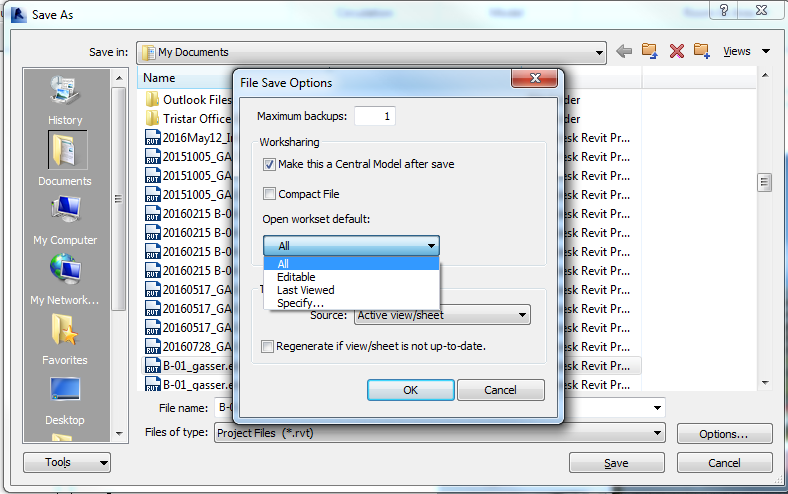
when you are saving the file as central you get 4 option to set whats the default workset as in the attachment , the usual is all , there is an option to only open the editable worksets , or the last viewed , and the specify which asks you each time you open the file what worksets you want to be opened and i think thats your best option to achieve what you want .
and here is the same part from the revit help :
https://knowledge.autodesk.com/support/revit-products/learn-explore/caas/CloudHelp/cloudhelp/2016/ENU/Revit-Collaborate/files/GUID-D0F87C1F-2056-4B64-B728-1770666B4B29-htm.html
Edited on: Sun, Sep 25, 2016 at 12:02:12 AM
|
This user is offline |
|
|
|
Similar Threads |
|
Hidding |
Revit Building >> Technical Support
|
Tue, Dec 21, 2010 at 6:18:57 PM
|
0
|
|
Workset VG in View Template |
Revit Building >> Technical Support
|
Mon, Nov 24, 2008 at 8:27:08 PM
|
0
|
|
Linked Structural model not visible in one section |
Revit Building >> Technical Support
|
Mon, Jan 28, 2013 at 11:09:10 AM
|
0
|
|
Making a Family Unique to a View |
Revit Building >> Technical Support
|
Tue, Jan 6, 2009 at 3:54:36 AM
|
0
|
|
Saving/unlinking a Workset Without Updating |
Workflow & Implementation >> Worksets
|
Wed, Oct 1, 2008 at 12:24:51 PM
|
3
|
|
|
Site Stats
Members: | 2161655 | Objects: | 23325 | Forum Posts: | 152479 | Job Listings: | 3 |
|
 Search