|
|
|
Home | Forums |
Downloads | Gallery |
News & Articles | Resources |
Jobs | FAQ |
| Join |
Welcome !
|
6 Users Online (4 Members):
Show Users Online
- Most ever was 626 - Mon, Jan 12, 2015 at 2:00:17 PM |
Forums
|
Forums >> General Discussion >> Revit Project Management >> I can't find View "Type Properties" in Project Browser.
|
|
|
active
Joined: Sat, Feb 11, 2012
0 Posts
No Rating |
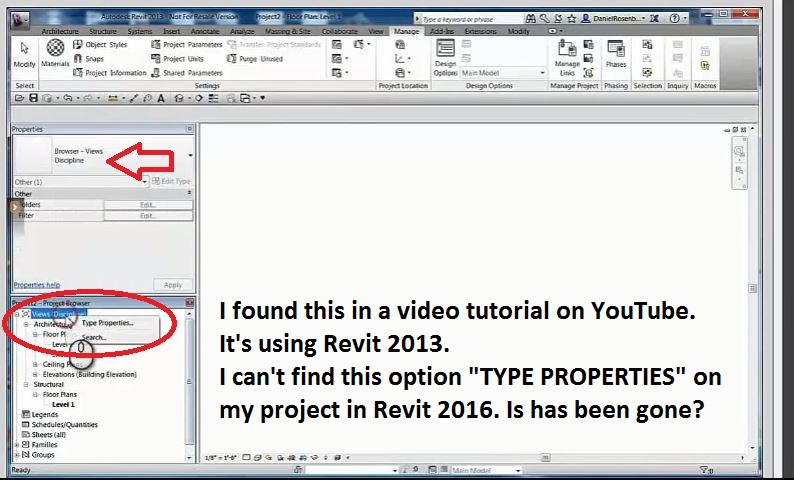
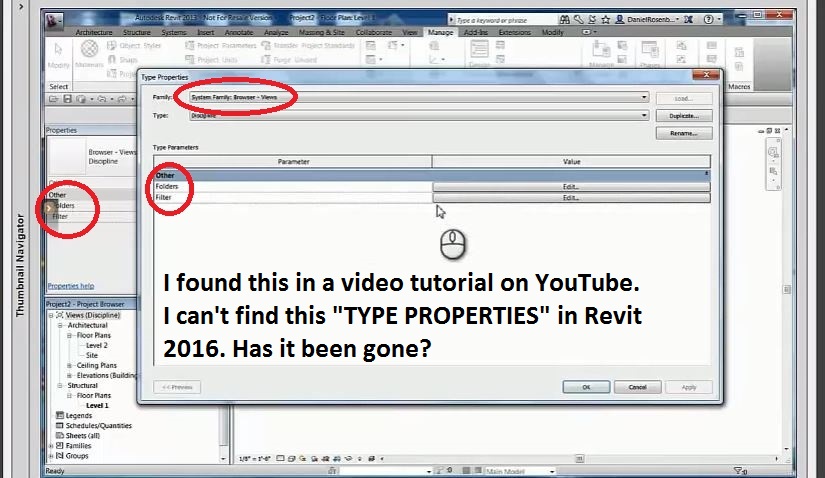
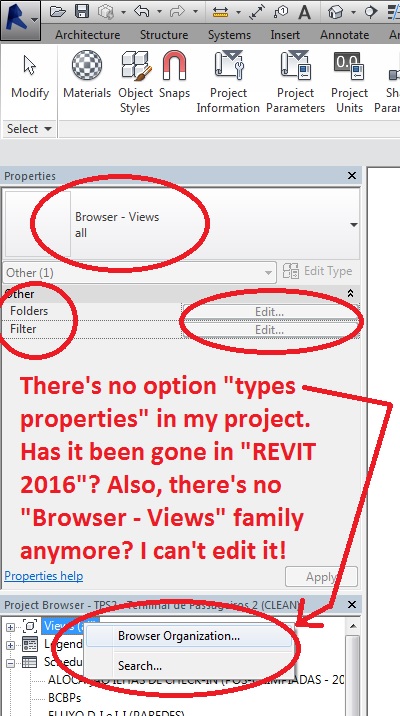
I found a tutorial video on YouTube (https://www.youtube.com/watch?v=y_yQlVFeiMY) in which the guy is using "Revit 2013" where I can see the option "TYPE PROPERTIES" when right clicking in "Views (all)". I can't find it in Revit 2016. Is has been gone?
Also, regarding the System Family "Browser - Views", where can I find it?
Please take a look at the attached images.
Thank you.
|
This user is offline |
|
 | |
|
|
active
Joined: Wed, Aug 19, 2015
0 Posts
 |
Firstly, click the little + symbool to the left of Views in the project browser to expand it. I will assume that you do not have any disciplines set up currently. Type properties only become available after you have made a type using the browser organization which appears for you when you right click on views.
|
This user is offline |
|
|
|
Similar Threads |
|
Editing Type Properties for View Tags 2011 |
Revit Building >> Technical Support
|
Fri, Jun 4, 2010 at 3:08:17 PM
|
3
|
|
project browser "expander" buttons disappear |
Revit Building >> Technical Support
|
Thu, Jul 26, 2007 at 11:15:31 AM
|
5
|
|
Project Browser Grouping Parameters |
Revit Building >> Technical Support
|
Wed, Feb 11, 2009 at 2:01:23 PM
|
0
|
|
where has my project browser gone?¿ |
Revit Building >> Technical Support
|
Sat, Jun 2, 2012 at 3:07:10 AM
|
6
|
|
changing the "family" and "type" names |
Revit Structure >> Technical Support
|
Mon, Apr 2, 2007 at 5:33:49 PM
|
3
|
|
|
Site Stats
Members: | 2161655 | Objects: | 23325 | Forum Posts: | 152479 | Job Listings: | 3 |
|
 Search