|
|
|
Home | Forums |
Downloads | Gallery |
News & Articles | Resources |
Jobs | FAQ |
| Join |
Welcome !
|
4 Users Online (2 Members):
Show Users Online
- Most ever was 626 - Mon, Jan 12, 2015 at 2:00:17 PM |
Forums
|
Forums >> Revit Building >> Technical Support >> Wall Dimensioning changing after changing Wall Type.
|
|
|
active
Joined: Thu, Jun 23, 2016
0 Posts
No Rating |
Hello,
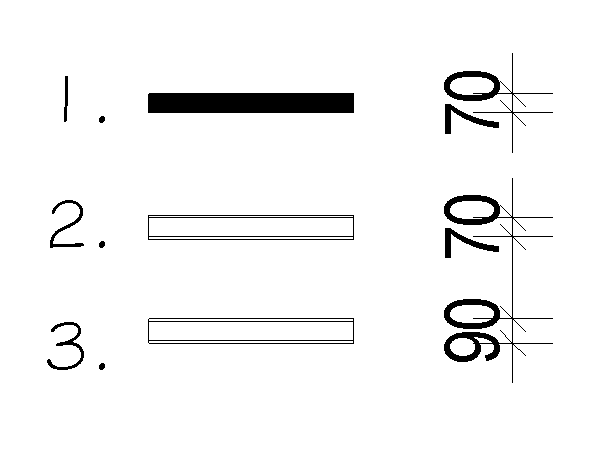
We've recently changed the way that we dimension and draw our walls, is there a simpler way to change all the walls. The issue is that our 70mm walls change to 90mm when I change the wall time, even though I have it hosting to the stud and not the plaster lining.
See attached image.
1. Current wall types in drawings
2. New dimensioning, dimensioned to stud not plaster lining.
3. What occurs when I select and change current wall types.
Is ther an easier way then redimensioning all the old projects.
Thanks
|
This user is offline |
|
 | |
|
|
active
Joined: Sun, Jun 14, 2009
68 Posts
 |
edit your walls so that the core face is the stud face , then dimension to core
|
This user is offline |
|
|
|
Similar Threads |
|
Changing wall finishing thickness without having to align it again |
Revit Building >> Technical Support
|
Tue, Jul 3, 2018 at 10:42:11 AM
|
5
|
|
Changing wall/wall tag parameter |
Revit Building >> Technical Support
|
Thu, Oct 14, 2010 at 12:44:42 PM
|
1
|
|
Changing wall thickness issue |
Revit Building >> Technical Support
|
Thu, Oct 12, 2006 at 11:07:14 AM
|
1
|
|
Changing wall types midmay through wall |
Revit Building >> Technical Support
|
Mon, May 22, 2006 at 1:45:33 PM
|
1
|
|
Changing wall based family to non wall based? |
Revit Building >> Technical Support
|
Wed, Nov 10, 2010 at 7:18:22 AM
|
3
|
|
|
Site Stats
Members: | 2161655 | Objects: | 23325 | Forum Posts: | 152479 | Job Listings: | 3 |
|
 Search