RevitCity.com Logo

Home  |  Forums  |  Downloads  |  Gallery  |  News & Articles  |  Resources  |  Jobs  |  FAQ  |  SearchSearch  |  Join  |  LoginLogin

Welcome !

589 Users Online (27 Members): Show Users Online - Most ever was 3914 - Wed, Aug 26, 2026 at 4:53:14 AM


Forums

Forums >> Revit Structure >> Technical Support >> HELP!!! 500 x 1500 Tile with 6 mm gap in between

Search this ThreadSearch this Thread | Page 1 of 1 |

Tue, Aug 30, 2016 at 11:16:16 AM | HELP!!! 500 x 1500 Tile with 6 mm gap in between

#1

shraddha158


active

Joined: Mon, Apr 8, 2013
0 Posts
No Rating


Hello All!


I am trying to make a PAT file for a floor tile that is 500 x 1500mm with 6mm gaps between the tiles.


Can someone please help..spent a few hours trying to get it to be a perfect repeat square in CAD but just not getting there.


Is there a formula that can be used directly in Revit that will make this is quicker process ?


THANKSSS


shraddha 


Attached Images

147083_PAT_FILE_Example.JPG

This user is offline


Tue, Aug 30, 2016 at 11:26:06 AM | HELP!!! 500 x 1500 Tile with 6 mm gap in between

#2

WWHub


site moderator|||

Joined: Tue, May 16, 2006
19889 Posts
3.5 Stars: 404 Votes


Formula?  


For simple rectangular pattern files, I typically find a pattern that is similar and edit the appropriate numbers.   In this case, I might use a 1/3 running bond brick or tile pattern that has the mortar joints.


If you are trying to draw it in Revit to use with hatchkit, then array is your answer.


This user is offline


Tue, Aug 30, 2016 at 10:00:56 PM | HELP!!! 500 x 1500 Tile with 6 mm gap in between

#3

hugh


active

Joined: Tue, Jan 27, 2004
80 Posts
3.5 Stars: 4 Votes


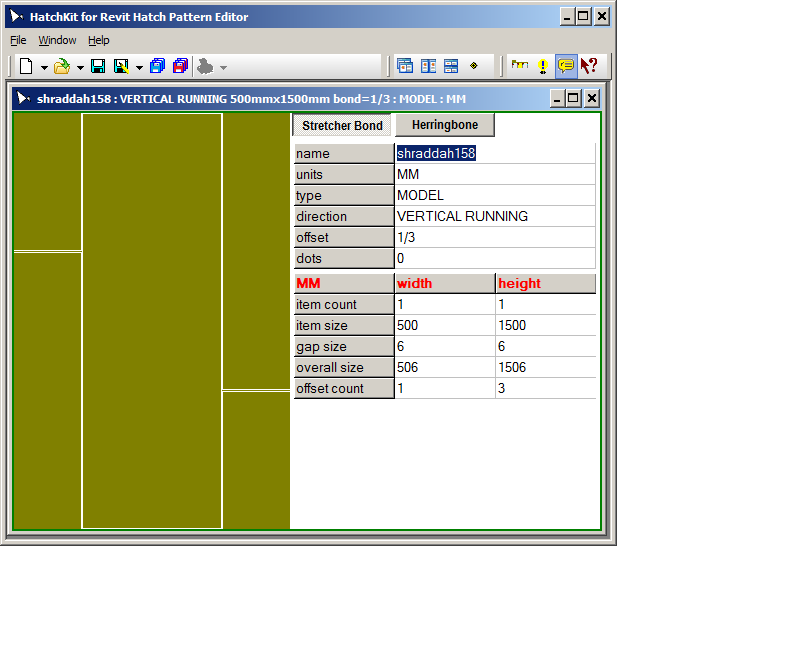
There is no inbuilt formula ir Revit but HatchKit has a wizard for this

Looks like 1/3 overlap. Try this:

;-------------------------------------------------------------------------------

;        Written by HatchKit for Revit

;        HatchKit for Revit (c)1990-2016 Cadro Pty Ltd

;        www.hatchkit.com.au/

;-------------------------------------------------------------------------------

;-Date                                   : 31/08/2016

;-Time                                   : 12:35:02 PM

;-HatchKit Version                       : 3.1.8.2681

;-HatchKit Output Filetype               : Revit with HatchKit Add-In

;-------------------------------------------------------------------------------

;%VERSION=3.0

;%UNITS=MM

*shraddah158,VERTICAL RUNNING 500mmx1500mm bond=1/3

;%TYPE=MODEL

90,0,0,502,-506,1500,-6

0,0,1500,506,502,500,-1018

-90,500,1500,502,-506,1500,-6

180,500,0,506,502,500,-1018


Attached Images

147095_revitcity23.png

-----------------------------------

Hugh Adamson

www.hatchkit.com.au

This user is offline

View Website

Search this ThreadSearch this Thread | Page 1 of 1 |


Similar Threads

Thread/Thread Starter

Forum

Last Post

Replies

Wall tile areas

Revit Building >> Technical Support

Mon, May 4, 2009 at 7:19:25 AM

8

plzzzzzz help with the whole syestem configuration...........everything......... [ 1 2 3 ]

Workflow & Implementation >> Hardware

Thu, Sep 4, 2008 at 10:21:00 AM

32

how do you get different colors for same type of floor?

Revit Building >> Technical Support

Thu, Dec 9, 2010 at 12:16:59 PM

1

Control Default Gap between conected structural members

Revit Building >> Technical Support

Mon, Jan 10, 2011 at 1:40:49 AM

0

Three-Dimensional Tile Roof

Revit Building >> Technical Support

Sat, May 30, 2015 at 10:43:29 PM

4

Site Stats

Members:

2175249

Objects:

23399

Forum Posts:

152401

Job Listings:

0

Sponsored Ads

Home | Forums | Downloads | Gallery | News & Articles | Resources | Jobs | Search | Advertise | About RevitCity.com | Link To Us | Site Map | Member List | Firm List | Contact Us

Copyright 2003-2010 Pierced Media LC, a design company. All Rights Reserved.

Page generation time: 0.4133

Login

User Name:

Password:

Remember Me  

Forgot Password?

Search Forums

Advanced Search

Search Forums

Advanced Search


Clear Highlights


Clear Highlights