|
|
|
Home | Forums |
Downloads | Gallery |
News & Articles | Resources |
Jobs | FAQ |
| Join |
Welcome !
|
4 Users Online (2 Members):
Show Users Online
- Most ever was 626 - Mon, Jan 12, 2015 at 2:00:17 PM |
Forums
|
Forums >> Revit Systems >> Technical Support >> RCP's
|
|
|
active
Joined: Thu, Mar 19, 2015
0 Posts
No Rating |
Hello! I am having problems taking .rpc files i downloaded from archvision and getting them into my revit file. I've tried the drag and drop method, and making a new rcp family but they both come up with the same error that the file cannot be loaded. How do you take the .rcp file and make it into a family recognized by revit?
|
This user is offline |
|
 | |
|
|
active
Joined: Thu, Sep 25, 2014
0 Posts
No Rating |
Do you mean a point cloud file? Go to Insert Tab > Link Point Cloud file and import the point cloud as a link. Hope this works!
|
This user is offline |
View Website
|
|
|
active
Joined: Fri, May 8, 2009
47 Posts
No Rating |
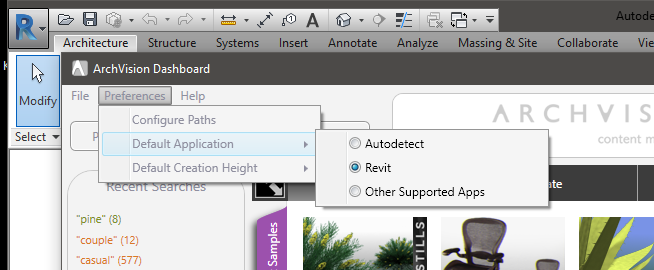
Try changing your default application to Revit from the preferences tab in your Archvision dashboard. This will enable the drag and drop feature. See attached.
Edited on: Fri, Jul 1, 2016 at 3:41:12 PM
|
This user is offline |
|
|
|
Similar Threads |
|
dropping in light fixtures and ceiling fans into RCP's |
Revit Building >> Technical Support
|
Mon, Aug 11, 2008 at 9:19:45 AM
|
6
|
|
2'x2' fluorescent fixture on rcp covers up part of adjacent 2'x2' return fixture |
Community >> Newbies
|
Fri, Aug 28, 2009 at 1:06:16 PM
|
1
|
|
how to create a live elevation in RCP's |
Revit Building >> Technical Support
|
Wed, Jul 9, 2008 at 10:54:11 PM
|
3
|
|
Can't see my roof structure in my RCP |
Revit Building >> Technical Support
|
Wed, Oct 10, 2007 at 2:44:20 PM
|
2
|
|
2D light family shows too big on RCP legend |
Revit Building >> Technical Support
|
Wed, Jul 3, 2013 at 11:35:44 AM
|
1
|
|
|
Site Stats
Members: | 2161655 | Objects: | 23325 | Forum Posts: | 152479 | Job Listings: | 3 |
|
 Search