|
|
|
Home | Forums |
Downloads | Gallery |
News & Articles | Resources |
Jobs | FAQ |
| Join |
Welcome !
|
553 Users Online (20 Members):
Show Users Online
- Most ever was 3914 - Wed, Aug 26, 2026 at 4:53:14 AM |
Forums
|
Forums >> Revit Building >> Technical Support >> Revit 2015 View Template Linked Vew resets to None Hiccup
|
|
|
active
Joined: Fri, Dec 13, 2013
0 Posts
 |
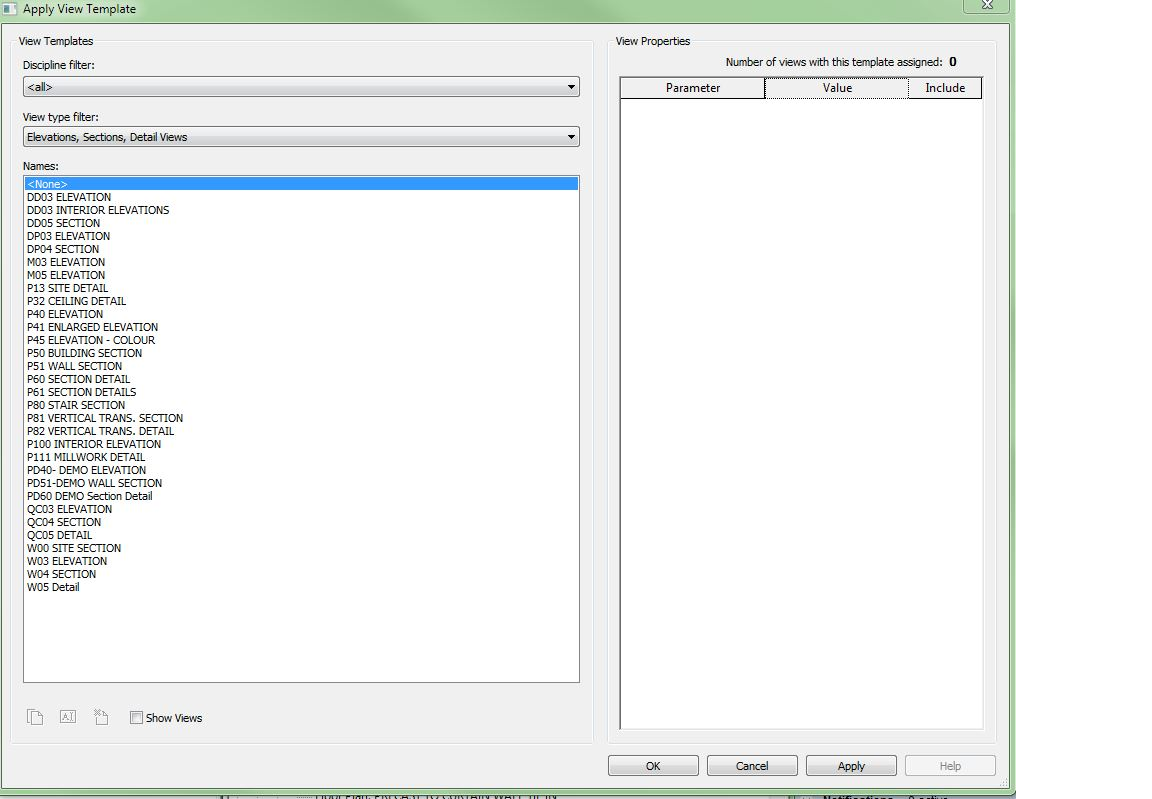
Good day. I have searched this question and no answers yet. We have custom view templates assigned in our rte.template files and in our projects since Jesus wore short pants. No issues except today
For some reason one of our VT is reverting back to none after it is selected.
The VT properties display in the view and behaves correctly. When the same view template is selected again in the same view in the actual apply view template pallete it reads none. Everytime no matter how many times we select and apply.
Cannot figure this one out.
|
This user is offline |
|
 | |
|
|
active
Joined: Fri, Dec 13, 2013
0 Posts
|
Okay I researched this and here are some possibilities.
-
The linked model no longer exists
-
The linked model changed from custom to by host view
-
the view you are linking to in the arch model no longer exists
|
This user is offline |
|
|
|
Similar Threads |
|
I Can't use RPC content in Revit Architecture 2011 |
Revit Building >> Technical Support
|
Fri, Jun 4, 2010 at 9:46:20 AM
|
6
|
|
Student laptop powerful enough to render |
Workflow & Implementation >> Hardware
|
Sun, Apr 24, 2011 at 10:47:35 PM
|
1
|
|
restrain precast beam to side of a column |
Revit Structure >> Technical Support
|
Wed, Nov 18, 2020 at 6:01:00 AM
|
0
|
|
We charge only 600 USD for 3000 sqft building production drawings |
Community >> The Studio
|
Mon, Feb 19, 2007 at 7:36:05 AM
|
0
|
|
Family issues for a newbie |
Revit Building >> Technical Support
|
Tue, Feb 10, 2009 at 10:06:19 PM
|
0
|
|
|
Site Stats
Members: | 2188000 | Objects: | 23399 | Forum Posts: | 152455 | Job Listings: | 0 |
|
 Search