|
|
|
Home | Forums |
Downloads | Gallery |
News & Articles | Resources |
Jobs | FAQ |
| Join |
Welcome !
|
572 Users Online (38 Members):
Show Users Online
- Most ever was 3914 - Wed, Aug 26, 2026 at 4:53:14 AM |
Forums
|
Forums >> Revit Building >> Technical Support >> Rules for Assigning Layers on - Applies to Walls and Roofs
|
|
|
active
Joined: Fri, Mar 20, 2015
0 Posts
 |
Hello...
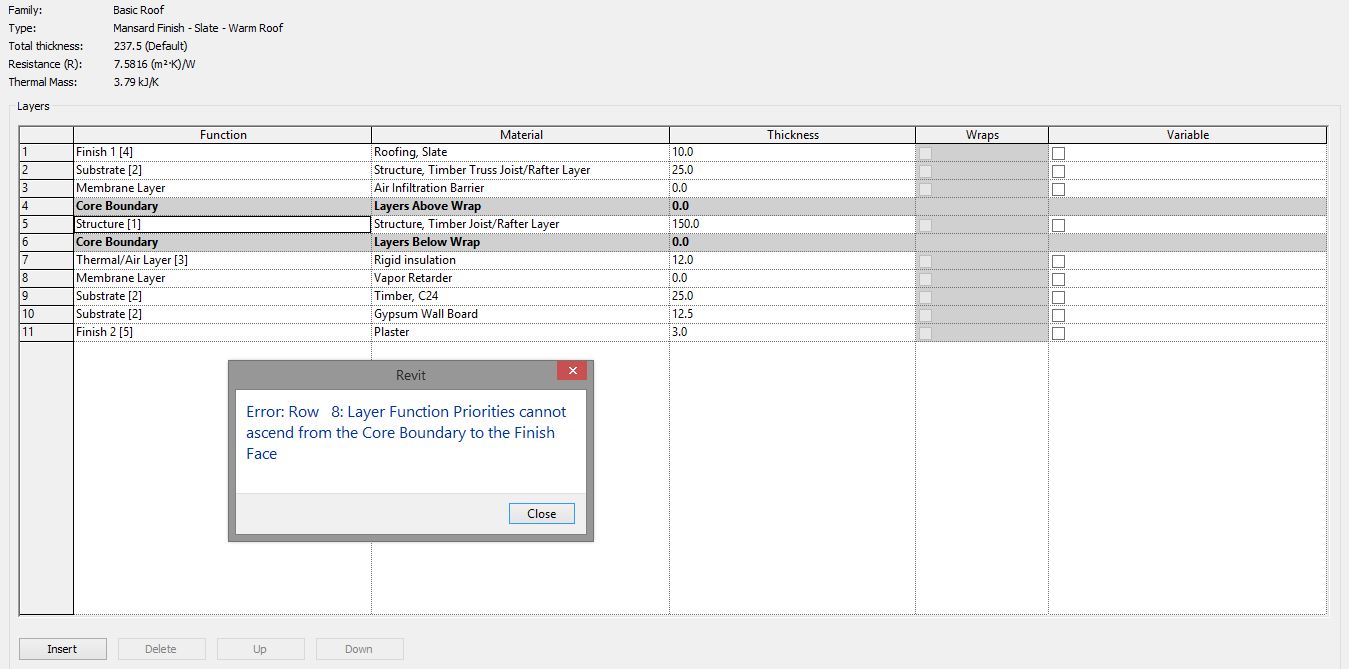
So I think I have followed the protocols for setting up this roof... Obviously I've done something wrong as am getting the error which will not let me close out the detail.
I am thinking its something glaring [usually is] that i am missing...can anyone see?
Attachement below...
Thank you in advance.
|
This user is offline |
|
 | |
|
|
active
Joined: Fri, Mar 20, 2015
0 Posts
|
Solved!!!
Basically the figures attached to the fucntion within brackets [1], [2], [3] etc...have to run in order.
I had Substrate [2] below my Core Boundary Structure [1] which is an error...
My error...
|
This user is offline |
|
|
|
Similar Threads |
|
Wall Cleanup |
Revit Building >> Technical Support
|
Fri, Apr 27, 2012 at 8:51:16 AM
|
1
|
|
Creating Families |
Revit Structure >> Technical Support
|
Wed, Sep 24, 2008 at 5:06:16 PM
|
2
|
|
how to properly connect/clean up the wall |
Revit Building >> Tips & Tricks
|
Mon, Aug 30, 2010 at 8:36:39 AM
|
1
|
|
Material Takeoff walls/floors |
Revit Building >> Technical Support
|
Mon, Apr 30, 2012 at 6:57:03 AM
|
9
|
|
Dormers on complex roofs |
Revit Structure >> Technical Support
|
Tue, Sep 20, 2011 at 11:11:37 AM
|
7
|
|
|
Site Stats
Members: | 2190987 | Objects: | 23399 | Forum Posts: | 152456 | Job Listings: | 0 |
|
 Search