|
|
|
Home | Forums |
Downloads | Gallery |
News & Articles | Resources |
Jobs | FAQ |
| Join |
Welcome !
|
36 Users Online (34 Members):
Show Users Online
- Most ever was 626 - Mon, Jan 12, 2015 at 2:00:17 PM |
Forums
|
Forums >> Revit Building >> Technical Support >> Roof Return
|
|
|
active
Joined: Wed, Apr 10, 2013
2 Posts
No Rating |
Does anyone know if Revit 2013 can simply maake a Return where thr rake moard meets the soffit?
Don't want a pidgeon walk or a porkchop, just hoping to find a way to simply make a Return.
Thank you!
|
This user is offline |
View Website
|
 | |
|
|
site moderator|||
Joined: Tue, May 16, 2006
13079 Posts
 |
We all don't have the same terminology so post an image with markups.
|
This user is offline |
|
|
|
active
Joined: Wed, Apr 10, 2013
2 Posts
No Rating |
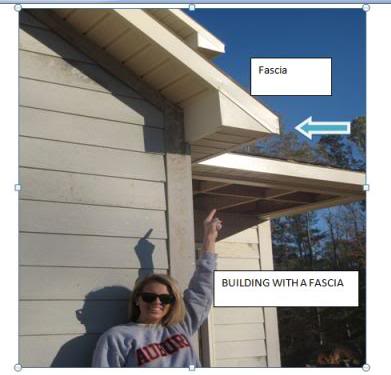
These two images show what I want and what I am getting. I can change the way the fascia end is but can never fill in the pork chop and the other end to make this typical "Return".
Thanks!
|
This user is offline |
View Website
|
|
|
site moderator|||
Joined: Tue, May 16, 2006
13079 Posts
|
Thanks for explaining "pork chop" NOT.
I use a soffit closure family and a face based void to clip the bottom of the barge board.
|
This user is offline |
|
|
|
active
Joined: Wed, Apr 10, 2013
2 Posts
No Rating |
I have never heard or have seen a soffit closure family and a face based void to clip the bottom of the barge board.
Can you please steer me in the direction?
In my reading, I have found that some have suggested modeling an extrusion the whole length instead of the soffit.
Im willing to try that even though I wonder how I am supposed to get two cuts on the fascia board.
But I can't seem to find which type to use in elevation plane to draw my triangle in!
Thanks
|
This user is offline |
View Website
|
|
|
site moderator|||
Joined: Tue, May 16, 2006
13079 Posts
|
Start with the face based void family. (Use only if not a roof - just a barge board trim. For roof, use the two cut plumb setting on roof)
- Open the face based template
- From the plan view add two reference planes to the two that are there - one vertical, one horizontal - lets set them at 12" from the insert planes.
- Add a dimension to both planes and then pick each one and change them to instance parameters.
- Create a void extrusion ... maybe -2" deep.
- Click on the void and set it to cut the host. You should see a shallow hole.
- Save and name the family.
Load that family and place picking the face of your barge board. Move it as need and push/pull the grips to clip the end.
Edited on: Mon, Mar 21, 2016 at 3:28:27 PM
|
This user is offline |
|
|
|
active
Joined: Wed, Apr 10, 2013
2 Posts
No Rating |
Thanks!
|
This user is offline |
View Website
|
|
|
Similar Threads |
|
Siding Sweep Return |
Community >> Newbies
|
Sun, Oct 30, 2011 at 5:57:53 AM
|
1
|
|
Roof fascia return |
Revit Building >> Technical Support
|
Thu, Dec 12, 2013 at 11:08:21 AM
|
7
|
|
Eave Return [ 1 2 ] |
Revit Building >> Technical Support
|
Fri, Jan 26, 2007 at 12:09:33 PM
|
18
|
|
stair tread return |
Revit Building >> Technical Support
|
Tue, Sep 2, 2014 at 6:13:48 PM
|
6
|
|
pipeing supply and return |
Revit Systems >> Technical Support
|
Tue, Mar 31, 2015 at 1:46:27 PM
|
3
|
|
|
Site Stats
Members: | 2161655 | Objects: | 23325 | Forum Posts: | 152479 | Job Listings: | 3 |
|
 Search