|
|
|
Home | Forums |
Downloads | Gallery |
News & Articles | Resources |
Jobs | FAQ |
| Join |
Welcome !
|
3 Users Online (1 Members):
Show Users Online
- Most ever was 626 - Mon, Jan 12, 2015 at 2:00:17 PM |
Forums
|
Forums >> General Discussion >> Revit Project Management >> How to find elements on a certain level?
|
|
|
active
Joined: Mon, Mar 9, 2009
160 Posts
 |
The roof on my building was raised, and so I changed the roof level. The hosted roof drains moved as I expected, but it also raised elements that were associated with that level, mostly by mistake. Is there a way to do a search for all items on a particular level so i can change them to their proper level, and if they moved I could move them back.
|
This user is offline |
|
 | |
|
|
site moderator|||
Joined: Tue, May 16, 2006
13079 Posts
 |
Nearly impossible to do. You can start with a multi-category schedule and include level and maybe family. Many elements do not report the level they may be associated with.
|
This user is offline |
|
|
|
active
Joined: Mon, Nov 12, 2007
19 Posts
 |
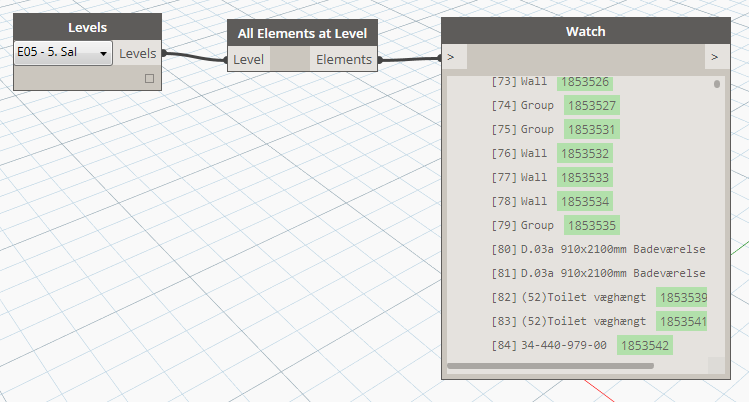
You can do it with Dynamo.
|
This user is offline |
|
|
|
Similar Threads |
|
find elements associated with level (2017) |
Revit Building >> Technical Support
|
Fri, Sep 14, 2018 at 6:08:42 AM
|
1
|
|
Find Objects Associated to a Level |
Revit Structure >> Technical Support
|
Fri, Oct 9, 2009 at 1:32:02 PM
|
2
|
|
select elements on current level only - revit 2014 |
Revit Building >> Technical Support
|
Tue, Jul 23, 2013 at 7:52:33 AM
|
4
|
|
Find connected objects to a Level? |
Revit Building >> Technical Support
|
Sun, Jan 20, 2013 at 10:45:34 AM
|
1
|
|
Lower level elements |
Revit Building >> Technical Support
|
Tue, Nov 27, 2012 at 10:53:43 AM
|
3
|
|
|
Site Stats
Members: | 2161655 | Objects: | 23325 | Forum Posts: | 152479 | Job Listings: | 3 |
|
 Search