|
|
|
Home | Forums |
Downloads | Gallery |
News & Articles | Resources |
Jobs | FAQ |
| Join |
Welcome !
|
3 Users Online (1 Members):
Show Users Online
- Most ever was 626 - Mon, Jan 12, 2015 at 2:00:17 PM |
Forums
|
Forums >> Revit Building >> Technical Support >> Material troubles when duplicating a material
|
|
|
active
Joined: Tue, May 6, 2014
0 Posts
No Rating |
Hi all.
So i have a material that i want to duplicate. But when i do and make changes to the duplicated material (it changes the original material) anyone know why? i read something about having to duplicate the assets too?
i just want to be able to duplicate a roofing material to create a new stand alone roofing material that isnt linked to the original.
im in revit 2015
Thanks
|
This user is offline |
|
 | |
|
|
active

Joined: Fri, Sep 3, 2010
0 Posts
 |
Are you sure that two roofs have two different materials applied to them. Does your roof 1 have the original material and roof 2 duplicated one? Please double check.
|
This user is offline |
|
|
|
active

Joined: Fri, Feb 24, 2012
2 Posts
|
Hi Mcveigh,
I believe the system has changed and maybe you're still using the old method? Materials are controlled by the asset assigned to them.
To create a new material you need to duplicate the ASSET as well as the MATERIAL.
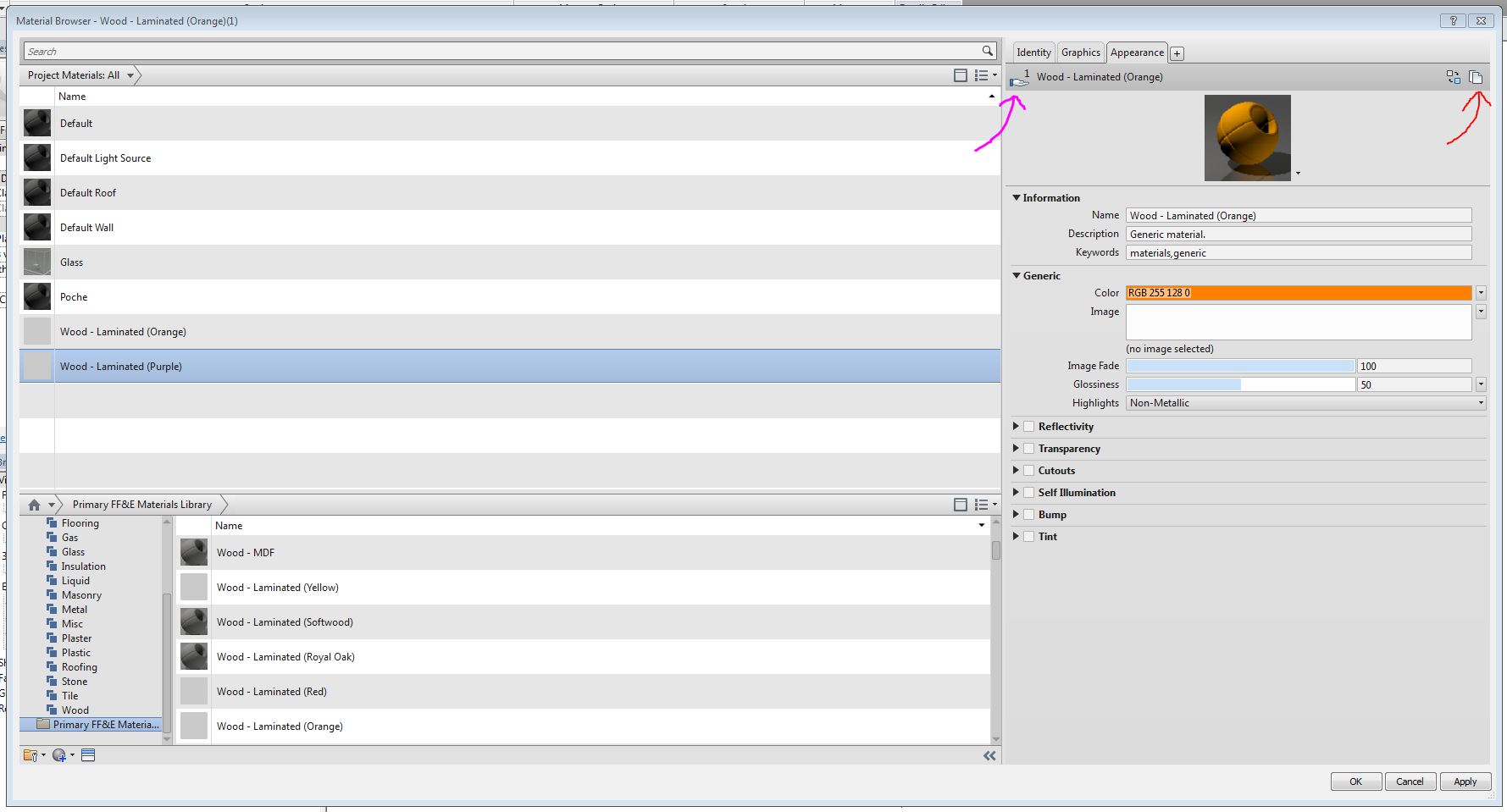
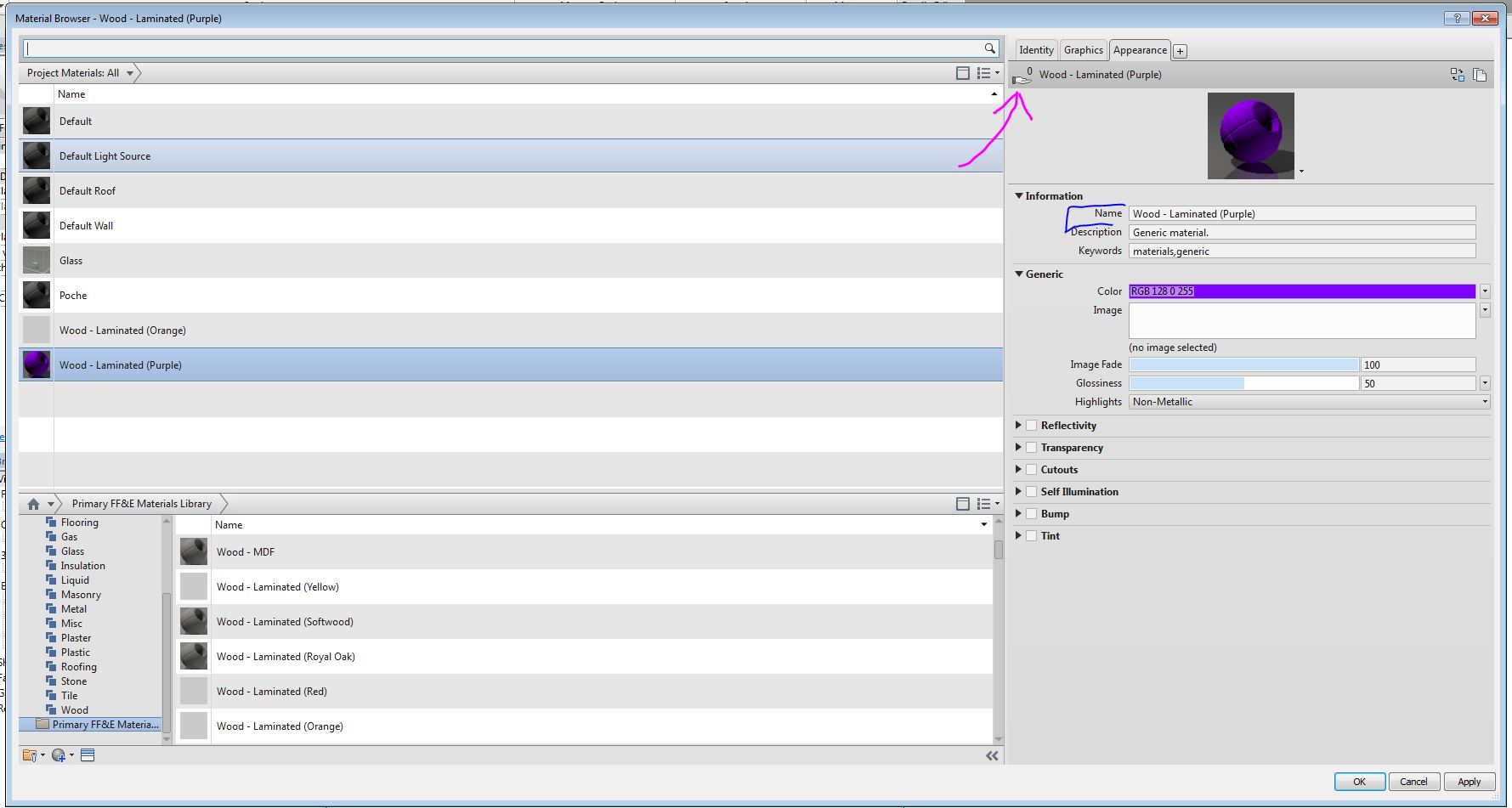
See images below. The first image shows that i have created two materials: ‘Wood Laminate (Orange)’ and ‘Wood Laminate (Purple)’. To create a new ASSET you can duplicate by press the symbol shown by the Red arrow.
NOTE: In image 1, the Pink arrow is pointing to a open hand, if you hover your mouse curser over this, it will tell you this material ASSET is being used by another. You'll notice on the second image that the hand is now greyed out as this ASSET is no longer shared between two MATERIALS.
Once you duplicated the ASSET you want to change its 'Information' to what you need it to be. I typically name the ASSET the same as I do the MATERIAL (see blue arrow).
Hope that helps!
Kind Regards,
Shatner86
-----------------------------------
"Try not to become a man of success, but rather to become a man of value"
-Albert Einstein |
This user is offline |
|
|
|
active
Joined: Fri, Sep 3, 2010
0 Posts
|
"
Materials are controlled by the asset assigned to them.
To create a new material you need to duplicate the ASSET as well as the MATERIAL.
"
Very true for rendered views. Assets have no effect on shaded or hidden line views, however it is a good practice to change assets as well when creating a new material to avoid confusion in the future. Good point Shatner.
|
This user is offline |
|
|
|
active
Joined: Thu, Oct 29, 2015
0 Posts
No Rating |
Thanks for the answer. I had similar issues and this solved my issues.

Suzanne
|
This user is offline |
|
|
|
Similar Threads |
|
Family material parameters duplicating issue |
Revit Building >> Technical Support
|
Tue, Mar 11, 2014 at 2:27:48 AM
|
4
|
|
confusion re material parameters |
Community >> Newbies
|
Sun, May 7, 2017 at 8:32:10 AM
|
1
|
|
material vs over ride graphics in view |
Revit Building >> Technical Support
|
Fri, Sep 18, 2015 at 12:04:56 PM
|
4
|
|
Question about shared custom material library |
Revit Building >> Technical Support
|
Wed, May 18, 2016 at 6:44:31 AM
|
3
|
|
painted cmu wall.. |
Revit Building >> Technical Support
|
Thu, Nov 14, 2013 at 11:16:49 AM
|
3
|
|
|
Site Stats
Members: | 2161655 | Objects: | 23325 | Forum Posts: | 152479 | Job Listings: | 3 |
|
 Search