
|
|
|
Home | Forums |
Downloads | Gallery |
News & Articles | Resources |
Jobs | FAQ |
| Join |
Welcome !
|
54 Users Online (52 Members):
Show Users Online
- Most ever was 626 - Mon, Jan 12, 2015 at 2:00:17 PM |
Forums
|
Forums >> Revit Building >> Technical Support >> Problem with transparency/graphics when printing to PDF (Revit 2015)
|
|
|
active
Joined: Fri, Mar 27, 2015
0 Posts
No Rating |
Hi,
I've having trouble with the graphics when printing to PDF.
In the example attached the ceiling has a hatch with diagonal red lines, and shows as a transparent hatch in the Revit view.
When printing to PDF the ceiling disappears behind the color of the Kitchen countertop, and the room color disappears behind the ceiling.
This only occurs when printing vector graphics. In Raster mode it turns out correct.
Is this a problem with the PDF printer or the Revit settings?
All inputs are appreciated!
|
This user is offline |
|
 | |
|
|
site moderator|||
Joined: Tue, May 16, 2006
13079 Posts
 |
Revit always switches to raster if shading is in the view to be printed so I don't understand why this difference exists unless it's somehow in your PDF driver. Other users have seen problems with print order and solid fills in some PDF writers.
|
This user is offline |
|
|
|
Similar Threads |
|
Vector printing and rasterized transparency |
Revit Building >> Technical Support
|
Thu, Jul 25, 2013 at 4:59:33 AM
|
3
|
|
Black lines printing grayscale in PDF |
Revit Building >> Technical Support
|
Fri, Oct 10, 2014 at 4:46:46 PM
|
3
|
|
Transparency when printing |
Revit Building >> Technical Support
|
Fri, Jun 19, 2015 at 1:33:45 PM
|
1
|
|
Help with PDF printing |
Revit Building >> Technical Support
|
Mon, Oct 16, 2006 at 7:30:55 AM
|
2
|
|
Printing with Shadows on and PDF |
Revit Building >> Technical Support
|
Wed, Jun 3, 2009 at 1:54:17 PM
|
6
|
|
|
Site Stats
Members: | 2161655 | Objects: | 23325 | Forum Posts: | 152479 | Job Listings: | 3 |
|
 Search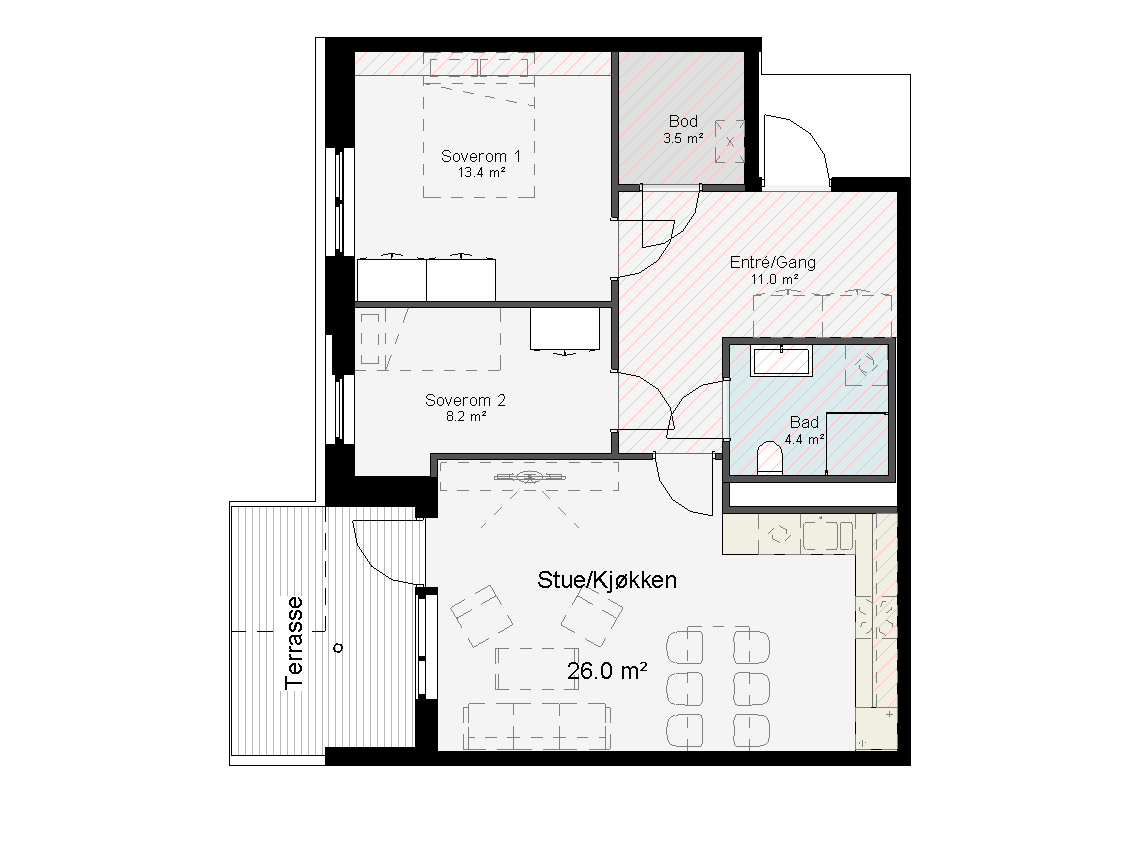
 140850_PDF_print.pdf