|
|
|
Home | Forums |
Downloads | Gallery |
News & Articles | Resources |
Jobs | FAQ |
| Join |
Welcome !
|
62 Users Online (60 Members):
Show Users Online
- Most ever was 626 - Mon, Jan 12, 2015 at 2:00:17 PM |
Forums
|
Forums >> Revit Building >> Technical Support >> Helical Handrail Help
|
|
|
active
Joined: Tue, May 12, 2015
0 Posts
No Rating |
Hey,
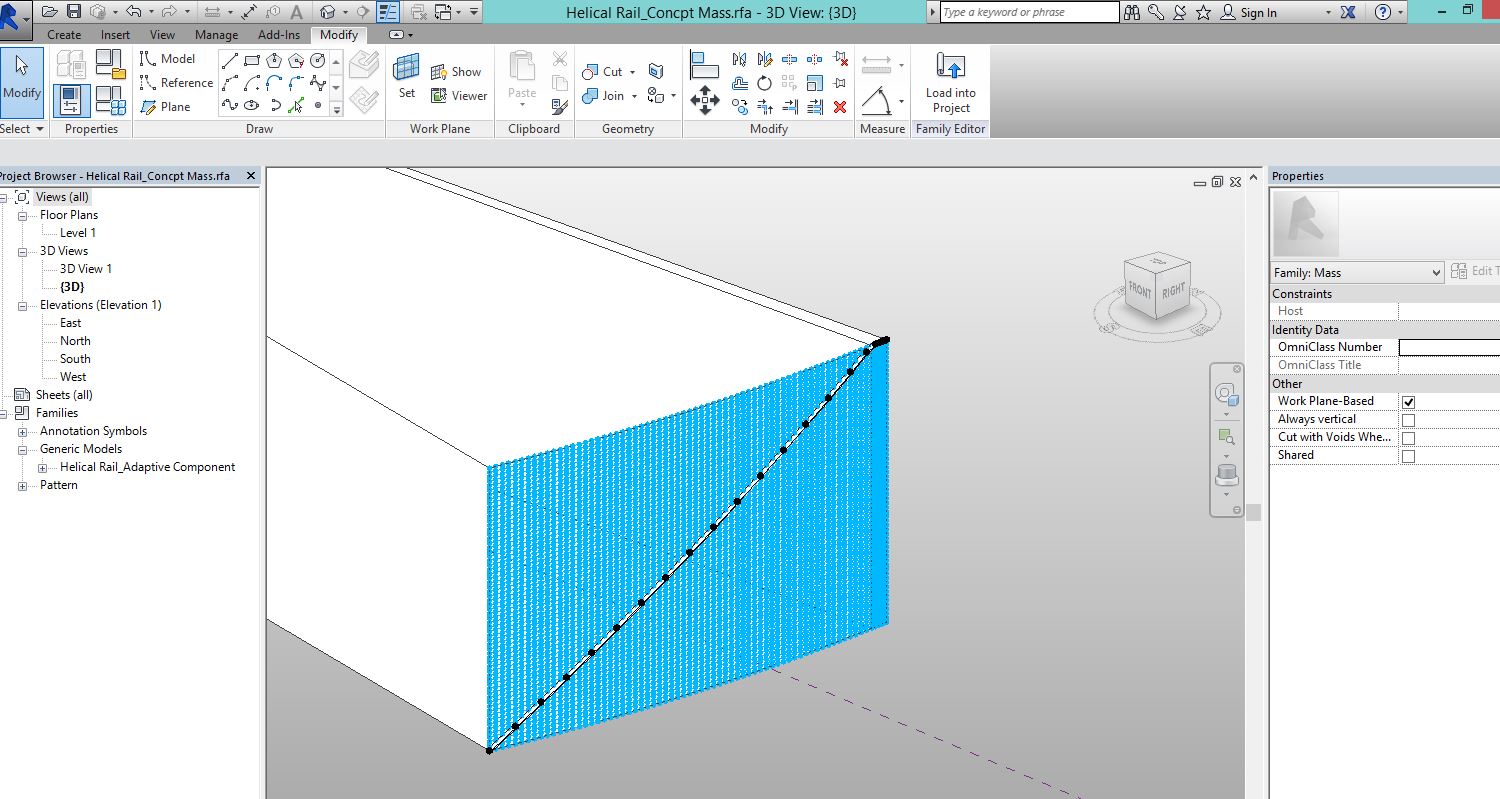
This is my first post. I'm using Revit Arch. 2015. I have created a helical handrail as an adaptive component. See pic attached. The stair is one story, curves only slightly and has a 62' radius so it covers only about 13 degrees of arc. I did this following this video: "How to create [a] Helix in Revit using adaptive component" https://www.youtube.com/watch?v=8XNnlx1yhbg.
This worked perfectly and I have my rail. However, and here’s where I'm probably missing something simple, how do I now separate my helical rail from the surface grid it is built on? I can return the surface to just a plain one, removing the grid and nodes. But any other alteration of the wedge form I applied the adaptive component to, like deleting it, deletes my rail as well.
Is there a way to separate the two, or was this not the way to go about it? If so, could someone outline how to accomplish this.
Thanks for any help.
|
This user is offline |
|
 |
|
Similar Threads |
|
Helical Ramp |
Revit Building >> Technical Support
|
Wed, Mar 10, 2004 at 8:51:07 AM
|
2
|
|
Handrail without Balusters |
Revit Building >> Technical Support
|
Wed, Oct 2, 2019 at 4:04:39 PM
|
6
|
|
Handrail - Wall mounted |
Revit Systems >> Technical Support
|
Fri, Apr 28, 2017 at 5:35:54 PM
|
4
|
|
Handrail Lighting LED Strip |
Revit Building >> Technical Support
|
Thu, Jan 11, 2018 at 6:31:21 AM
|
2
|
|
Another handrail issue |
Revit Building >> Technical Support
|
Mon, Jun 23, 2014 at 6:25:20 PM
|
2
|
|
|
Site Stats
Members: | 2161655 | Objects: | 23325 | Forum Posts: | 152479 | Job Listings: | 3 |
|
 Search