|
|
|
Home | Forums |
Downloads | Gallery |
News & Articles | Resources |
Jobs | FAQ |
| Join |
Welcome !
|
7 Users Online (5 Members):
Show Users Online
- Most ever was 626 - Mon, Jan 12, 2015 at 2:00:17 PM |
Forums
|
Forums >> Community >> Newbies >> Topo Surface Pattern
|
|
|
active
Joined: Sun, Nov 23, 2014
0 Posts
 |
Is there a way to accomplish this yet? Going through old posts and it doesn't seem like there is a viable method in the program.
|
This user is offline |
|
 | |
|
|
site moderator|||
Joined: Tue, May 16, 2006
13079 Posts
 |
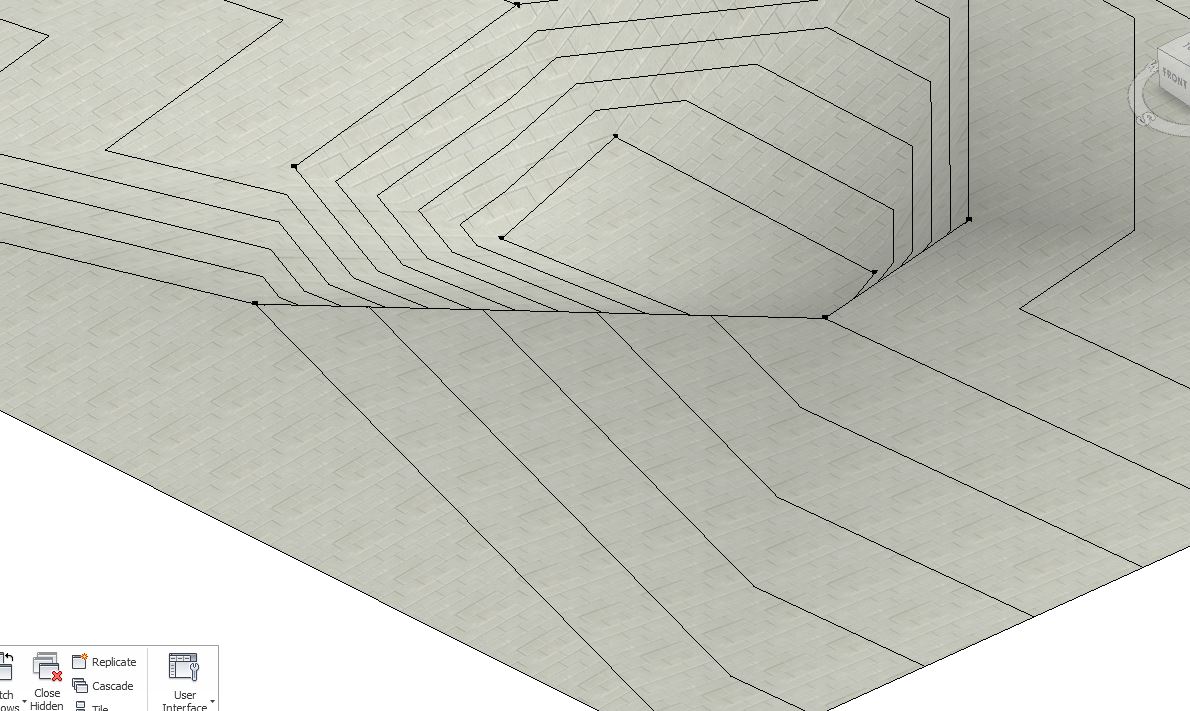
Your question is not clear. Below is a topo with a concrete block material. As you can see, it has a surface pattern.
So I assume you mean a 2D or 3D linework pattern. This is not supported.
|
This user is offline |
|
|
|
active
Joined: Sun, Nov 23, 2014
0 Posts
|
Yes this is what I mean. There is still no way to apply a hatch pattern to a toposurface in plan view? The last thread i read about this was from 2013 and wanted to be sure there was not some easy workaround.
Thanks
|
This user is offline |
|
|
|
Similar Threads |
|
Surface pattern to Topo surface |
Revit Building >> Technical Support
|
Mon, Aug 19, 2013 at 10:50:10 PM
|
2
|
|
Deleted Topo Surface |
Community >> Newbies
|
Fri, Apr 2, 2010 at 3:54:58 PM
|
5
|
|
Topo Surface from autocad into revit |
Community >> Newbies
|
Tue, Oct 13, 2009 at 10:37:25 PM
|
4
|
|
placing a street, vegetation and barrier or railing on topo surface |
Revit Building >> Tips & Tricks
|
Tue, Jan 17, 2017 at 5:47:40 AM
|
1
|
|
Surface pattern |
Revit Building >> Technical Support
|
Mon, Sep 10, 2007 at 11:18:01 AM
|
1
|
|
|
Site Stats
Members: | 2161655 | Objects: | 23325 | Forum Posts: | 152479 | Job Listings: | 3 |
|
 Search