|
|
|
Home | Forums |
Downloads | Gallery |
News & Articles | Resources |
Jobs | FAQ |
| Join |
Welcome !
|
48 Users Online (46 Members):
Show Users Online
- Most ever was 626 - Mon, Jan 12, 2015 at 2:00:17 PM |
Forums
|
Forums >> Revit Building >> Technical Support >> Demolition view of an new opening - how to show the wall ends as solid lines?
|
|
|
active
Joined: Tue, May 26, 2015
0 Posts
No Rating |
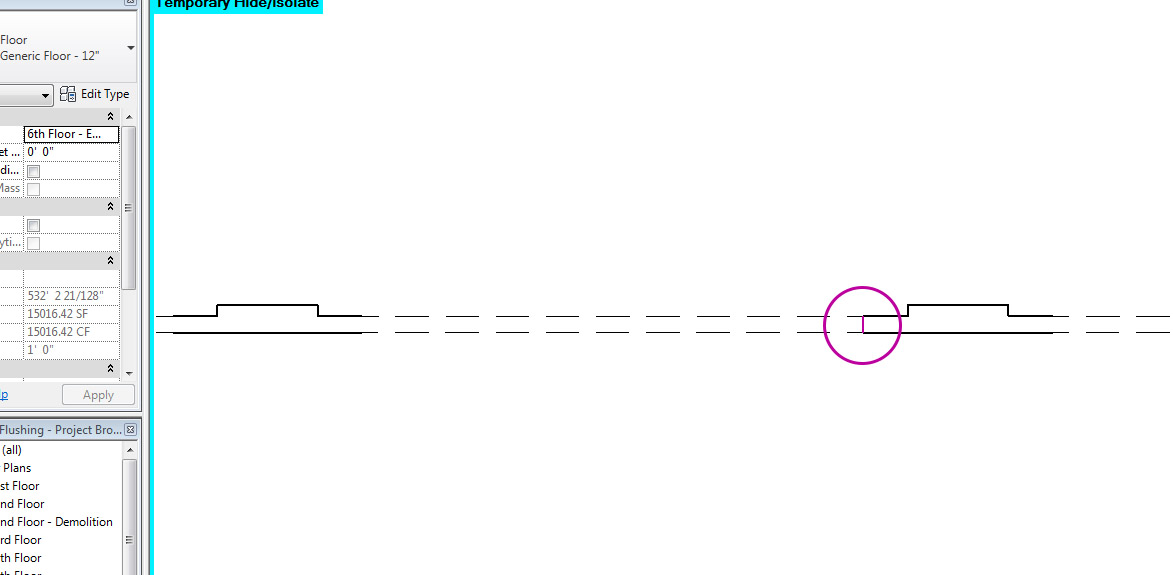
Hello,I feel this is a question that must have been asked before, but I can't find an answer anywhere.For a project in an existing condition, I am trying to create Demo plans. For some future windows, additional wall openings are needed.I have used the loadable "opening" family, placed the components in the model and set them as "created in new construction". In my demo view they show as demolition with dashed lines (which is what I want), however, I would like the end of the wall/beginning of the opening to show as a solid line (see pic).Is there any way to set this up?Thank you!
|
This user is offline |
|
 | |
|
|
site moderator|||
Joined: Tue, May 16, 2006
13079 Posts
 |
When i add a door, a window or an opening, i automatically get the lines at the end of the opening so I'm not sure what you are doing. The only time I don't get a line is when I demo an entire wall that is joined at the end.
I just checked and my lines aoccur it seems because we have a cross hatch set for the demo'd area.
|
This user is offline |
|
|
|
active
Joined: Tue, May 26, 2015
0 Posts
No Rating |
Hmm ... that doesnt seem to work for me either.
If I add a new window to the wall, the wall area shows as dashed in the demo view but also doesnt have the desired lines between the demo wall and the wall that is being kept.
Is there a setting or a VG override that I am missing?
Thanks!
|
This user is offline |
|
|
|
site moderator|||
Joined: Tue, May 16, 2006
13079 Posts
|
Read my last sentence!
|
This user is offline |
|
|
|
active
Joined: Tue, May 26, 2015
0 Posts
No Rating |
Ah, sorry. I set a cross hatch in the graphic override of the phasing panel, which gives me a cross hatch in the demo'd wall but still no framing lines.
|
This user is offline |
|
|
|
active
Joined: Tue, May 26, 2015
0 Posts
No Rating |
Actually I realize the problem persits for all demolished walls. If I set a wall to demolish i do not get a line between that wall and the next (not demolished) wall.
|
This user is offline |
|
|
|
active

Joined: Fri, Sep 3, 2010
0 Posts
 |
"
The only time I don't get a line is when I demo an entire wall that is joined at the end.
"
Exactly, this is a normal behavior. CL10, for the demolished part of the wall or infill, use ‘unjoin geometry’ tool and you will get your lines.
|
This user is offline |
|
|
|
Similar Threads |
|
Camera View not showing demolition lines dashed |
Revit Building >> Technical Support
|
Wed, Dec 11, 2013 at 2:24:15 PM
|
2
|
|
Show Hidden Lines Creating Double Lines |
Revit Building >> Technical Support
|
Mon, Sep 23, 2013 at 11:55:16 AM
|
1
|
|
New Windows in Existing Wall |
Revit Building >> Technical Support
|
Thu, Nov 10, 2005 at 4:06:18 PM
|
1
|
|
Setting wall to demolition, infills - how to stop? |
Revit Building >> Technical Support
|
Fri, Aug 5, 2016 at 11:24:18 AM
|
2
|
|
Calculate Demolition |
Revit Building >> Technical Support
|
Fri, May 8, 2015 at 3:56:11 PM
|
2
|
|
|
Site Stats
Members: | 2161655 | Objects: | 23325 | Forum Posts: | 152479 | Job Listings: | 3 |
|
 Search