|
|
|
Home | Forums |
Downloads | Gallery |
News & Articles | Resources |
Jobs | FAQ |
| Join |
Welcome !
|
12 Users Online (10 Members):
Show Users Online
- Most ever was 626 - Mon, Jan 12, 2015 at 2:00:17 PM |
Forums
|
Forums >> General Discussion >> Revit Project Management >> "This central model has been copied or moved . . ."
|
|
|
active
Joined: Tue, Apr 7, 2015
0 Posts
No Rating |
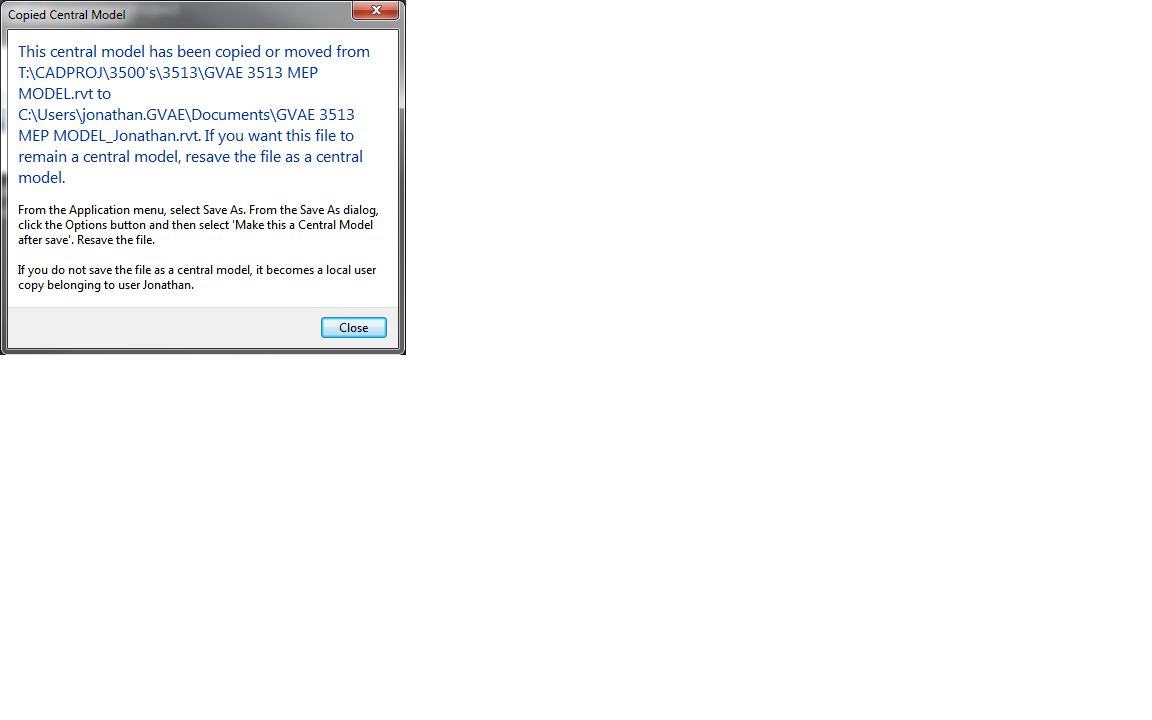
We have setup and worked more than a dozen Revit projects in the past using the same setup and have never had any problems. But on one project, we get the error screen attached. It happens on all of our local computers when trying to open the local model.
It says "This central model has been copied or moved from XXX to XXX. If you want this file to remain a central model, resave the file as a central model." It has smoe other writing below as well.
Anyone know what is wrong?
Any help is appreciated.
|
This user is offline |
|
 | |
|
|
site moderator|||
Joined: Tue, May 16, 2006
13079 Posts
 |
Look first at your users, someone may be saving over the central file.
There are also possible problems with pathing. We have seen problems with mapped path vs absolute path.
|
This user is offline |
|
|
|
Similar Threads |
|
How to make a "Model in-place" a "Family" |
Revit Building >> Technical Support
|
Thu, Mar 17, 2011 at 5:07:59 PM
|
5
|
|
Detaching from Central Model...I CANT! |
Revit Structure >> Technical Support
|
Fri, Aug 27, 2010 at 10:26:55 AM
|
2
|
|
Workshare btwn home network |
Community >> Newbies
|
Wed, Dec 2, 2009 at 1:48:55 PM
|
1
|
|
"File not saved" |
Workflow & Implementation >> Worksets
|
Mon, Nov 26, 2007 at 5:41:46 PM
|
0
|
|
" an unknown error occurred while accessing ....central.rvt" |
Revit Building >> Technical Support
|
Wed, Oct 11, 2017 at 12:53:21 AM
|
9
|
|
|
Site Stats
Members: | 2161655 | Objects: | 23325 | Forum Posts: | 152479 | Job Listings: | 3 |
|
 Search