|
|
|
Home | Forums |
Downloads | Gallery |
News & Articles | Resources |
Jobs | FAQ |
| Join |
Welcome !
|
10 Users Online (8 Members):
Show Users Online
- Most ever was 626 - Mon, Jan 12, 2015 at 2:00:17 PM |
Forums
|
Forums >> Community >> Newbies >> Wall section question
|
|
|
active
Joined: Sun, Nov 23, 2014
0 Posts
 |
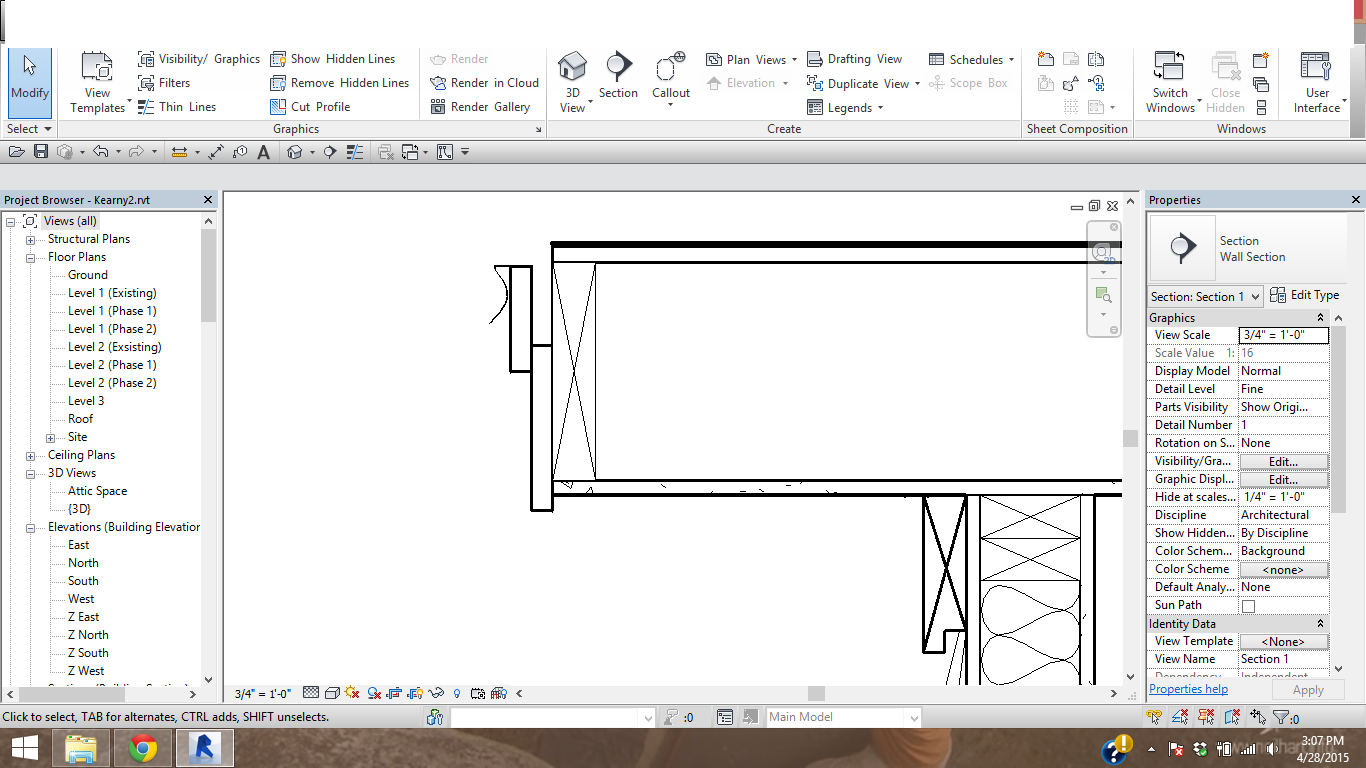
I would like to extend the 1/2 inch plywood and ashpalt shingle layer out past the soffit detail. How would you go about doing this?
|
This user is offline |
|
 | |
|
|
site moderator|||
Joined: Tue, May 16, 2006
13079 Posts
 |
There is currently no easy way to do this with the normal model. You could do 2 roofs but that seems to be a waste. Typically, we just use the edit cut profile tool to cut back the structure and leave the plywood and shingle layer out.
In your case with the stepped fascia, I might cosider using an in-place void sweep to cut the model roof.
|
This user is offline |
|
|
|
active
Joined: Sun, Nov 23, 2014
0 Posts
|
I tried the cut profile, however the line weight was thicker thant that of the roof materials. How would I go about changing that?
|
This user is offline |
|
|
|
site moderator|||
Joined: Tue, May 16, 2006
13079 Posts
|
I have been complaining for years that this is not an independent setting.
You have to change the cut-lineweight of the category then use the linework tool to bring your other lines back up.
|
This user is offline |
|
|
|
active
Joined: Sun, Nov 23, 2014
0 Posts
|
Wow, thanks for the suggestions! The couple months I have been using this program I am amazed how thorough Revit can be and also how simple and basic tools have been left out. I think I will actually create a second roof and manually stack them so that the material show up in my materials takeoff. O well another workaround.
|
This user is offline |
|
|
|
Similar Threads |
|
Section Blow up Details |
Revit Building >> Technical Support
|
Tue, Apr 29, 2008 at 4:38:22 PM
|
5
|
|
Using 2d group for Wall section, section details called out from wall section? |
Revit Building >> Technical Support
|
Fri, Oct 9, 2015 at 10:50:56 AM
|
2
|
|
The option to create Wall section not showing up, only building section. |
General Discussion >> Revit Project Management
|
Wed, Jan 23, 2013 at 3:16:46 PM
|
2
|
|
Copy Wall Section |
Revit Building >> Technical Support
|
Wed, Apr 29, 2009 at 10:20:17 AM
|
2
|
|
Wall Section won't show in both plan and building section |
Revit Building >> Technical Support
|
Wed, Jan 29, 2014 at 6:52:25 AM
|
1
|
|
|
Site Stats
Members: | 2161655 | Objects: | 23325 | Forum Posts: | 152479 | Job Listings: | 3 |
|
 Search