|
|
|
Home | Forums |
Downloads | Gallery |
News & Articles | Resources |
Jobs | FAQ |
| Join |
Welcome !
|
36 Users Online (34 Members):
Show Users Online
- Most ever was 626 - Mon, Jan 12, 2015 at 2:00:17 PM |
Forums
|
Forums >> Revit Building >> Technical Support >> logo as material
|
|
|
active
Joined: Fri, Nov 26, 2010
0 Posts
No Rating |
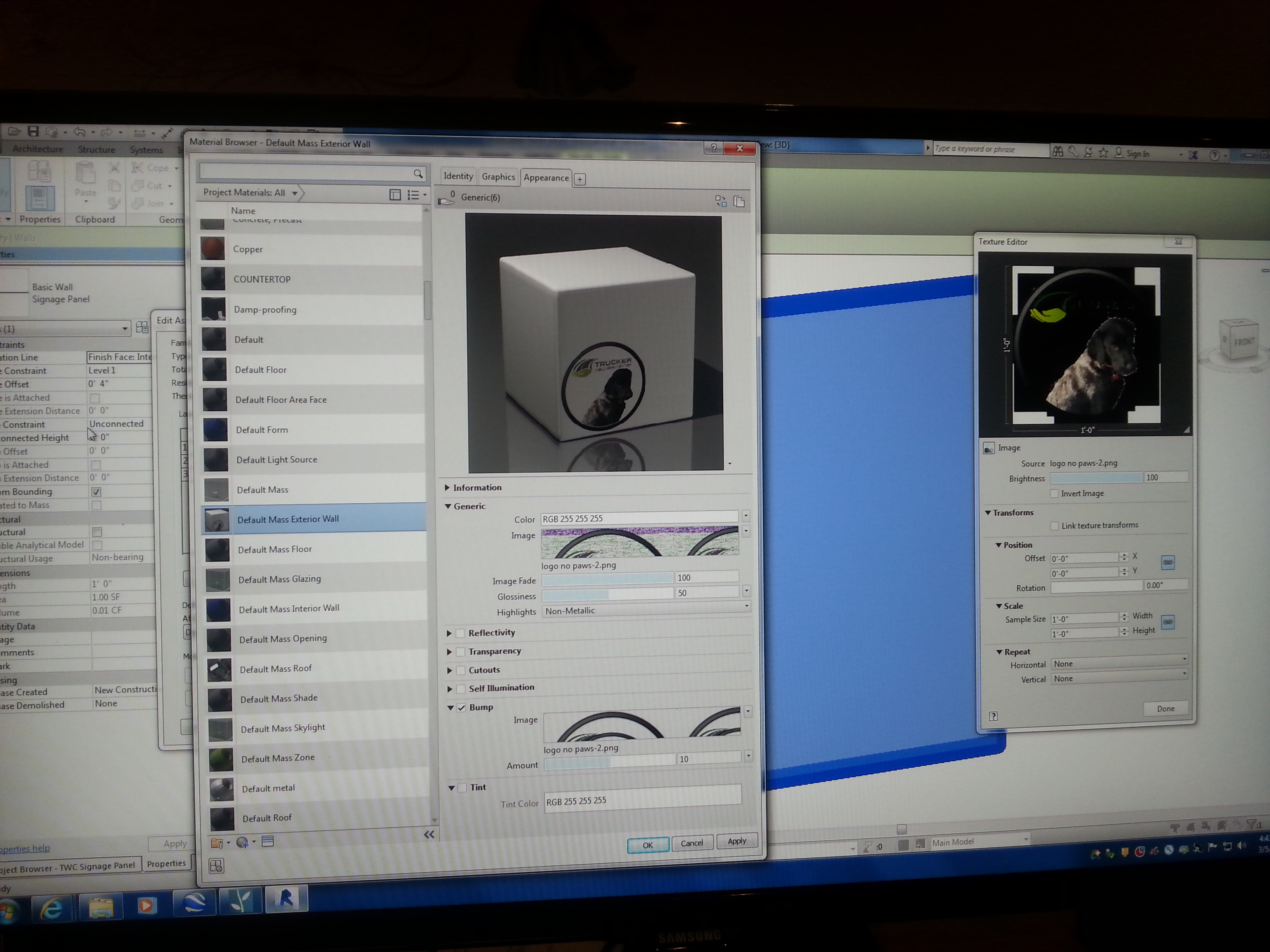
Good morning all. I'm using Revit 2015 and am trying to add a logo as a material so I can add it to a wall panel. I need it as a material and not as a decal for importing it to another program for rendering. When I add the image, it shows up correctly in the preview, but then it messes up the image (reverses the white to black and pixelates the edges of the image) in the texture editor. I've spent over 4 hours trying everything I can think of to fix this, and am now relying on those with more knowledge to help me. See attached image for reference. FYI the logo is in .png format so I can have transparency within the logo so it reads accurately on the wall panel. Any/all help is GREATLY appreciated! Thanks in advance! - Brian
|
This user is offline |
|
 | |
|
|
active
Joined: Wed, Apr 3, 2013
0 Posts
No Rating |
btfalcon71,
What program are you exporting to? Is there no way to make the material unique in Revit and replace it with the logo in the rendering program itself?
|
This user is offline |
|
|
|
Similar Threads |
|
URGENT! blue logo revit 2012 |
Revit Building >> Technical Support
|
Fri, Jun 14, 2013 at 9:45:05 AM
|
6
|
|
Logo / Filled region in Drawing Sheet |
Revit Building >> Technical Support
|
Fri, May 7, 2010 at 4:22:30 PM
|
6
|
|
Logo on a Titleblock showing up in negative |
Revit Building >> Technical Support
|
Wed, Oct 31, 2012 at 7:49:50 AM
|
2
|
|
JPG logo |
Revit Building >> Technical Support
|
Wed, Mar 20, 2013 at 7:40:52 AM
|
1
|
|
Adding Company Logo |
Revit Building >> Technical Support
|
Tue, Nov 14, 2006 at 10:44:03 AM
|
4
|
|
|
Site Stats
Members: | 2161655 | Objects: | 23325 | Forum Posts: | 152479 | Job Listings: | 3 |
|
 Search