|
|
|
Home | Forums |
Downloads | Gallery |
News & Articles | Resources |
Jobs | FAQ |
| Join |
Welcome !
|
4 Users Online (2 Members):
Show Users Online
- Most ever was 626 - Mon, Jan 12, 2015 at 2:00:17 PM |
Forums
|
Forums >> Community >> Newbies >> Filter by Subcategory?
|
|
|
active
Joined: Mon, Jun 2, 2014
0 Posts
No Rating |
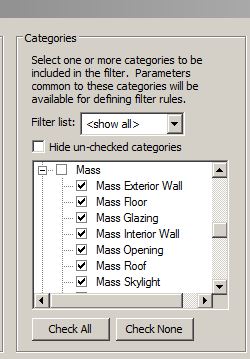
Im trying to get better understanding on how to control visibility in project in Revit 2014. One thing I can't understand is if I can apply a filter to subcategory. Filters dialog lists subcategories just for some categories like Mass, Roofs Flors, why?
Whats more when I remove the selection of some subcategories and close the dialog it is checked back on next edit. Why?
|
This user is offline |
|
 | |
|
|
site moderator|||
Joined: Tue, May 16, 2006
13079 Posts
 |
Look at the two images below - the available sub-elements under mass category and the same list under VG. Do you see any corelation? I do. The only sub-elements that are available are ones that have seperately controlable patterns. This is true for all categories.
This question "...close the dialog it is checked back on next edit. Why?..." Did you allow it to reset if required? Did you finish the process? I don't have this issue so you need to show us / tell us more.
|
This user is offline |
|
|
|
active
Joined: Mon, Jun 2, 2014
0 Posts
No Rating |
"seperately controlable patterns."
Can you please be more specific?
As per second question, here are the steps to reproduce this behavior:
1) Create new project from architectural template.
2) Open Filter dialog and create new Filter.
3) Check Mass Category, expand it and uncheck a couple of categories.
4) Click Apply. This will scrol the category list to the top, scrol the list down to Mass and expand it again. Everythink is checked back.
|
This user is offline |
|
|
|
site moderator|||
Joined: Tue, May 16, 2006
13079 Posts
|
"seperately controlable patterns." < Look at the VG - right image. The oly available 'su category' elements are ones that have controlable cut and surface patterns that are seperate from the main category. In other words, they are almost a seperate element (category). ONLY those items are listed.
I looked at the mass / sub category switches and you are correct. I tried to use them and I could not get them to work. I don't remember seeing any questions about these here at RC. I think you should post this question on the Autodesk site. If you get an answer, please come back and inform us.
http://forums.autodesk.com/t5/revit/ct-p/2003
|
This user is offline |
|
|
|
Similar Threads |
|
assigning a subcategory to a solid fill (RMEP2010, 2011) |
Revit Building >> Technical Support
|
Tue, Oct 19, 2010 at 10:02:59 AM
|
0
|
|
assign different subcategory to labels? |
Revit Building >> Technical Support
|
Wed, Feb 16, 2011 at 3:11:06 AM
|
0
|
|
linewidth of elements in family editing |
Community >> The Studio
|
Tue, Feb 15, 2005 at 9:56:43 PM
|
0
|
|
Filter Nested subcategories By Category name ?? |
General Discussion >> Revit Project Management
|
Wed, May 30, 2018 at 10:56:19 AM
|
2
|
|
Filter turns everything off |
Revit Structure >> Technical Support
|
Wed, Apr 19, 2017 at 9:25:54 AM
|
1
|
|
|
Site Stats
Members: | 2161655 | Objects: | 23325 | Forum Posts: | 152479 | Job Listings: | 3 |
|
 Search