|
|
|
Home | Forums |
Downloads | Gallery |
News & Articles | Resources |
Jobs | FAQ |
| Join |
Welcome !
|
38 Users Online (36 Members):
Show Users Online
- Most ever was 626 - Mon, Jan 12, 2015 at 2:00:17 PM |
Forums
|
Forums >> Revit Building >> Technical Support >> file open - date display
|
|
|
active
Joined: Sat, Oct 25, 2003
411 Posts
 |
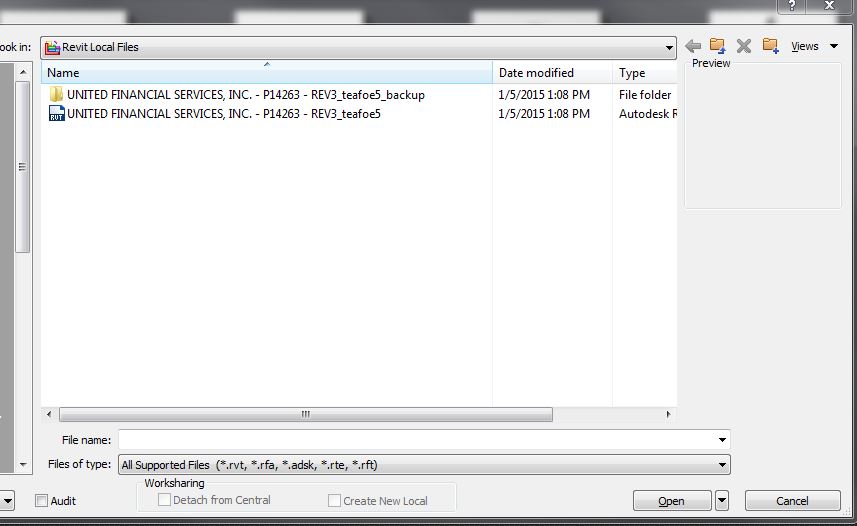
it's a little thing: when executing a file/open, there appears to be no way to make the date of the file display. http://goo.gl/d9bbB4 Is there a way?
|
This user is offline |
View Website
|
 | |
|
|
site moderator|||

Joined: Fri, Nov 12, 2010
1749 Posts
 |
I don't have that problem, it must be a computer system setting, check your view settings.
|
This user is offline |
View Website
|
|
|
active
Joined: Sat, Oct 25, 2003
411 Posts
|
On this computer, "Date modified" shows in <saveas> or <file open> etc of every operation of every program except Revit. Wouldnt be a system setting.
|
This user is offline |
View Website
|
|
|
active
Joined: Sat, Oct 25, 2003
411 Posts
|
figured it out: you right clik at the top of the next blank col and "date" comes up as checkbox choice.
|
This user is offline |
View Website
|
|
|
Similar Threads |
|
Plot stamp parameter that will read the windows file "Modified Date"... |
Revit Building >> Technical Support
|
Tue, Apr 9, 2013 at 5:54:03 PM
|
2
|
|
Recovering a file from Backup Files W/O/ the original File |
General Discussion >> Revit Project Management
|
Fri, Feb 6, 2015 at 9:40:43 AM
|
2
|
|
Failed to open document |
Revit Building >> Technical Support
|
Tue, Nov 17, 2015 at 2:54:38 PM
|
1
|
|
Revit Arch 2013 - Noticed my backups & file date and time aren't changing |
Revit Building >> Technical Support
|
Thu, Jan 23, 2014 at 12:53:09 PM
|
1
|
|
Date Stamp on Drawings |
Revit Structure >> Technical Support
|
Tue, May 29, 2012 at 10:10:13 AM
|
1
|
|
|
Site Stats
Members: | 2161655 | Objects: | 23325 | Forum Posts: | 152479 | Job Listings: | 3 |
|
 Search