Forums
|
Forums >> Revit Building >> Technical Support >> Rentable Square Feet Calculation
|
|
|
active
Joined: Tue, Dec 9, 2014
0 Posts
No Rating |
I would like to replace the actual square footage of the room (which is the default) with the rentable square footage (RSF), which is often a multiple (of a factor) of the actual square footage. For example if a room is 976 square feet, the rentable square feet (RSF) factor (in this example) is 1.18, so here you would multiply the 976 by 1.18 and get 1152 square feet. In other words, the equation is RSF = SF*1.18 = 976*1.18 = 1152 SF
How do I create the parameter of RSF and show it as a value = a multiple of the SF, then create the tag so that instead of the "Area" tag i use the "RSF" tag? I'm having a lot of trouble creating the parameter itself.
Many thanks and deeply appreciated.
|
This user is offline |
|
 | |
|
|
site moderator|||
Joined: Tue, May 16, 2006
13079 Posts
 |
You can not do this with a tag but you can do it with a schedule.
|
This user is offline |
|
|
|
active
Joined: Tue, Dec 9, 2014
0 Posts
No Rating |
You mean as a table? I already did that in Excel. I need them labelled in the rooms themselves. That's what I'm trying to do.
Many thanks
|
This user is offline |
|
|
|
site moderator|||
Joined: Tue, May 16, 2006
13079 Posts
|
Again.... YOU CAN NOT DO THIS AUTOMATICALLY WITH A TAG. You can add a shared parameter to rooms that you fill in and it can be tagged.
|
This user is offline |
|
|
|
active
Joined: Tue, Dec 9, 2014
0 Posts
No Rating |
Sorry I'm getting you frustrated. Now, in the last comment you made, you said:
"You can add a shared parameter to rooms that you fill in and it can be tagged."
How does THAT work? I've always struggled with shared parameters. Often they want me to open some sort of file in my computer which I don't have, or I am not aware of it. You are saying the shared parameter is the one that would have the number, and that is where the tag is created, (like for RSF)? Is that what you are saying?
Thanks so much, by the way!
|
This user is offline |
|
|
|
site moderator|||
Joined: Tue, May 16, 2006
13079 Posts
|
Revit's HELP is one of the best for any software. Why are you not looking there first? Shared parameter use and creation are clearly defined there. http://help.autodesk.com/view/RVT/2014/ENU/?guid=GUID-E7D12B71-C50D-46D8-886B-8E0C2B285988
|
This user is offline |
|
|
|
active
Joined: Tue, Dec 9, 2014
0 Posts
No Rating |
Will do. Thanks
|
This user is offline |
|
|
|
active
Joined: Tue, Dec 9, 2014
0 Posts
No Rating |
I tried to make a shared parameter with area. Even the help tells me that it is an acceptable to make a shared parameter with area. But then when I try to add it in as a parameter, the shared parameter part is greyed out. So I'm confused here.
(Sorry for being such a pest)
|
This user is offline |
|
|
|
site moderator|||
Joined: Tue, May 16, 2006
13079 Posts
|
I don't have a clue as to what you mean by: "...I tried to make a shared parameter with area...".
A shared parameter is singular - .... it is ... no "withs". You can add project shared parameters to the area category, is that what you mean?
Perhaps you don't understand. Our English language is bad sometimes. You can have 'area' - a quantity and 'area' - a space. If you notice, the halp says you can add shared parameters to 'areas', meaning the space term. Area plans are seperate from floor plans showing rooms. When I first read your original post, I thought you meant room areas.
So - here is the process to follow:
- Open your shared parameter file or create one. (We have several office files and sometimes ones that are project ones that are stored with the project.) (You may want to do this in process 4 - below)
- In that file, create the shared parameter (and group if needed).
- Close the file.
- Edit your area tag.
- Under the manage tab, pick your shared parameter file (or create it)
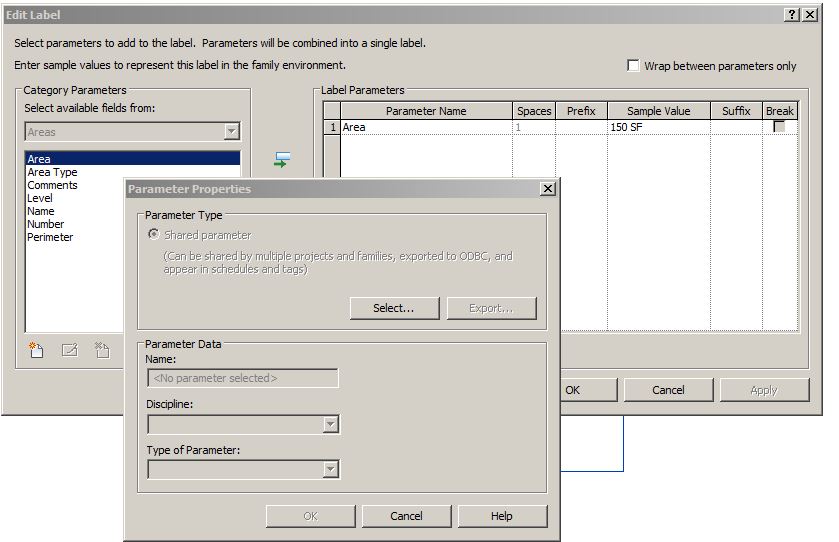
- Add a label -
- When you see the image below, click on the lower left icon that has the colored asterick
- Add your parameter to the tag.
- save your tag (maybe with a new name?)
- Load the tag into the project
- While in the project:
- Set the pointer of your shared parameter file under the manage tab
- Under manage tab, pick project parameters, then add
- Now you will see the second image where you pick your shared parameter and your area category.
Now when you click on an area, your shared parameter will be there for you to fill in. BTW - I would think you knew to set this as instance based....
|
This user is offline |
|
|
|
Similar Threads |
|
Square Yards calculations |
Revit Building >> Technical Support
|
Mon, Mar 19, 2012 at 3:00:43 PM
|
4
|
|
Heat loss calculation formula |
Revit Systems >> Tips & Tricks
|
Wed, Apr 29, 2009 at 10:09:09 AM
|
3
|
|
Dimensioning with yards |
Revit Systems >> Technical Support
|
Tue, Apr 27, 2021 at 3:42:11 PM
|
1
|
|
Room Tags with Area - ASF instead of SF |
Revit Building >> Technical Support
|
Tue, Sep 21, 2010 at 12:14:06 PM
|
0
|
|
Level Display (only) to decimal feet |
Revit Building >> Technical Support
|
Sun, Aug 10, 2014 at 11:00:01 PM
|
12
|
|
|
Site Stats
Members: | 2161655 | Objects: | 23325 | Forum Posts: | 152479 | Job Listings: | 3 |
|

 Search