|
active
Joined: Wed, Apr 21, 2010
0 Posts
No Rating |
I have done a little searching around on this but have been unable to find anything. Is there a macro, plugin or other way to auto label elevations in relation to True North in a project? In that we would rotate True North the right way, hit a macro button and the elevation labels would change to East Elevation, West Elevation, OR North-East Elevation, South-West elevation etc. or even have them update automatically?
Related to this I was also wondering whether you can get a North Point that does as well? It would be nice if we actually rotated this North Point it would also rotate the projecvts True North as well (not sure if this is possible).
Currently, these are open to human error as they are all changed manually for each project, and elevations can be labelled wrong and North Point turned the wrong way on sheets.
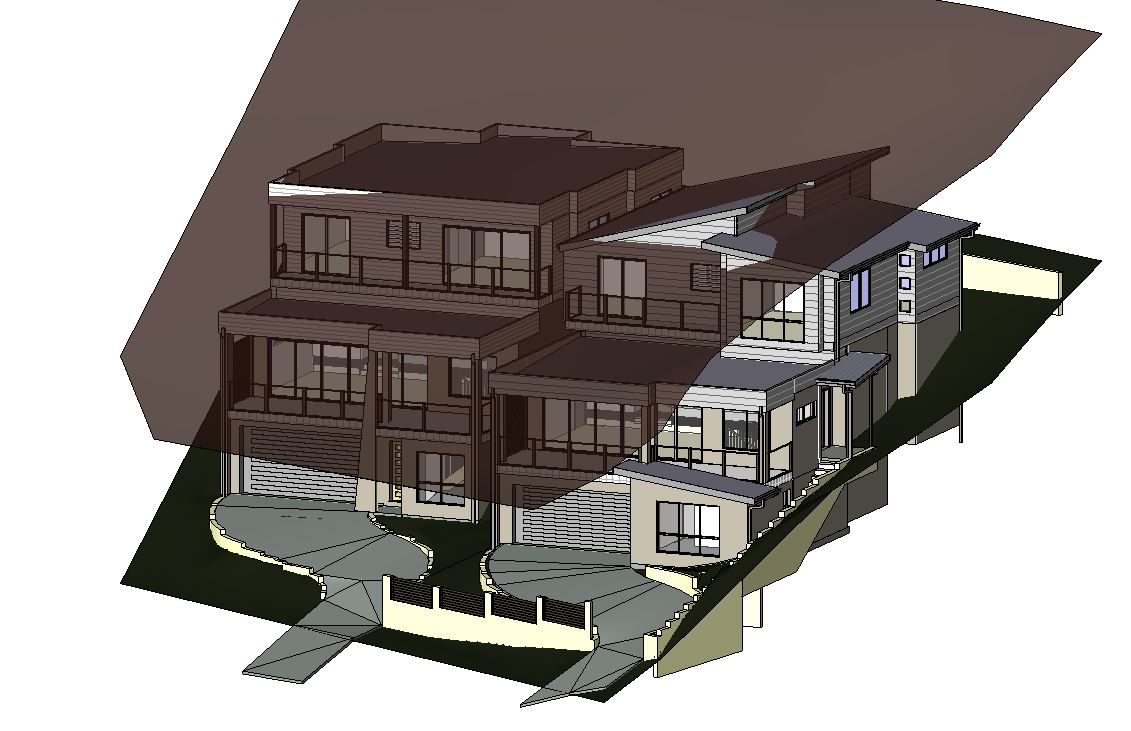
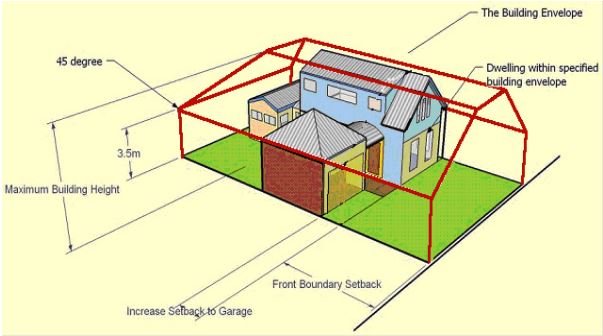
One last question which may be trickier, we are also required for some of our local Council's to detail Height Envelopes. On sloping sites we would like to do a 3D envelope view. The envelopes involve a height limit and usually a 45 degree side angle depending on the Council. The picture "Height Envelope Sample 2" shows are a standard Council's envelope requirement. We have no problems doing an overall height diagram similar to the picture "Height Envelope Sample", it is just the 45 degrees and side parts that are the issue, especially on sloping sites.
Thanks for any help in advance, sorry for longish post and multiple questions.
|
|
site moderator|||
Joined: Tue, May 16, 2006
13079 Posts
 |
Revit assumes project and true north is always up at the beginning unless set differently in your template. It is always advisable to use the rotate project north tool at the beginning of the project if possible. But when you can't, you have to manually reset the project north pointer and rename your views. I don't see any other way.
It appears you may need a little more understanding of project base point and survey. This video is really good at explaining this:
http://www.youtube.com/watch?v=BigvY4LT-RI
|

 Search