|
|
|
Home | Forums |
Downloads | Gallery |
News & Articles | Resources |
Jobs | FAQ |
| Join |
Welcome !
|
6 Users Online (4 Members):
Show Users Online
- Most ever was 626 - Mon, Jan 12, 2015 at 2:00:17 PM |
Forums
|
Forums >> Revit Building >> Technical Support >> Pad Phasing
|
|
|
active
Joined: Wed, May 14, 2008
209 Posts
No Rating |
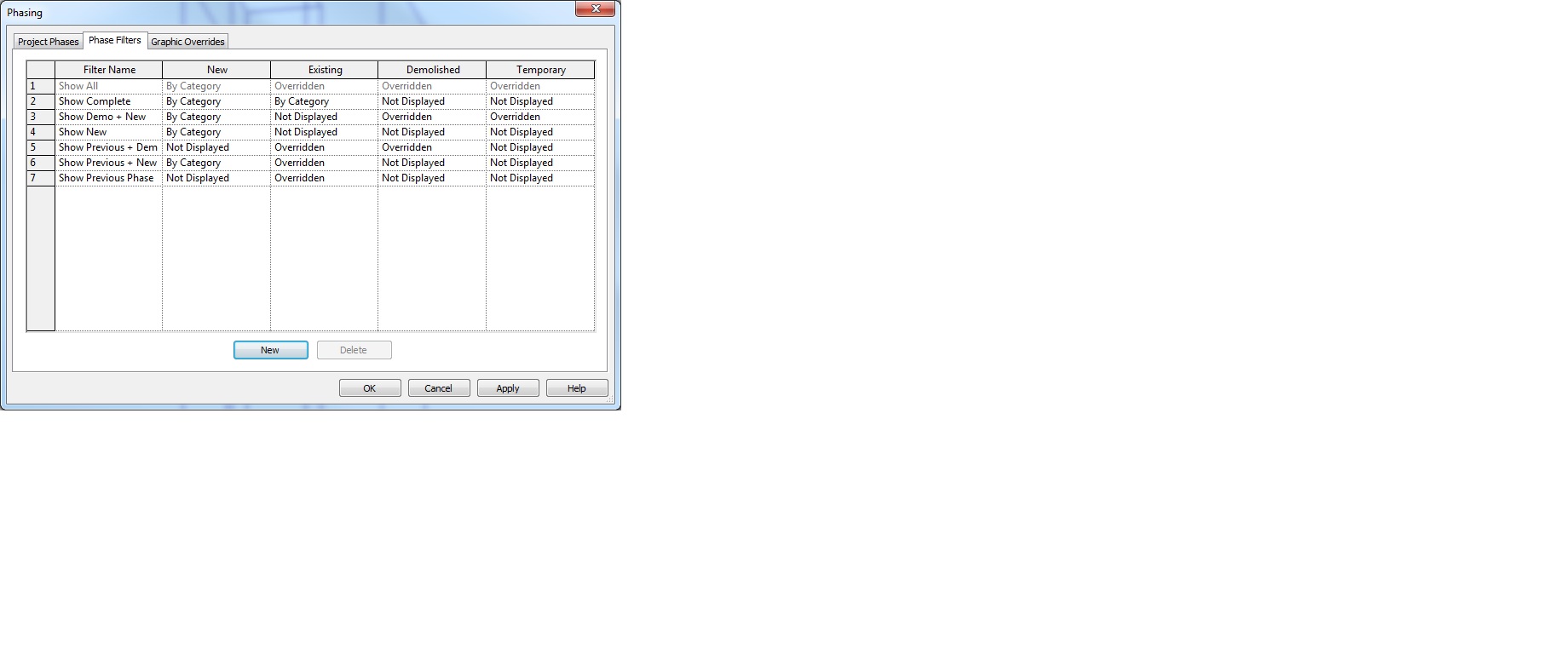
We have a pad set to a future phase and we placed it onto an existing topo. The existing phase is showing a hole where the pad of the future phase will be. The pad doesnt exist yet so how can the existing phase show where it will be?
|
This user is offline |
|
 | |
|
|
site moderator|||

Joined: Fri, Nov 12, 2010
1749 Posts
 |
Sounds like you have your phase filters set wrong.
|
This user is offline |
View Website
|
|
|
active
Joined: Wed, May 14, 2008
209 Posts
No Rating |
Views we reviewed were previous and new and show all and we had the issue. What is wrong in our phase filters?
|
This user is offline |
|
|
|
active
Joined: Thu, Mar 29, 2012
113 Posts
 |
nothing wrong with the phase
its just TOPO behaves like that as far as i know (rvt2013)
even if its filter off.. the cut will still be there.
"if you create a phase before any pads were added the toposurface will still display the opening"
http://forums.autodesk.com/t5/Revit-Architecture/Building-pads-don-t-seem-to-respect-phases/m-p/2902292#M49577
|
This user is offline |
|
|
|
site moderator|||
Joined: Tue, May 16, 2006
13079 Posts
 |
roomalt is correct.
I would probably use either worksets or design options to have two different topos.
|
This user is offline |
|
|
|
active
Joined: Wed, May 14, 2008
209 Posts
No Rating |
To fill the void we copied the topo set one to existing and demoed it in the future phase. The second topo in the future we put the pad on. Both existing and future reflected what we wanted. The first topo essentually was to fill the void in existing phase with a pad on it and it worked.
|
This user is offline |
|
|
|
active
Joined: Mon, Nov 12, 2007
19 Posts
 |
I think you should use the buildin option for this, Graded Region in Massing&Site tab.
Create Existing Topo, use Graded Region, it creates a New Construction Topo (and demolishes the Existing), and gives you quantities for Cut/fill.
Sofus
|
This user is offline |
|
|
|
Similar Threads |
|
Building Pad Problem |
Revit Building >> Technical Support
|
Thu, Dec 20, 2012 at 3:51:08 PM
|
7
|
|
Cannot choose edge of a pad in Revit 2010 |
Revit Building >> Technical Support
|
Sun, Feb 21, 2010 at 5:16:33 AM
|
4
|
|
Topo slopped pad (parking lot/road) |
Revit Building >> Technical Support
|
Mon, Aug 24, 2009 at 8:26:23 AM
|
4
|
|
Phasing - Building Already Done but Dind't Set up Phasing |
Community >> Newbies
|
Tue, Dec 15, 2009 at 7:40:42 AM
|
1
|
|
Building Pad Altering My Topography Surface |
Revit Building >> Technical Support
|
Wed, Nov 30, 2011 at 12:01:59 PM
|
2
|
|
|
Site Stats
Members: | 2161655 | Objects: | 23325 | Forum Posts: | 152479 | Job Listings: | 3 |
|
 Search