
|
|
|
Home | Forums |
Downloads | Gallery |
News & Articles | Resources |
Jobs | FAQ |
| Join |
Welcome !
|
30 Users Online (28 Members):
Show Users Online
- Most ever was 626 - Mon, Jan 12, 2015 at 2:00:17 PM |
Forums
|
Forums >> Revit Building >> Technical Support >> line styles not reading/ printing the same
|
|
|
active
Joined: Wed, Jan 27, 2010
34 Posts
 |
I have two detail items (split-face cmu & cmu sections.) within each family it says the line is "Heavy Line." and the lineweight is set to 5 for both. yet on the computer screen and when it prints out one of the detail items is thinner than the other? how to correct?
|
This user is offline |
|
 | |
|
|
site moderator|||
Joined: Tue, May 16, 2006
13079 Posts
 |
Are both detail families? Both have the identical detail line type? "Heavy Line" does not equal "Heavy line".
Is there a masking region or hatch in one or both families? Not all detail creators are equal and they place regions over linetypes. No reason to have a line if the region is defined correctly. << This is probably your problem
|
This user is offline |
|
|
|
active
Joined: Wed, Jan 27, 2010
34 Posts
|
I checked for masking regions and linework. none existing in either family. both families are "out of the box" from revit. if possible I will try to attach each family or at least an image of the two conditions.
|
This user is offline |
|
|
|
site moderator|||
Joined: Tue, May 16, 2006
13079 Posts
|
The families are OK.
Did you create this drawing?
Is the lower element overridden perhaps?
As a side issue.....Did you know that you can control these lineweights through the manage object styles? ...or by view in VG - The heavy lineweight seems to be too heavy.
|
This user is offline |
|
|
|
active
Joined: Wed, Jan 27, 2010
34 Posts
|
so I think I came up with a solution or at least a work around. I clicked on the detail item that wasnt show the proper line weight and the clicked on edit type. within there I unchecked the core visibility and hit ok. i repeated the same steps and checked the core visibility and the line weights are reading properly now.???
|
This user is offline |
|
|
|
Similar Threads |
|
lines styles not printing or displaying |
Revit Building >> Technical Support
|
Thu, Jul 17, 2014 at 8:50:30 AM
|
1
|
|
Removing Line Styles |
Revit Building >> Technical Support
|
Mon, May 8, 2017 at 2:21:04 PM
|
10
|
|
Associating Line styles with patterns |
General Discussion >> Revit Project Management
|
Tue, Sep 18, 2012 at 11:30:05 AM
|
6
|
|
Deleting Line Styles |
Community >> Newbies
|
Tue, Aug 5, 2014 at 2:57:29 PM
|
4
|
|
Line styles |
Revit Building >> Technical Support
|
Sun, Jun 3, 2018 at 8:27:34 AM
|
1
|
|
|
Site Stats
Members: | 2161655 | Objects: | 23325 | Forum Posts: | 152479 | Job Listings: | 3 |
|
 Search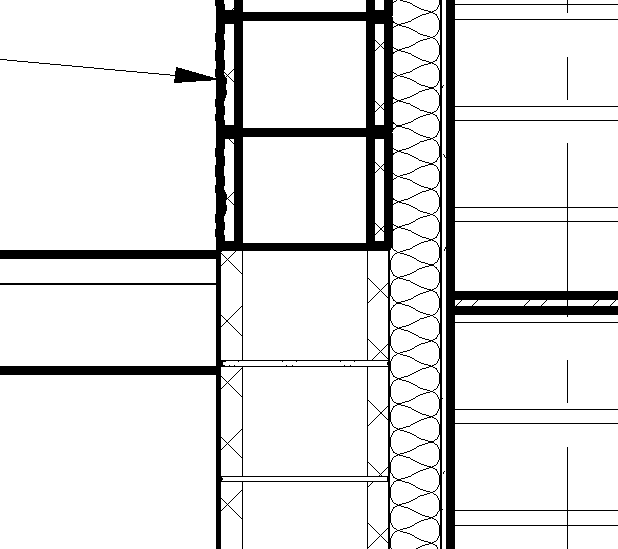
 129115_Split_Face_CMU-Section.rfa