|
|
|
Home | Forums |
Downloads | Gallery |
News & Articles | Resources |
Jobs | FAQ |
| Join |
Welcome !
|
7 Users Online (5 Members):
Show Users Online
- Most ever was 626 - Mon, Jan 12, 2015 at 2:00:17 PM |
Forums
|
Forums >> Revit Systems >> Technical Support >> Annotation Symbol Help.
|
|
|
active
Joined: Tue, Oct 22, 2013
0 Posts
 |
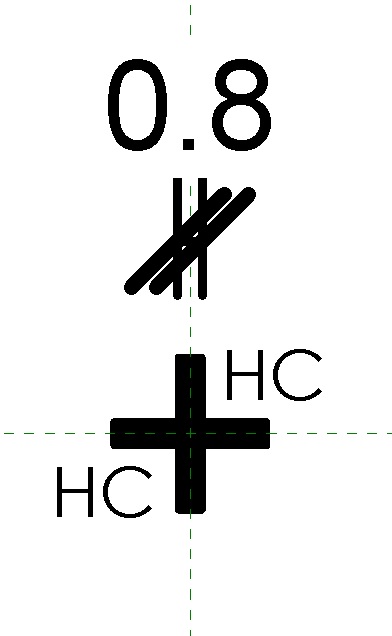
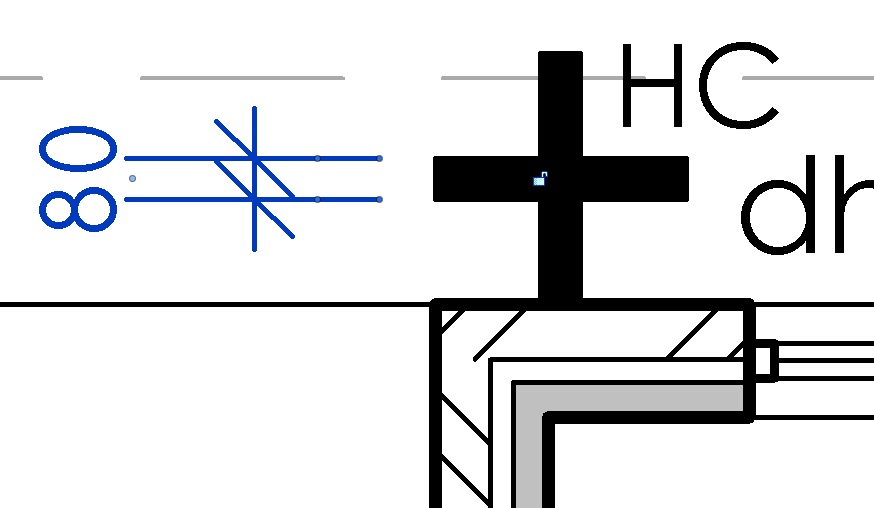
Hi, I have created an annotatin symbol for a hose cock using the generic template. When drawing the symbol i started with it at the size i wanted and have then progressed to drawing it as small as possible. my problem is that even when drawing in to 0.8mm wide, when loading to project it comes in being 80mm wide. i have made sure that my project units match. the only thing i can put it down to is that the symbol has been drawn in 1:1 and when putting into a 1:100 sheet it stays the same size and does not scale with the plan.
Is there anyway i can scale down the symbol or draw it in 1:100?
I have tried making it smaller but this is as small as revit will let me draw it.
Thanks for any help given.
Nevin
|
This user is offline |
|
 | |
|
|
site moderator|||
Joined: Tue, May 16, 2006
13079 Posts
 |
Symbols never scale with the plan, that is part of the design of Revit. Only model elements scale.
|
This user is offline |
|
|
|
active
Joined: Tue, Oct 22, 2013
0 Posts
|
So you are saying it is imposible to create an annotation symbol, that looks like mine, any smaller than the one i have created???
|
This user is offline |
|
|
|
site moderator|||
Joined: Tue, May 16, 2006
13079 Posts
|
"....So you are saying it is imposible to create an annotation symbol, that looks like mine, any smaller than the one i have created?...."
W Where did I say that? Create the annotation symbol as you want it. Just don't expectt it to scale with the view!
|
This user is offline |
|
|
|
active
Joined: Tue, Sep 27, 2011
2 Posts
No Rating |
If this symbol is a 2D only view (no 3D model geometry), you might have better luck in trying a different category for the symbol. Try creating the symbol a a detail item and then nest the item in another file with the correct category you want this symbol to appear (like mechanical). Detail items will scale up and down. Annotative items will always be the same print size regardless of scale. You didn't indicate what category you started out with other than saying it was generic. Was it a generic annotative or generic model or ???. Tye type you choose will influence its behaviour.
|
This user is offline |
View Website
|
|
|
Similar Threads |
|
sloped annotation symbol text |
Revit Building >> Technical Support
|
Mon, Aug 15, 2011 at 8:04:20 PM
|
6
|
|
Annotation Symbol |
Revit Building >> Technical Support
|
Wed, Jan 23, 2008 at 6:36:59 AM
|
1
|
|
Generic Annotation symbol |
Community >> Newbies
|
Mon, Dec 5, 2011 at 4:02:48 PM
|
2
|
|
Generic annotation symbol not visible |
Revit Building >> Technical Support
|
Thu, Nov 20, 2014 at 10:08:45 AM
|
2
|
|
Annotation Symbol Text - Keep Vertical? |
Revit Building >> Technical Support
|
Thu, Dec 15, 2011 at 3:23:42 PM
|
1
|
|
|
Site Stats
Members: | 2161655 | Objects: | 23325 | Forum Posts: | 152479 | Job Listings: | 3 |
|
 Search