|
|
|
Home | Forums |
Downloads | Gallery |
News & Articles | Resources |
Jobs | FAQ |
| Join |
Welcome !
|
6 Users Online (4 Members):
Show Users Online
- Most ever was 626 - Mon, Jan 12, 2015 at 2:00:17 PM |
Forums
|
Forums >> Revit Building >> Technical Support >> How to remove the layer beneath on planview?
|
|
|
active
Joined: Fri, Jan 27, 2012
15 Posts
No Rating |
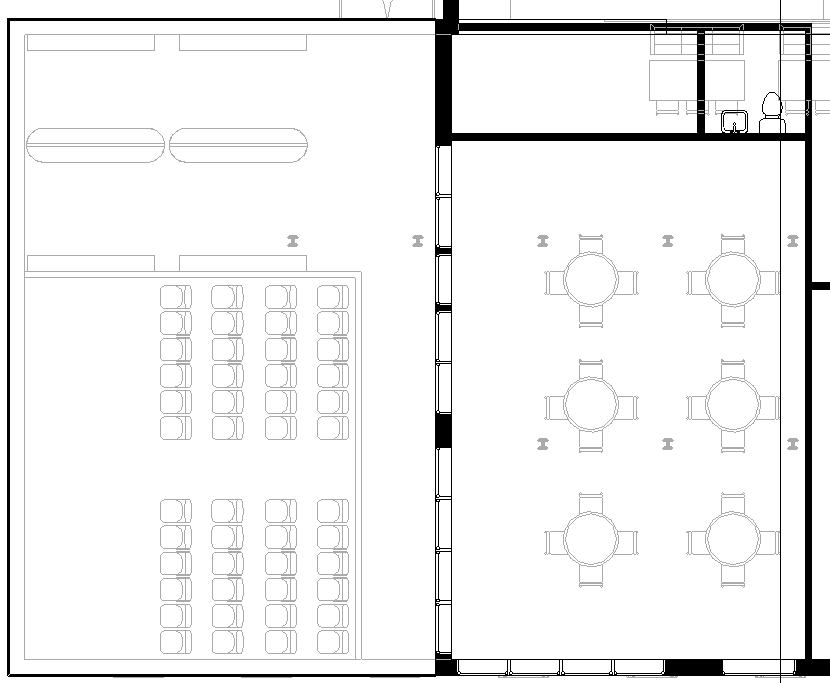
On the second floor, I dont want to see whats on the first floor beneath..how do I remove it from my view?
An example in my picture:
|
This user is offline |
|
 | |
|
|
site moderator|||
Joined: Tue, May 16, 2006
13079 Posts
 |
Change the depth of your view or if you have an underlay on, remove it.
|
This user is offline |
|
|
|
active
Joined: Fri, Jan 27, 2012
15 Posts
No Rating |
"
Change the depth of your view or if you have an underlay on, remove it.
"
Ok, where can I find the depth of view settings?
|
This user is offline |
|
|
|
site moderator|||

Joined: Fri, Nov 12, 2010
1749 Posts
 |
In your properties under View Range
|
This user is offline |
View Website
|
|
|
active
Joined: Fri, Jan 27, 2012
15 Posts
No Rating |
Thanks! Found it 
|
This user is offline |
|
|
|
Similar Threads |
|
exporting to CAD only showing wall core |
Revit Building >> Technical Support
|
Thu, Jun 15, 2017 at 9:59:53 AM
|
1
|
|
imported revit structure and no visibility beneath |
Revit Building >> Technical Support
|
Tue, Jan 27, 2009 at 2:29:28 PM
|
6
|
|
Images uderlayed beneath 3-d views (Revit 2008) |
Revit Building >> Technical Support
|
Tue, Jun 10, 2008 at 1:37:16 PM
|
2
|
|
Exporting and layer modifiers |
Revit Building >> Technical Support
|
Wed, Nov 16, 2011 at 4:04:33 PM
|
0
|
|
contours in section |
Revit Building >> Technical Support
|
Fri, Apr 21, 2006 at 1:48:17 PM
|
0
|
|
|
Site Stats
Members: | 2161655 | Objects: | 23325 | Forum Posts: | 152479 | Job Listings: | 3 |
|
 Search