|
|
|
Home | Forums |
Downloads | Gallery |
News & Articles | Resources |
Jobs | FAQ |
| Join |
Welcome !
|
6 Users Online (4 Members):
Show Users Online
- Most ever was 626 - Mon, Jan 12, 2015 at 2:00:17 PM |
Forums
|
Forums >> Revit Building >> Technical Support >> Elements missing from elevation when behind a transparent tree
|
|
|
active
Joined: Sat, Oct 24, 2009
11 Posts
No Rating |
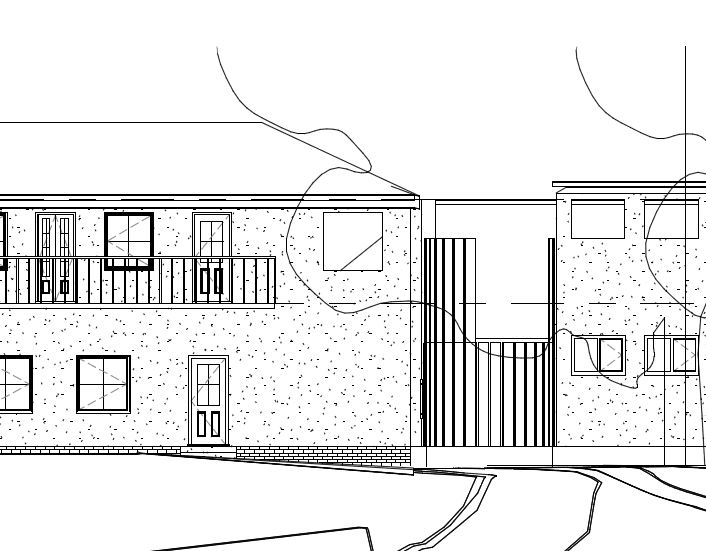
We are experiencing something strange on some elevations we are producing. I've attached an extract of one elevation, what this is showing is a tree infront of the building but it is having an odd effect on the windows, glazing and roof behind it (where the empty squares are these are windows, there is an odd shaped cut out to the long thin vertical glazing which should extend to the eaves height and there is a roof missing to the building on the right.)
The tree is from the standard revit library and has been overridden in the view to display transparent.
What is most odd is that on the screen there is no sign of anything wrong, all the windows and roof are in place. This only seems to occur when printed(the extract attached is from a pdf)
We have tried changing the graphic overides between half tone and differing levels of transparency with no luck. The only solution is to hide the tree which solves it.
In the mean time we are drawing the tree in on 2D, but it would be good to know if anytbody has experienced this or knows the reason it is happening?
We are using Revit 2014.
Many Thanks
Simon
|
This user is offline |
|
 | |
|
|
active
Joined: Thu, Mar 29, 2012
113 Posts
 |
hi
i tried to recreate wall door window and a decidouos oak tree (from OOTB) overridden with 20% and 80% transparency using 2013 and 2014 and no issues for me, i think its a printer issue then.
if its a vew specific, or PC/User specific, or if you create new elevation/section and still same issue, or if you model from 2013 and upgraded to 2014 then i think we got some revit issues here..
btw, for the meantime you are drawing the tree in 2D? how about using a 2d detailed component from the library =)
-----------------------------------
** dont be mad, i dont have much... i am homeless |
This user is offline |
|
|
|
active
Joined: Sat, Oct 24, 2009
11 Posts
No Rating |
Thanks for taking the time to have a look. The problem occurs when printed out and when printed to PDF so not sure it is related to a specific printer problem?
The model was created from scratch in 2014.
We did use the 2D detail trees, Thanks
|
This user is offline |
|
|
|
active
Joined: Tue, Apr 26, 2011
0 Posts
No Rating |
I'm having same issue... haven't found better solution yet....
|
This user is offline |
|
|
|
active
Joined: Mon, Jun 30, 2003
3 Posts
No Rating |
I have had the same issue. Solved by changing "Remove Lines Using:" to "Raster Processing" in Print Setup dialog.
I know this is an old... thread but just in case someone is looking for solution... Enjoy!
|
This user is offline |
View Website
|
|
|
Similar Threads |
|
schedule elements . . . not in model but in tree |
Revit Structure >> Technical Support
|
Wed, Apr 22, 2015 at 12:28:48 PM
|
2
|
|
TRANSPARENT ELEMENTS |
General Discussion >> Wishlist
|
Thu, Sep 13, 2007 at 6:25:55 PM
|
2
|
|
Tree |
General Discussion >> Wishlist
|
Fri, Jul 16, 2010 at 4:19:25 AM
|
4
|
|
rpc tree |
Revit Building >> Technical Support
|
Tue, Mar 31, 2009 at 12:01:03 PM
|
2
|
|
car and tree families for plan, section and elevation drawings |
General Discussion >> Wishlist
|
Mon, Apr 21, 2014 at 9:34:09 AM
|
5
|
|
|
Site Stats
Members: | 2161655 | Objects: | 23325 | Forum Posts: | 152479 | Job Listings: | 3 |
|
 Search