|
|
|
Home | Forums |
Downloads | Gallery |
News & Articles | Resources |
Jobs | FAQ |
| Join |
Welcome !
|
156 Users Online (154 Members):
Show Users Online
- Most ever was 626 - Mon, Jan 12, 2015 at 2:00:17 PM |
Forums
|
Forums >> Revit Building >> Technical Support >> Mass and Walls
|
|
|
active
Joined: Fri, Jul 12, 2013
4 Posts
No Rating |
Hi everybody,
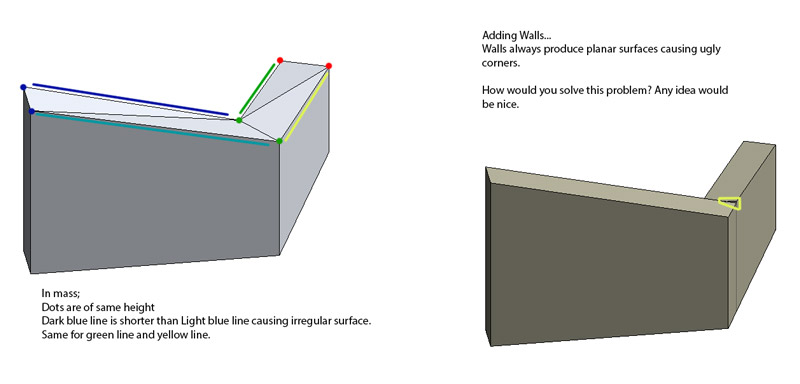
I just started learning Revit and I have a problem... I did a schema to illustrate it but in a few words,
when the wall height varies, corners turn ugly: image a wall railing and a corner. It needs to have wall properties asI must add doors and windows.
Is there any technic or series of technics to make this look perfect? I hioe someone can help me because... I am a bit lost.
Thank you for any help.
|
This user is offline |
|
 | |
|
|
active
Joined: Fri, Jul 5, 2013
38 Posts
 |
Your masses seems to be triangulated on the top. Are there 4 different plans? Is this how you intend to build it?
-----------------------------------
Marc Faber
BIM Solutions Developer
goto.archi | Oslo, Norway
|
This user is offline |
View Website
|
|
|
active
Joined: Fri, Jul 12, 2013
4 Posts
No Rating |
Triangulation is not intented but it seems I can't make it planar: I extrude a sketch and then lower some vertices equally and get this. Is there a way to avoid that? For me, as the same color dots are of same height, triangulation is unavoidable. Howeveras the angle between trangules is weak, it is ok for me. What is not ok, in the corner where the two wall meet.
A cut section of the wall should show that the top surface is perpendicular to the wall sides'.
My intention is to make the wall serve as a railing (yes, a thick one).
Edited on: Fri, Jul 12, 2013 at 5:22:42 AM
|
This user is offline |
|
|
|
site moderator|||
Joined: Tue, May 16, 2006
13079 Posts
 |
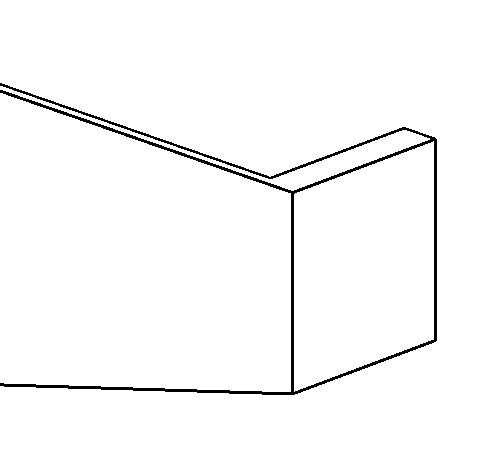
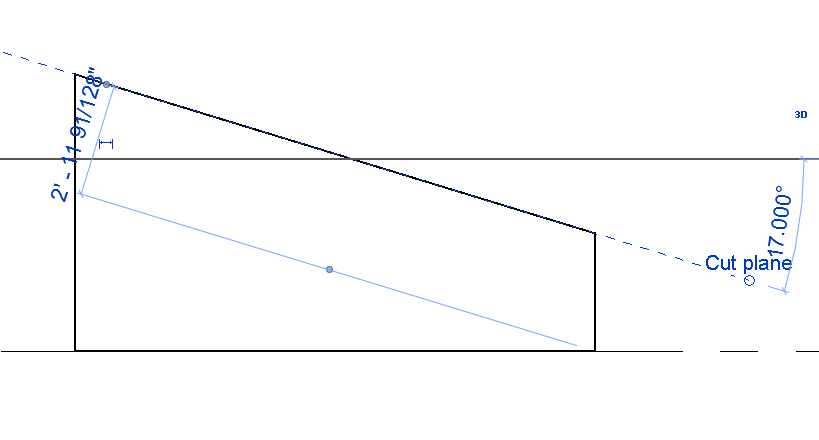
I hate masses.... I would have just added a cut plane and attached the top of normal walls to it.
|
This user is offline |
|
|
|
active
Joined: Fri, Jul 12, 2013
4 Posts
No Rating |
WWhub, I can't find how to make a cut plane... and would I be able to cut each wall segment with a differentcut plane slope? For example in your image, the 1st slope would be at 17º but the second at 25º? In your exampleeverything seems cut at the slope and direction.
|
This user is offline |
|
|
|
site moderator|||
Joined: Tue, May 16, 2006
13079 Posts
|
That was just a reference plane - I added the name cut plane... make as many planes as you want - at any angle - and simply attach the top of the wall to the appropriate plane.
|
This user is offline |
|
|
|
active
Joined: Fri, Jul 12, 2013
4 Posts
No Rating |
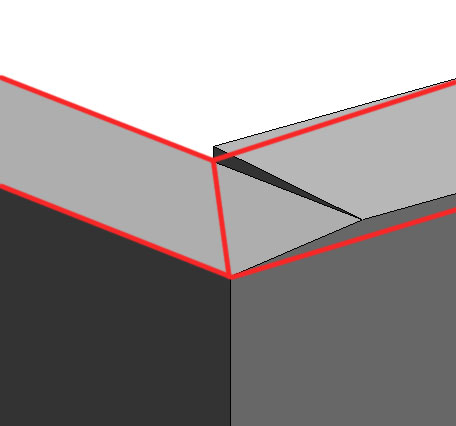
Thanks, it looks better and it is easier to build than the solution I had. However, because I have different slopesand because the wall join, I still have a join that is not perfect. In the sketch, in red, you will see the solution I am lookingfor: the walls join perfectly. Is it possible to do this? (with walls of different slopes)
I want to thank you for the time spent on this issue. I hope there is a fix to it.
|
This user is offline |
|
|
|
Similar Threads |
|
walls disassociated with mass - can't update walls |
Revit Building >> Technical Support
|
Fri, Nov 2, 2012 at 10:51:18 AM
|
1
|
|
Tops of the walls applied to mass looks horrible |
Revit Building >> Technical Support
|
Mon, Jan 5, 2015 at 10:45:47 AM
|
2
|
|
Mass and walls are squiggled |
Revit Building >> Technical Support
|
Tue, May 5, 2009 at 2:23:00 PM
|
2
|
|
How to attach top/base - walls to mass roof |
Revit Building >> Technical Support
|
Tue, Sep 22, 2015 at 3:18:05 PM
|
6
|
|
Need HELP creating walls from mass |
Revit Building >> Technical Support
|
Wed, Nov 7, 2012 at 6:35:21 AM
|
6
|
|
|
Site Stats
Members: | 2161655 | Objects: | 23325 | Forum Posts: | 152479 | Job Listings: | 3 |
|
 Search